
Among Us Server Issues – Is It Down or Is It You?
You can play Among Us on cellular data: the game runs on 4G/5G cellular alone, and if it will not connect, check that the app is allowed to use cellular data in your phone’s settings. Drops mid-round happen because the game needs a small, constant stream of data, and a connection that pauses for a second is enough to lose the session.
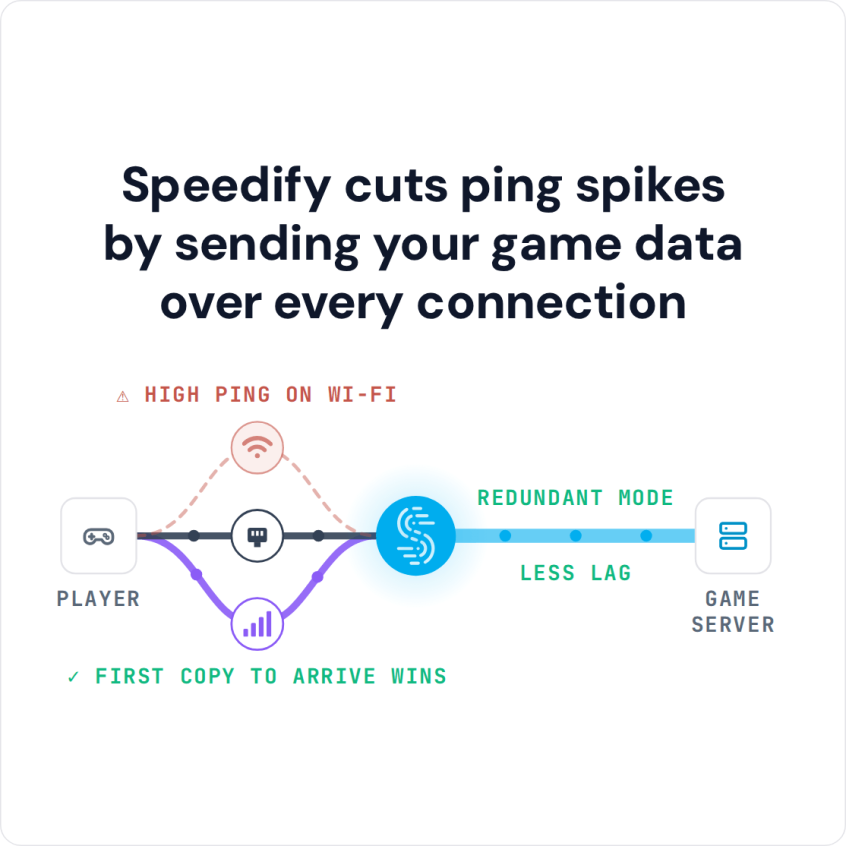
Speedify is an app that runs the game over two internet connections at once (Wi-Fi and 4G/5G cellular, for example), so a brief stumble on one does not end the round. That needs both connections: on one connection, Speedify works as an encrypted VPN and can be a little slower; with two connections in Redundant Mode, your ping follows whichever connection is faster at that moment.
Speedify cuts ping spikes by sending your game data over every connection
This post covers how to tell whether the servers or your connection are at fault, why the disconnects happen, how to fix them, and how to reach the game where it is blocked.
How to Play Among Us on Wi-Fi and Cellular at Once with Speedify
- Download Speedify on the phone or computer you play Among Us on (Windows, macOS, iOS, Android).
- Open Speedify and create a free account (the free tier includes 5 GB per month), or sign in.
- Give it a second internet connection: on a phone, keep Wi-Fi on and turn on cellular data; on a computer, add Ethernet, a second Wi-Fi network, or a phone shared over USB or Personal Hotspot.
- Connect. Speedify sends traffic over both connections at once and moves it to the working one when one weakens.
- Open Among Us and play as usual.
Among Us Server Problems or Your Connection: How to Tell
The cause of Among Us server problems is either the Among Us servers or your own connection. When the game had a surge of new players (3 million concurrent players at the end of September 2020), the servers struggled at peak hours, and busy times can still cause trouble. Check if their servers are down or not before you change anything at home.
If the servers are fine, look at your own internet connection. Online games react to every short pause in the connection, and any temporary network issue on your ISP’s side can interrupt a round, whatever speed your plan promises.
And it doesn’t even have to be the ISP. You may be too far from the Wi-Fi hotspot or have an out-of-date router / modem.
How to Fix Among Us Server Problems
Start with the basic checks: restart the router and your phone or computer, move closer to the Wi-Fi router, and close apps that download in the background. For a full walkthrough, check out this article here.
If the drops continue, you need a second internet connection that takes over the moment the first one stalls. That is what Speedify does, on a computer or a smartphone.
By default, computers and smartphones only connect to the internet through one connection at a time: cellular, Wi-Fi or Ethernet. Speedify allows your device to connect to the Internet using all of your available Internet connections at once, so a pause on one connection does not interrupt the game.
On your phone, Speedify uses both Wi-Fi and 4G/5G cellular at once, and you can set a data limit per connection so you do not go over your data cap. If you’re playing Among Us on your computer, you can combine your home internet with a public Wi-Fi network or 4G/5G cellular from a phone or USB modem.
Speedify also has auto failover. When it detects that a signal is weak or spotty, for example while you play Among Us on your commute, Speedify moves all the data to the working connection, so the round continues. Once the other connection is available again, Speedify adds it back.
How to Unblock Among Us If Restricted
Speedify is a VPN that combines internet connections, and it encrypts all traffic from your device. On a restricted network such as a school, workplace or public place, the network sees only an encrypted connection to a Speedify server, not the game, so Among Us often works where it is blocked. The network admin can still see that you are using a VPN, and the network’s rules still apply.
Avoid Among Us server problems on your side of the connection: get Speedify and play on two internet connections at once.
Speedify
Get started with Speedify today.
Speedify combines Wi-Fi, 4G/5G cellular, Ethernet, Starlink and satellite into one faster, more reliable internet connection. Free to try: 5 GB a month with a free account. No credit card required.
🚀 Speed
Faster uploads and downloads, because Speedify uses all your internet connections at once.
📶 Stability
If one internet connection drops, Speedify moves your traffic to the others in milliseconds.
🔒 Security
AES-256 encryption on every internet connection, on any network you join.



15M+ downloads worldwide. 75K+ five-star reviews on iOS and Android.