
Speedify Uses Your Android’s 4G/5G Cellular as Backup for Starlink to Keep You Online
Your Android phone or tablet can use Starlink and 5G at the same time. With Speedify, it uses Starlink Wi-Fi and its own 4G/5G cellular together, and if your Starlink internet connection drops, Speedify switches your traffic to cellular automatically, so your call, video or upload keeps going instead of cutting out.
4G/5G cellular is already built into your Android device, so you don’t need any extra hardware, and that cellular connection is what Speedify needs: on Starlink Wi-Fi alone, Speedify works as an encrypted VPN and cannot stop Starlink from dropping. Setup takes three steps.
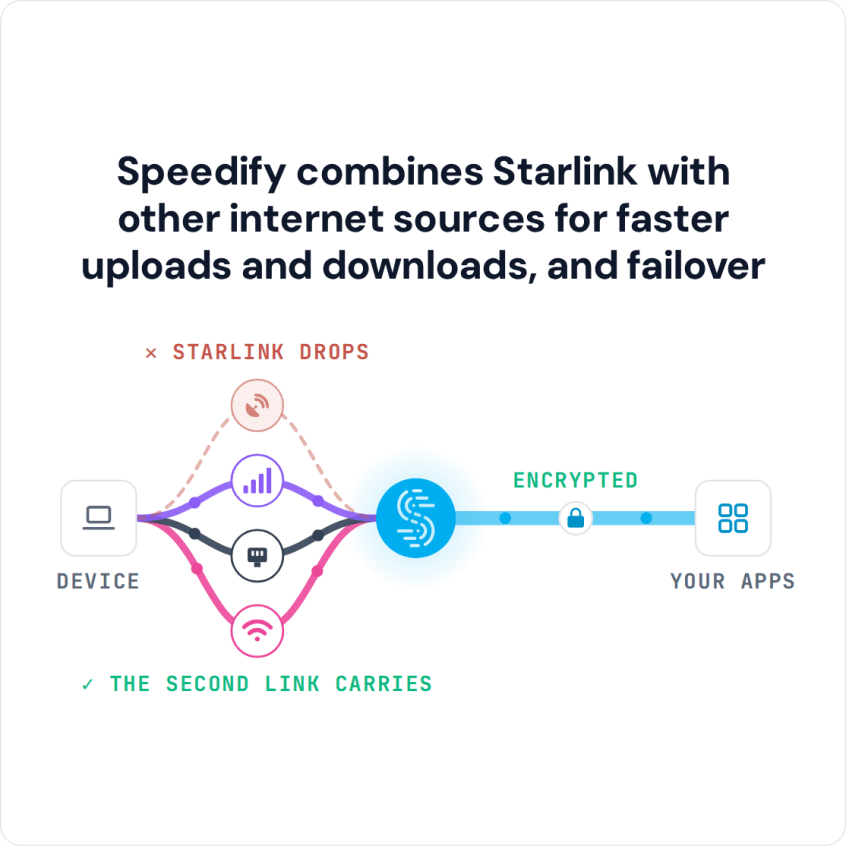
Speedify combines Starlink with other internet sources for faster uploads and downloads, and failover
Starlink Internet Connection Dropouts Happen to Everyone
Speedify measures thousands of Starlink users in more than 150 countries. From 29 September to 12 October 2026, fixed Starlink dishes went offline for about 37 minutes a day on average, and Starlink dishes on RVs and boats for about 61 minutes a day.
Starlink also switches each dish to a new satellite every 15 seconds, and a switch can cause a short dropout. Even a perfectly installed Starlink dish goes offline, and about 7 in 10 Starlink users on Speedify use Starlink together with a second internet connection, like 4G/5G cellular.
What Happens on Your Android When Starlink Drops
Starlink is fast most of the time: Starlink lists download speeds of 45 to 280 Mbps, depending on your plan and location. It still slows down or drops when something blocks your Starlink dish’s view of the sky, in bad weather, when the Starlink dish overheats, and for a moment each time your Starlink dish switches satellites, about every 15 seconds.
When that happens in the middle of a call or an upload, your Android device has nothing to fall back on unless a second internet connection is already working.
How Speedify Uses Starlink Wi-Fi and 4G/5G Cellular Together on Android
Speedify runs in the background on your Android device and keeps both Starlink Wi-Fi and 4G/5G cellular working at the same time. It checks how fast and steady each one is, many times a second.
When both are working well, Speedify sends your traffic over both, so you get the download and upload speed of both together. When one weakens or drops, Speedify moves all your traffic to the other one, and your calls, video and file transfers keep running. Speedify needs that second internet connection: with Starlink alone, it can’t add speed or stop drops.
Speedify also encrypts all your traffic, on Starlink and on cellular.
How to Use Starlink and 4G/5G Cellular at Once on Android with Speedify
Step 1: Check That Mobile Data Is Turned On
Swipe down from the top of your Android screen and check that mobile data is on. You can also go to Settings > Connections (or Network & Internet, depending on your device) and check that mobile data is turned on. One bar of 4G/5G signal is enough for Speedify to use.
Step 2: Connect Your Android Device to Your Starlink Wi-Fi Network
Check that your Starlink dish is set up and its Wi-Fi network is on. On your Android device, go to Settings > Connections > Wi-Fi (on Samsung) or Settings > Network & Internet > Internet (on most other phones) and connect to your Starlink Wi-Fi network. Check that the Wi-Fi icon shows in your status bar.
Step 3: Download and Open Speedify
Download Speedify from the Google Play Store and open it. The first time you connect, Android asks whether Speedify may set up a VPN connection: tap OK. Speedify then finds your Starlink Wi-Fi and your 4G/5G cellular on its own and starts using them together.
Use Cellular Only When Starlink Drops, to Save Data
If your mobile plan has a data cap, tap the cellular connection in Speedify and set its priority to Backup. Speedify then sends everything over Starlink Wi-Fi and uses cellular only when Starlink drops. You can also set a data limit for cellular. More on that in how to avoid mobile data overage charges.
To add more cellular connections without extra hardware, use Speedify’s cellular sharing. Put your phones on the same Starlink Wi-Fi network, install Speedify on each one, and pair them in the Speedify app so they can share their 4G/5G cellular connections with each other.
Speedify Also Shows Your Starlink Dish Status on Android
Speedify shows real-time Starlink dish alerts in the app on your Android device. If the dish’s motor is stuck, its mast is tilted or it is overheating, Speedify shows an alert, so you know your Starlink dish needs attention.
Other Internet Connections Speedify Can Use with Starlink on Android
4G/5G cellular is the easiest second internet connection on Android, but not the only one. With a USB-C to Ethernet adapter, your Android device can also take a wired internet connection: plug an Ethernet cable from the adapter into your cable, fiber or DSL router, or into a second Starlink router. Your Android device’s Wi-Fi joins one network at a time, so the adapter is how you add a second Starlink dish. Results vary by device: some Android phones turn Wi-Fi off when Ethernet is plugged in, which stops Speedify from combining them. A second Starlink dish covers an outage or obstruction on the first, but not satellite switches, which happen on the same schedule on every Starlink dish; cellular covers those. Speedify uses every internet connection it finds together, and switches your traffic to the others when one drops.
Speedify
Get started with Speedify today.
Speedify combines Wi-Fi, 4G/5G cellular, Ethernet, Starlink and satellite into one faster, more reliable internet connection. Free to try: 5 GB a month with a free account. No credit card required.
🚀 Speed
Faster uploads and downloads, because Speedify uses all your internet connections at once.
📶 Stability
If one internet connection drops, Speedify moves your traffic to the others in milliseconds.
🔒 Security
AES-256 encryption on every internet connection, on any network you join.



15M+ downloads worldwide. 75K+ five-star reviews on iOS and Android.