
Speedify Makes the Starlink Internet Connection on Cruise Ships Faster and More Reliable
Yes, Starlink works on cruise ships. Many cruise lines now run Starlink Maritime, Starlink’s internet service for ships, and passengers use it through the ship’s Wi-Fi. Some airlines now use Starlink too: here is how Starlink works on planes.
You usually can’t bring your own Starlink dish, like a Starlink Mini. Most large cruise lines don’t allow passengers to bring satellite dishes or routers on board.
At sea, hundreds of people share the ship’s Starlink internet connection, and bad weather and a moving ship slow it down. Speedify helps by using the ship’s Wi-Fi and a second internet connection at the same time.
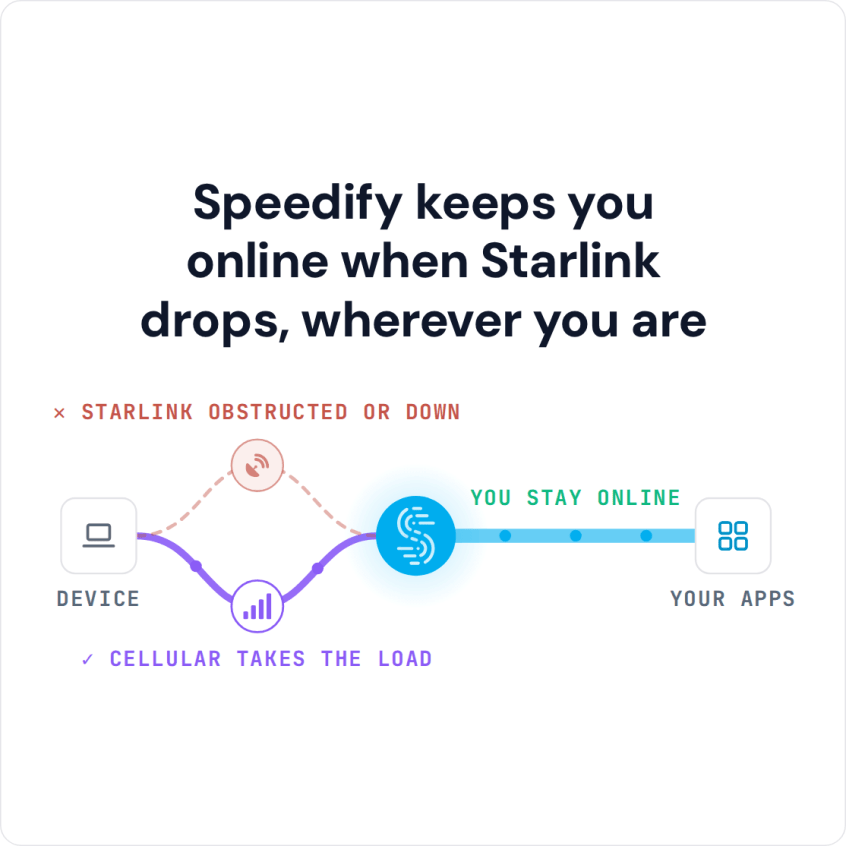
Speedify keeps you online when Starlink drops, wherever you are
Watch now
How Speedify combines internet connections on any hardware
Get started with Speedify for your business
Speedify offers three commercial paths. They work together, and most enterprise customers use two or more.
01
Speedify Teams
Speedify on every supported OS for every team member
Centralized dashboard for billing, user provisioning, and usage analytics
CSV import/export and a RESTful management API
02
Speedify for Routers
License for supported OpenWrt routers
Powered by Speedify hardware lineup ready to deploy out of the box
Miri, GL.iNet and other partner models
Covers every device on the network, with no per-device install
03
Embed Speedify into your product
A · DIY
Build it yourself with the Speedify SDK.
Integrate Speedify into your iOS, Android, Windows, macOS, Linux or QNX product. Full developer documentation, sample code and supported integration paths. Your team owns the build, and the Speedify SDK handles combining the internet connections.
B · CUSTOM ENGINEERING
Have the Speedify team build it for you.
How Starlink Works on Cruise Ships
Starlink Maritime is Starlink’s internet service for ships. Its satellites are much closer to Earth than the satellites older ship internet uses, so it has less delay and faster downloads and uploads. That makes video calls and streaming possible on board.
Cruise ships usually install several Starlink dishes to serve passengers and crew. Even so, hundreds of people share the same Starlink internet connection, so it slows down at busy times of day. Rough seas, bad weather and the moment a Starlink dish switches between satellites can also cause slowdowns or short dropouts.
That’s why one Starlink internet connection isn’t always enough at sea. A second internet connection, like 4G/5G cellular in port, another satellite service, or a second Starlink dish on a different account, gives Speedify another internet connection to use. A second Starlink dish helps at busy times and with obstructions, but not with satellite switches: every Starlink dish switches satellites on the same 15-second schedule, so only cellular or another satellite service covers those short drops.
Bringing Your Own Starlink Dish on a Cruise Is Usually Banned
Most large cruise lines ban satellite dishes, routers and other internet equipment that passengers bring on board. Check your cruise line’s list of banned items before you pack a Starlink Mini.
How Speedify Keeps Your Internet Steadier on a Cruise Ship
Speedify is an app for your phone or laptop. Speedify uses every internet connection you have at the same time: the ship’s Starlink Wi-Fi, plus 4G/5G cellular when your phone has a signal in port or near the coast. You get nearly the full speed of both internet connections combined. See how Speedify combines internet connections.
When the ship’s Starlink internet connection slows down or drops, Speedify moves your video calls, uploads and other activity to your other internet connection, so they keep going. When Starlink is back, Speedify uses both again.
Far out at sea, the ship’s Wi-Fi is often your only internet connection. With one internet connection, Speedify can’t add speed, but it adds your cellular connection again as soon as your phone gets a signal.
Speedify also encrypts all your internet traffic, so other people on the ship’s Wi-Fi can’t see what you’re doing.
How to Use Speedify with Starlink on a Cruise Ship
Step 1: Connect to the Ship’s Wi-Fi
Make sure you can get online through the ship’s passenger or crew Wi-Fi, which runs on Starlink Maritime.
Step 2: Add a Second Internet Connection
In port or near the coast, your phone may have a 4G/5G cellular signal. Your phone’s cellular connection, a mobile hotspot or a USB cellular modem gives Speedify a second internet connection. On ships with several Starlink dishes or a second satellite service, crew devices can use those too.
Step 3: Download and Run Speedify
Download Speedify on your phone or laptop. Speedify finds every internet connection you have and starts using them right away.
Who Needs Speedify with Starlink on Cruise Ships
- Cruise passengers who work remotely, make video calls, or keep in touch with family during the trip
- Crew members who rely on the internet for work and for calls home
- Cruise line IT teams who run the ship’s internet and need to combine several Starlink dishes or satellite services, with automatic switching when one slows down
- Business travelers who need their company VPN, file uploads and video calls to work at sea
- Creators and journalists who stream or report from the ship
Speedify Is Used on Millions of Devices Worldwide
Speedify has made internet connections faster and more reliable for businesses and individuals since 2014.
15M+
Speedify downloads worldwide75K+
5-star reviews for Speedify on iOS and Android82
Speedify server points of presence in 50+ cities on 6 continents500TB+
Of internet traffic carried by Speedify every weekSpeedify Partners
Speedify works with these companies to bring faster, more reliable internet and networking technology to their customers and employees.


Speedify Shows Starlink Dish Alerts to the Ship’s IT Team
Speedify shows real-time Starlink dish alerts in the app. If a Starlink dish on the ship has a problem, such as a stuck motor, a tilted mast or overheating, Speedify shows an alert once the problem has lasted 15 seconds, and clears it when it’s fixed.
For cruise line IT teams running several Starlink dishes, that means hardware problems show up in the Speedify app before passengers start to complain.
For cruise lines and ship operators: Speedify can combine every Starlink dish and satellite service on a ship for passengers and crew. Contact Us to plan the setup for your fleet.
For passengers: Download Speedify to combine Starlink Wi-Fi with 4G/5G cellular during your cruise.
Speedify Business Solutions
Speedify Teams
Speedify for Routers

Speedify Embedded Solutions and Integrations
Add Speedify to your own app or hardware with the Speedify SDK. Your product then combines internet connections, fails over automatically when one drops, and encrypts the traffic, using the same technology as the Speedify app.