

Speedify Monitors Your Starlink Connection and Keeps You Online Through Starlink Outages
When the internet drops out, the first question is whether the Starlink system itself is down, the dish has a problem, or the sky is briefly obstructed. Tracking outages and uptime answers that question; staying online through the drop is a separate job. Speedify is an app that helps you use all of your internet connections at the same time – including Starlink plus 4G/5G cellular, cable, or another Starlink dish – for faster uploads and downloads and a more reliable connection. Speedify also logs Starlink outages and uptime. This guide explains how to read that history and how Speedify keeps the internet online even when Starlink drops out.
Starlink disconnects all the time for ALL Starlink users. The Speedify Starlink Index report found that Starlink connections are down for an average of ~33 min per day. Plus, all Starlink dishes experience small drops and packet loss every 15 seconds, when the moving Starlink satellites hand off the connection to the next satellite overhead.
The best way to fix Starlink's connection drops is to combine your Starlink connection with another internet connection, such as 4G/5G cellular, cable, fiber, DSL, or another Starlink connection. Speedify makes this possible with channel bonding.
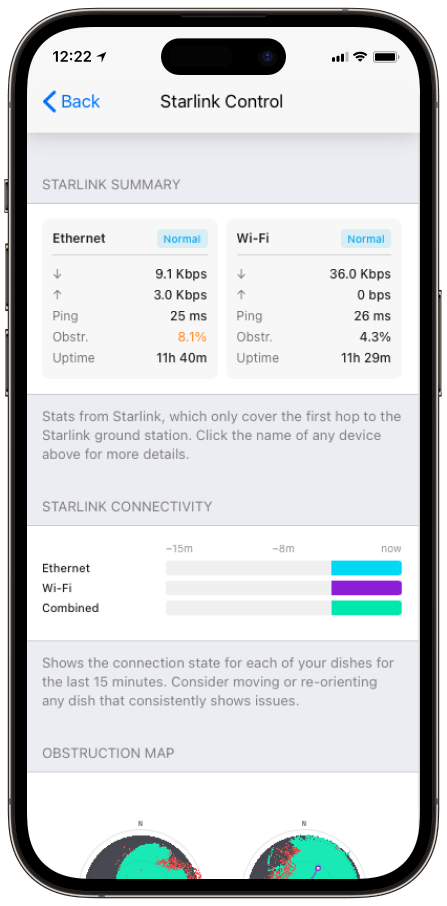
Monitor your Starlink dish performance inside Speedify.
Speedify’s built-in Starlink Control Center gives you real-time visibility into your dish’s health — without opening a separate app.
How to Check If Starlink Is Down
- Check dish and router status. The Starlink app shows your dish and router status locally, even with no internet, so you can tell whether the hardware is reachable.
- Read the uptime and outages log. The Statistics page (in the app, or at dishy.starlink.com or 192.168.100.1) lists recent outages with their likely causes: obstruction, no signal received, or network issues.
- Tell a local problem from a network one. Outages tagged as obstruction are usually local; a widespread loss with no dish alerts points to a network outage on Starlink’s side.
- Confirm with a third-party tracker. Independent outage trackers show whether other users are reporting the same drop in your region.
How Speedify Monitors Starlink Uptime and Dish Health
Speedify’s Starlink Control Center tracks your dish’s status, uptime, ping, and obstruction in real time, and surfaces Starlink dish alerts in the app when the actuator motor is stuck, the mast isn’t vertical, or the dish hits a thermal throttle.
Each alert fires if the condition occurred in the previous 15 seconds and stays up while it’s active, so you see a developing problem as it happens rather than after the connection has already failed. If you run more than one Starlink, Speedify monitors every dish at once.
How Speedify Keeps You Online Through a Starlink Outage
Monitoring tells you you’re down. Speedify keeps that from happening in the first place. Starlink reassigns your dish to a new satellite roughly every 15 seconds, with handovers landing at the 12th, 27th, 42nd, and 57th second of each minute, and every handoff is a chance to drop. Add weather and obstruction and the drops add up.
Speedify’s channel bonding technology runs your Starlink alongside a second connection, a 4G/5G cellular link or a second Starlink, and carries your traffic on both at once.
When one drops, Speedify’s automatic failover shifts everything to the other instantly, with no interruption to calls, streams, or downloads. There’s more on the handoff problem in how Speedify prevents disconnections from Starlink satellite handoffs.
Who Needs to Monitor Starlink Outages
An individual: the work-from-home rural user. Someone whose job runs on video calls watches uptime and bonds Starlink with cellular, so a handoff or a brief outage never ends a meeting.
A professional: the remote clinician. A telehealth provider can’t have an appointment cut off. Speedify monitors dish health and keeps the session alive on a second connection through any single drop.
A business: the field operation. A remote site where downtime stops work monitors every dish in Speedify and bonds them, so one antenna or one satellite handoff failing doesn’t take the site offline.
Monitor Starlink with Speedify, and Stay Online When It Drops
Check the app to see whether Starlink is down, read the uptime and outage log to learn why, and watch dish health in Speedify’s Starlink Control Center. Then bond a second connection so the outages you’re tracking stop taking you offline. Speedify makes your Starlink faster, more reliable, and more secure.
Speedify
Get started with Speedify today.
Combine Wi-Fi, 4G/5G cellular, Ethernet, Starlink, and more into one faster, steadier connection. Free to try — no credit card required.
🚀 Speed
Faster uploads and downloads by bonding all your connections at once.
📶 Stability
Automatic failover in under a second when any connection drops.
🔒 Security
AES-256 encryption on every connection, on every network you join.



15M+ downloads worldwide. 75K+ five-star reviews on iOS and Android.