
Planning Robot Behavior for the Moment Every Internet Connection Is Gone
Robot connectivity loss needs a defined behavior on the robot, because detection is slow and one-sided. The robot sees an internet connection drop locally. A fleet manager on MQTT with a 60-second keepalive waits through 90 seconds of silence before marking the robot gone. More internet connections make a total loss rarer, but rare is not never. Two SIMs from one carrier share the carrier’s core network. A concrete parking garage blocks every radio at once. A storm can take out site Wi-Fi and the nearest cell tower in the same afternoon.
Every robotics team that deploys outside the lab meets the same question: what does the robot do when no internet connection is left?
The short version: give the robot a defined behavior for lost connectivity, such as a safe stop, a minimal-risk maneuver or a cached policy. Late commands need a timestamp and a maximum age. No network should be the robot’s safety system, and combining internet connections of different kinds makes the all-connections-down case rare instead of routine.
This article covers what keeps running, how fast each side detects the loss and how to stop late commands. The article also explains what Speedify does when every internet connection drops, and where the network ends and the safety system begins. Speedify is software that combines every network a machine can reach (Wi-Fi, 4G/5G cellular, Ethernet, Starlink and satellite) into one connection.
What Keeps Running on a Robot and What Stops Without a Network
Everything on the robot keeps running; everything with a party on the other end stops. Motion control, perception and the safety controller run on the robot and should not depend on the network at all. A robot whose software stops when Wi-Fi disappears has a software problem on top of a network problem. The software problem is the cheaper fix before deployment.
What stops: remote assistance, live video, the fleet manager’s view of the robot, task assignment that depends on the fleet manager, and uploads in progress. Each item has a cost per minute. The numbers to plan around are how often the robot loses every internet connection and for how long.
How Fast a Lost Internet Connection Gets Detected, and by Whom
The robot knows within milliseconds; the fleet manager can take 90 seconds or more. The robot sees the Wi-Fi driver lose association or the modem drop registration. The fleet manager sees only silence. A fleet manager on MQTT relies on the keepalive. The MQTT standard closes a client’s connection after one and a half keepalive intervals without traffic. The keepalive interval sets how far the dashboard lags behind the robot.
Speedify detects a dead internet connection in two ways. On Linux, an internet connection with data outstanding and nothing acknowledged for four round trips leaves rotation. In testing, that rule caught a blackholed connection in 301 to 797 ms. Silence alone, two seconds with no answer, took 2,053 to 2,113 ms. The time was the same on a 4 ms Ethernet connection and a 600 ms satellite connection.
Some losses are known instead of inferred. When a modem reports losing carrier, Speedify removes the internet connection within milliseconds and tells the server over the remaining connections. In testing, the far end stopped sending over an unplugged connection 2 ms after the cable came out, instead of 370 ms.
Choose the fleet manager’s timeouts on purpose. A short keepalive catches real losses fast and raises false alarms on every slow roam. A long keepalive hides real losses. Either way, the robot should record which internet connection failed and when, and report the record in the first message that gets through.
How to Keep Late Commands From Executing After a Network Delay
Give every command a timestamp and a maximum age, and enforce both on the robot. A late command can do more harm than a missing command. A velocity command held up in the network can arrive intact after the robot’s state has changed, and executing the command then makes no sense.
Controllers drop commands older than the set age, and a watchdog stops the robot when commands stop arriving within the expected interval. Messaging protocols help: MQTT 5 supports a message expiry interval. A faster network makes late commands rarer. Timestamps and timeouts make late commands harmless.
What Speedify Does When Every Internet Connection Drops
Speedify holds the robot’s session for a grace period of 30 seconds by default. The most common cause of an empty combined connection is a restart or a short outage. A robot that returns inside the grace period rejoins the same session at the same address. After the grace period, the robot asks for a new session and the tunnel address changes. The session either recovers cleanly or ends cleanly, and never hangs half alive.
Speedify also never suspends the last internet connection still carrying traffic. On a test bench whose only remaining connection was a phone tether, a 379 ms cellular gap once suspended the connection. A call’s audio went silent for a second and a half without losing a single frame. The rule now counts the carrying connections and never suspends the last.
Where the Network Ends and Robot Safety Begins
Speedify carries operational traffic: telemetry, video, diagnostics, data and updates. Speedify is not certified as a safety communication channel. Safety-critical control, and the machine’s response to lost connectivity, belong in the machine’s own independently validated design.
Drawing the line helps a safety reviewer. The reviewer learns exactly what Speedify changes: how often the robot loses contact, and for how long. The reviewer also learns what Speedify leaves alone: what the robot does when contact is lost.
How to Keep Robots Reachable on Networks Your Team Does Not Control
Add an internet connection your team owns, such as carrier cellular, next to the venue’s Wi-Fi. Service robots and humanoids often work in somebody else’s building, on a guest network the robot team cannot audit. The failure modes are mundane: a changed password, a firewall rule added over a weekend, or a captive portal. A captive portal answers every web request with a login page, so the robot sees a Wi-Fi network that looks connected and passes no traffic.
Corporate IT is often the fastest fix. Write a one-page document for the venue’s IT team. List exactly which ports and services the robot needs, and why. The document gives IT everything a firewall change request needs.
Combining the venue’s Wi-Fi with carrier cellular keeps the robot reachable when the building’s network changes. The fix becomes a phone call to the venue instead of a site visit.
Which Internet Connections Fail Together, and Which Fail Independently
Internet connections that share a dependency fail together. Two SIMs on one carrier share the carrier’s core network. Two carriers can share a tower and the tower’s power. Two Starlink dishes share the Starlink network, which is why Speedify recommends pairing Starlink with a different kind of internet connection. Two Wi-Fi networks in one building share the building’s power and uplink.
Speedify Starlink Index data supports the same rule. Across 31 days of readings between 5 September and 11 October 2026, the average Starlink dish was offline 38 to 53 minutes a day. No day showed the 120 extra minutes a two-hour, network-wide Starlink outage would add. The lost minutes were mostly local: obstructions, misaligned dishes and conditions at the user’s end. A second, different internet connection covers exactly those losses. In the Speedify Starlink Index window of 29 September to 12 October 2026, 72% of Starlink users on Speedify ran a second internet connection. Cellular was the choice of 53% of those users.
For traffic that cannot wait, such as telemetry and fault reports, Speedify can send every packet over two internet connections at once. The first copy to arrive is delivered. Redundancy protects against a connection that stalls or dies with packets already committed to the connection. The cost is bandwidth: a 300 Mbps combined connection carries 150 Mbps of traffic at a redundancy of two. A copy never goes to a cost tier the original was barred from, so redundancy cannot quietly spend a metered Backup connection.
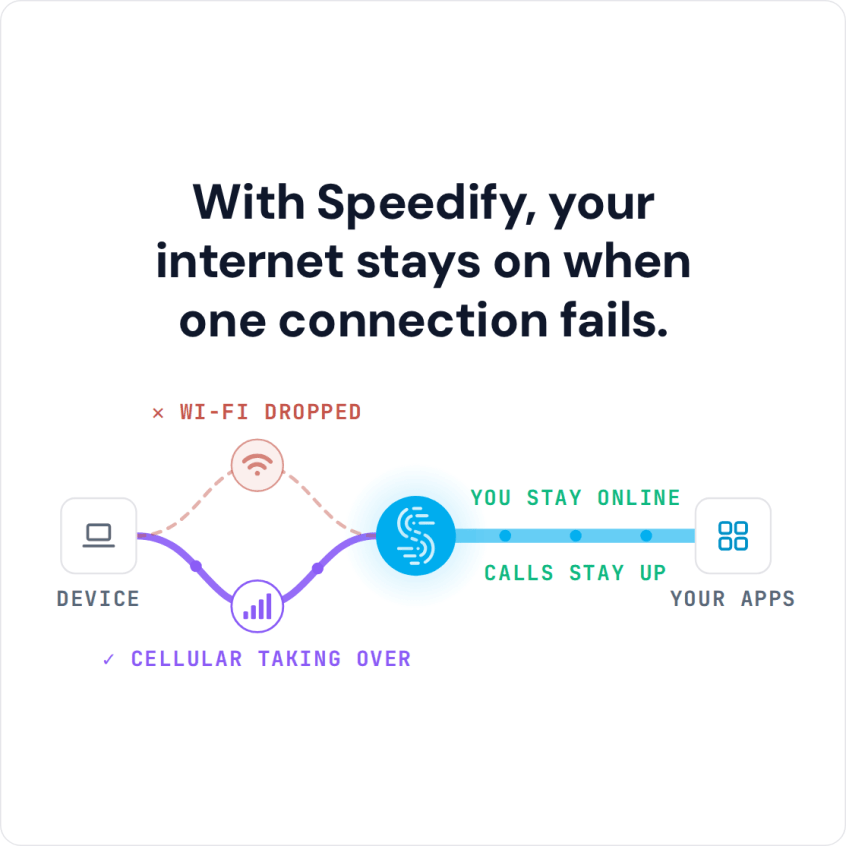
The diagram at the top of this article is an illustration, not a measurement. The shape still holds: every internet connection has gaps, and gaps on independent connections rarely line up.
Questions to Settle Before Your Robots Deploy
- What does each robot do after 1 second, 10 seconds and 60 seconds without any internet connection?
- Which keepalive and heartbeat timeouts does the fleet run, and who gets alerted when a timeout fires?
- Which commands carry a timestamp and a maximum age, and which should?
- Which traffic may wait, and where does the waiting traffic queue?
- Which internet connections can each robot reach at each site, and which share a dependency?
Speedify for physical AI explains how Speedify combines internet connections for robot fleets. Contact Us to book a demo with the Speedify team or to plan a pilot on your own hardware.
Speedify Business Solutions
Speedify Teams
Speedify for Routers

Speedify Embedded Solutions and Integrations
Add Speedify to your own app or hardware with the Speedify SDK. Your product then combines internet connections, fails over automatically when one drops, and encrypts the traffic, using the same technology as the Speedify app.