
Why Robot Software Built for One Network Struggles Across Cellular
Robot software over cellular breaks three assumptions from the lab at once. Multicast discovery stops at the first router. Carrier-grade NAT lets a robot open connections out but blocks every connection in. And a change of network gives the robot a new IP address, which resets every open TCP session and costs seconds per reset. The working design keeps discovery on the robot. Only the traffic that needs to leave goes out, through a broker or gateway the robot connects out to. The outbound session has to survive changes of internet connection.
Has a cloud dashboard come back empty the first time robot data left your building? One of the three assumptions is the usual cause, and none of the three is specific to your software.
The short version: reachability and session survival need different tools, a VPN for the first and combined internet connections for the second. Speedify has not published a lab test of specific messaging setups, so this article describes the approaches, not a measured result.
This article explains why multicast does not cross a VPN or a carrier network, and what carrier NAT does to inbound connections. The article also covers why a VPN solves reachability but not network changes, and where Speedify fits under any IP-based messaging layer. Speedify is software that combines every network a machine can reach (Wi-Fi, 4G/5G cellular, Ethernet, Starlink and satellite) into one connection. Speedify carries ordinary IP traffic, so Speedify fits under any broker or gateway.
Why Multicast Discovery Does Not Cross a VPN or a Cellular Network
Routers do not forward multicast by default, and a VPN, a carrier network and the internet are all routed. Multicast discovery sends announcements to a group address. Every process on the local network that joined the group hears every announcement. Processes on the far side of a router never hear the announcements.
Wi-Fi adds a separate cost. An access point sends multicast frames at a low basic rate, without acknowledgments or retransmission. Discovery traffic on Wi-Fi is therefore slow, lossy and expensive in airtime, and the cost grows with every robot added. IGMP snooping, a switch feature that forwards multicast only to ports that asked for multicast, reduces the load. IGMP snooping does not make multicast cross a router.
The practical rule: keep multicast discovery on the robot, bound to the loopback interface where the software allows, and choose deliberately which traffic leaves the robot.
What Carrier NAT Does to Inbound Connections to a Robot
Carrier NAT blocks every inbound connection to the robot. Many cellular carriers assign private addresses behind carrier-grade NAT. A robot on cellular can open connections out, but nothing on the internet can open a connection in. Port forwarding on a carrier network is usually unavailable. NAT mappings also expire when a connection goes idle, so long-lived connections need keepalives.
The design that follows: the robot connects out to a meeting point in the cloud. The meeting point can be an MQTT broker, a WebRTC signaling server or a gRPC endpoint. Operators reach the robot through the meeting point. Speedify adds a second option. A Speedify Dedicated Server or Self-Hosted Server provides a static IPv4 address and port forwarding. A service on the robot can then be reachable from the public internet, even behind carrier NAT.
Why Network Changes Reset Robot Sessions, and How to Prevent Resets
A TCP connection is tied to the addresses at both ends, so a new address resets every session. When a robot moves from Wi-Fi to an LTE modem, packets leave from a new IP address. The MQTT client reconnects and subscribes again, a gRPC stream restarts, and a WebRTC session needs an ICE restart to find a new path. Each reset costs seconds, and each application handles the reset differently. The same roam shows up as different symptoms in different parts of the fleet software.
Speedify keeps the robot’s tunnel address stable across restarts and changes of internet connection. The Speedify server leases the address to the robot’s session. Some cellular networks now hand out no IPv4 address at all. Speedify admits an IPv6-only radio like any other internet connection, and the robot keeps the same IPv4 tunnel address on top.
A VPN Solves Reachability; Combining Internet Connections Keeps the Session Alive
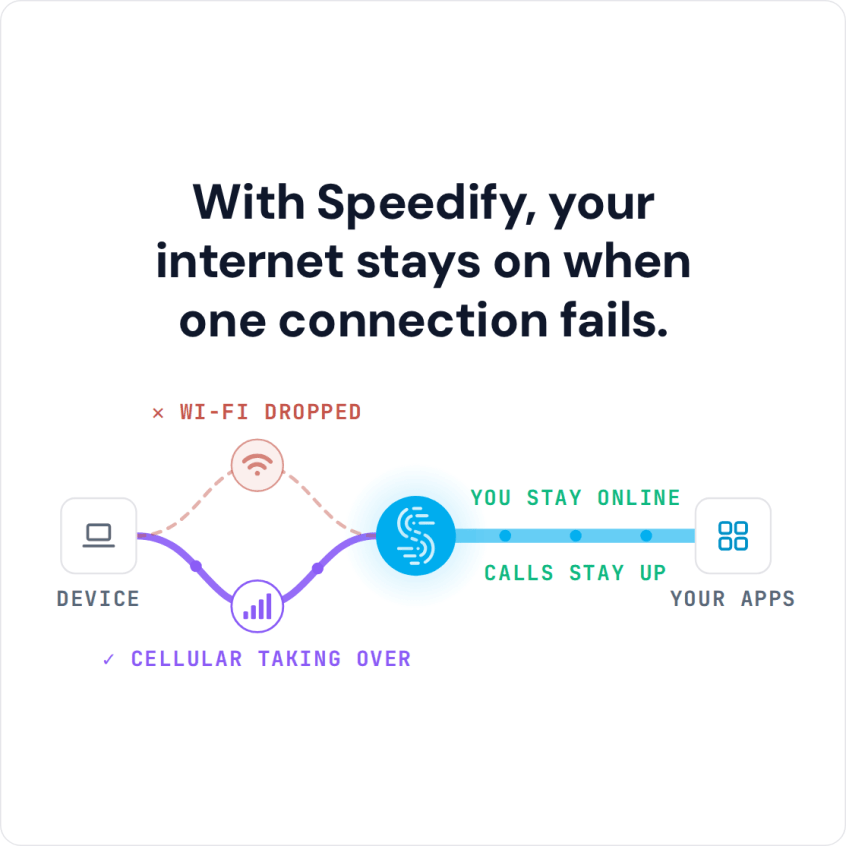
A VPN solves reachability: the operator’s laptop and the robot can address each other, even behind carrier NAT. A mesh VPN is a common choice for exactly that reason. A VPN does not solve network changes. A VPN tunnel rides one internet connection at a time. When the robot’s Wi-Fi drops, the tunnel and every session inside the tunnel stall until the tunnel finds another connection.
Combining internet connections answers a different question. Speedify keeps one session to a Speedify server alive across Wi-Fi, two carriers and Starlink at once, splitting packets across every connection. The gateway’s connection to the cloud broker never sees the Wi-Fi drop, and the broker sees one stable address per robot. A fleet can run a VPN and Speedify together.
Some networks need the opposite of a tunnel. Speedify also offers a mode with no tunnel at all, the Local Load Balancer. Each flow leaves over one internet connection with the device’s own address, so the site’s security stack can still inspect the traffic. The mode has a stated cost: no packet-by-packet combining, and a flow on a failed connection fails with the connection.
Speedify’s robot data path carries traffic over plain TCP by design. Combining internet connections does not require a second layer of encryption. Most robot traffic already carries TLS, and encrypting twice costs CPU on an onboard computer with little to spare. Confidentiality comes from the payload, with MQTT over TLS for example. Or the combined connection can end somewhere trusted, such as a Speedify Self-Hosted Server inside the facility. WebRTC media is encrypted with DTLS-SRTP by design. The Speedify app and Speedify for Routers encrypt traffic with AES-256 between the machine and the Speedify server.
Where Speedify Fits Under Robot Messaging Software
- Speedify is not messaging middleware, and Speedify does not make multicast cross a routed network.
- Speedify carries the IP traffic that MQTT, WebRTC, gRPC and REST already use, with no changes to those protocols.
- Speedify keeps the session under the gateway alive when one internet connection drops, and gives the fleet’s services one stable address per robot.
- Server placement follows the traffic. A warehouse puts a Speedify Self-Hosted Server next to the broker. Robots that roam across public networks use a Speedify Dedicated Server in the cloud.
Gateways also need to know when the robot’s internet connections change. A status snapshot cannot show a transition. An internet connection that drops and recovers between two samples leaves two identical snapshots. The Speedify daemon’s local interface therefore offers an event stream. The stream reports each change as the change happens and counts any events a slow reader missed. A gateway or broker client can react to each change instead of polling.
Speedify for physical AI covers the deployment options for robot fleets. Contact Us to book a demo with the Speedify team or to plan a pilot on your own hardware.
Speedify Business Solutions
Speedify Teams
Speedify for Routers
Speedify Embedded Solutions and Integrations
Add Speedify to your own app or hardware with the Speedify SDK. Your product then combines internet connections, fails over automatically when one drops, and encrypts the traffic, using the same technology as the Speedify app.