
A Personal Hotspot Shares Your Phone’s 4G/5G Cellular Connection with Other Devices Over Wi-Fi
A personal hotspot is a feature built into smartphones that lets you share your phone’s 4G/5G cellular connection with other devices such as laptops, tablets and other phones, over Wi-Fi, USB or Bluetooth. Your phone acts as a portable wireless router, turning its cellular link to the network into a local Wi-Fi network that nearby devices can connect to.
Speedify is an app that combines Wi-Fi, 4G/5G cellular, Ethernet, Starlink and satellite internet connections into one faster, more reliable connection. If you want more bandwidth and reliability from your hotspot, Speedify’s cellular sharing feature lets you combine multiple personal hotspots together for faster upload and download speeds for everyone connected.
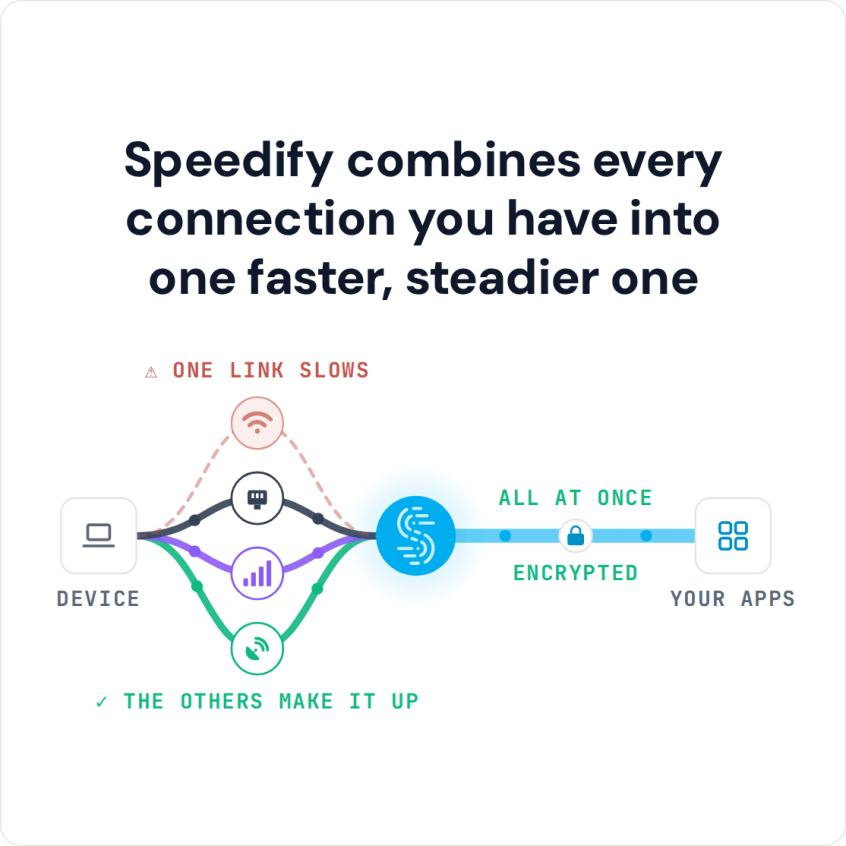
Speedify combines every connection you have into one faster, steadier one
How do I use WiFi and 4G/5G cellular at the same time with Speedify?

Pick your two internet connections and your device below and we'll take you to the step-by-step setup guide.


What a Personal Hotspot Actually Does
When you enable a personal hotspot, your phone starts broadcasting a Wi-Fi network, just like a home router does. Any device that connects to that network can use your phone’s 4G/5G cellular connection to reach the internet. Your phone handles the routing between the local Wi-Fi network it’s broadcasting and its 4G/5G cellular connection to your carrier.
From the perspective of a connected laptop or tablet, the hotspot looks like any other Wi-Fi network. The difference is what’s on the other side: instead of a cable modem or fiber connection, it’s the 4G/5G cellular link from your phone to the nearest tower on your carrier’s network.
How to Turn On a Personal Hotspot on iPhone and Android
On an iPhone, open Settings > Personal Hotspot and turn on Allow Others to Join. On Android, the setting is usually under Settings > Network & internet > Hotspot & tethering, or on Samsung phones under Settings > Connections > Mobile Hotspot and Tethering. Your plan has to allow hotspot use, and hotspot data usually counts against a separate allowance.
Why Your Personal Hotspot Is Slow
A personal hotspot is useful but has real constraints that come from the cellular connection it depends on.
Network Carrier Throttling
Most mobile plans treat hotspot data as a separate allocation with different speed rules from regular on-device data. Even unlimited plans routinely cap hotspot speeds at 5 to 15 Mbps, or throttle hotspot data after a monthly threshold. That is not a hardware limitation, since LTE and 5G can move data much faster. It is a carrier policy applied at the network level to hotspot traffic specifically.
Going Over Your Hotspot Data Cap
Hotspot data allotments are often smaller than total plan data, and they run out faster than most people expect. Uploading video, supporting multiple connected devices, or running cloud backups can exhaust a monthly hotspot cap in a few hours. Once the cap is hit, speeds drop to near-unusable levels on that plan, regardless of how much regular data is left.
Single Carrier Dependency
A personal hotspot is only as good as your carrier’s coverage at your current location. No carrier covers every location equally well. Signal strength varies by building, floor, neighborhood, and network type. If you’re somewhere your carrier doesn’t cover well, the hotspot struggles too. And if the local tower gets congested, the hotspot slows down with it.
Device Heat and Thermal Throttling
Running a personal hotspot is demanding on a phone. The cellular radio is active continuously, the Wi-Fi radio is broadcasting, and the CPU is managing traffic between them. Sustained hotspot use generates significant heat, and most smartphones throttle performance, including the cellular radio, when they get too hot. Extended sessions can see speeds degrade steadily as the phone heats up. A hotspot also drains the phone’s battery faster than normal use, so plug the phone in for long sessions.
How Personal Hotspots Are Used
Getting a Laptop Online Without Wi-Fi
The most common use case: you’re somewhere without available Wi-Fi, such as a train, a client site, or a hotel with unreliable in-room internet, and you need to get a laptop or tablet online. Turning on a personal hotspot gives you a private connection that’s tied to your data plan rather than whatever public network happens to be nearby.
A Second Internet Connection When Home Internet Goes Down
When home or office internet fails, a personal hotspot provides a cellular fallback. It’s not always fast enough to replace a broadband connection for the whole household, because hotspot data is often throttled or capped. But for keeping critical work going during an outage, it’s a practical option that doesn’t require any additional hardware.
Sharing 4G/5G Cellular Data with a Group
A personal hotspot can serve multiple connected devices at once, making it useful when a group needs internet access and only one person has a reliable cellular plan. Everyone connects to the same hotspot, and all their traffic flows through that one phone’s cellular link.
How Speedify’s Cellular Sharing Feature Takes Personal Hotspots Further
The limits of a personal hotspot all trace back to the same root cause: one phone, one carrier, one cellular connection. Speedify gets past that by using several internet connections at the same time, including Wi-Fi, 4G/5G cellular, Ethernet, Starlink, satellite and tethered smartphones, for faster uploads and downloads.
Speedify routes traffic packet-by-packet across all available connections based on real-time performance metrics: latency, jitter, packet loss, and available bandwidth. If one connection weakens, traffic automatically shifts to the others without dropping active sessions.
Speedify’s cellular sharing feature applies the same idea to phones. Instead of each phone keeping its hotspot to itself, paired phones share and use each other’s 4G/5G cellular connections at the same time, so everyone in the group gets faster uploads and downloads.
How Speedify’s Cellular Sharing Feature Works
One-Time Pairing
All devices need to run Speedify and be on the same local network, such as the same Wi-Fi network or router. If there is no Wi-Fi, turn on Personal Hotspot on one phone and connect the other devices to it; Personal Hotspot is not needed on every phone. Pairing is a one-time step (see the setup steps below), and Speedify remembers paired devices for future sessions.
All Phones Give and Take Simultaneously
Once paired, each phone acts as both a connection provider and a connection consumer at the same time. Phone A contributes its cellular connection to Phone B; Phone B contributes its cellular connection to Phone A. Both devices draw bandwidth from two cellular connections at once, with Speedify continuously splitting packets between them based on how each one is performing.
That is what makes Speedify’s cellular sharing feature different from simply connecting to someone else’s hotspot. Standard hotspot sharing is one-directional: one device gives, the other takes. With cellular sharing, both devices give and take at the same time.
Automatic Failover When One Carrier Drops
Speedify monitors both connections continuously. If one carrier loses signal or hits congestion, traffic shifts automatically to the other without dropping active sessions, so video calls stay connected and uploads continue without restarting.
Who Benefits Most from Combining Personal Hotspots with Speedify’s Cellular Sharing Feature
Remote Workers and Traveling Professionals
For anyone whose work depends on a reliable connection away from a fixed office, a single hotspot is a single point of failure. Speedify’s cellular sharing feature gives remote workers the combined bandwidth and automatic failover of two cellular connections, so video calls, cloud collaboration and VPN access stay stable whichever carrier has the stronger signal at a given location.
Live Streamers and Video Creators
Upload speed and connection consistency are essential for live streaming. A single hotspot that dips in bandwidth mid-stream causes quality drops or a dropped stream. By combining two hotspots with Speedify’s cellular sharing feature, creators get the combined upload bandwidth of both cellular connections, and if one fluctuates, the other compensates automatically. That matters most at crowded venues where one carrier’s network is congested. Learn more about how Speedify helps live streamers stay connected.
Teams Working in the Field
Any team that needs reliable internet away from fixed infrastructure benefits from Speedify’s cellular sharing feature: journalists, field technicians, emergency responders, event production crews. Team members pair their phones, pool their cellular bandwidth, and everyone benefits from the combined connection. Where any single carrier has marginal coverage, two phones on different networks improve the odds of staying connected.
Home and Small Office Failover
When home or office internet goes down, two phones using Speedify’s cellular sharing feature provide a combined cellular connection with more bandwidth than either phone could deliver alone. Instead of everyone competing for one hotspot’s capacity, the household or team gets faster upload and download speeds from the combined pool, with no extra hardware.
How to Get Started with Speedify’s Cellular Sharing Feature
Setup takes just a few minutes:
- Download and install Speedify on all phones (available for iOS and Android).
- Connect all phones to the same Wi-Fi network or router.
- If there is no Wi-Fi network, turn on Personal Hotspot on one phone and connect the other phones to it.
- Open Speedify on all devices, go to Settings > Pair & Share, and turn on Sharing, Receiving or both.
- Pair the devices: tap Start by Pairing a Device, pick the other phone under Discovered Devices, and accept the request on the other phone.
- You’re connected: the paired phones now share and receive each other’s cellular connections at the same time.
- Laptops and other computers running Speedify on the same network can pair too, and receive the shared 4G/5G cellular connections for faster uploads and downloads.
Speedify works across iPhone and Android, so the phones don’t need to be the same type or on the same carrier. Phones on different carriers work best: if one network is congested or down, the other carrier’s connection keeps the combined connection running.
Personal Hotspot Limits, and How Combining Two Phones Gets Past Them
A personal hotspot is a useful feature built into every modern smartphone, but its limits all stem from relying on one phone’s cellular connection: carrier throttling, single-carrier dependency, data caps and device heat. Speedify’s cellular sharing feature is built to get past those limits by combining multiple personal hotspots for faster upload and download speeds, with automatic failover and coverage across two carriers. If you have two or more phones, you have everything you need.
Download Speedify and try cellular sharing today. You can also read how Speedify combines internet connections under the hood, or see cellular sharing for teams and enterprise use cases.
Speedify
Get started with Speedify today.
Speedify combines Wi-Fi, 4G/5G cellular, Ethernet, Starlink and satellite into one faster, more reliable internet connection. Free to try: 5 GB a month with a free account. No credit card required.
🚀 Speed
Faster uploads and downloads, because Speedify uses all your internet connections at once.
📶 Stability
If one internet connection drops, Speedify moves your traffic to the others in milliseconds.
🔒 Security
AES-256 encryption on every internet connection, on any network you join.



15M+ downloads worldwide. 75K+ five-star reviews on iOS and Android.