
Combine Multiple Personal Hotspots Together for Faster Upload and Download Speeds for Everyone
You can combine multiple mobile hotspots into one connection, so three or more phones pool their 4G/5G cellular at the same time. One phone’s hotspot can already serve more than one device, but every device on it shares that one phone’s connection. Combining hotspots adds every phone’s connection to one pool, for groups at events, families on the road and teams in the field. For exactly two phones, see how to join 2 personal hotspots.
Speedify is an app that combines two or more internet connections at once, such as the 4G/5G cellular from several phones on different carriers, so you get faster uploads and downloads and stay online if one hotspot drops out. With only one internet connection, Speedify works as an encrypted VPN and cannot make that connection faster or stop it from dropping. Speedify’s cellular sharing feature pairs the phones running Speedify on the same Wi-Fi network, or on one phone’s Personal Hotspot, and pools the 4G/5G cellular of the whole group.
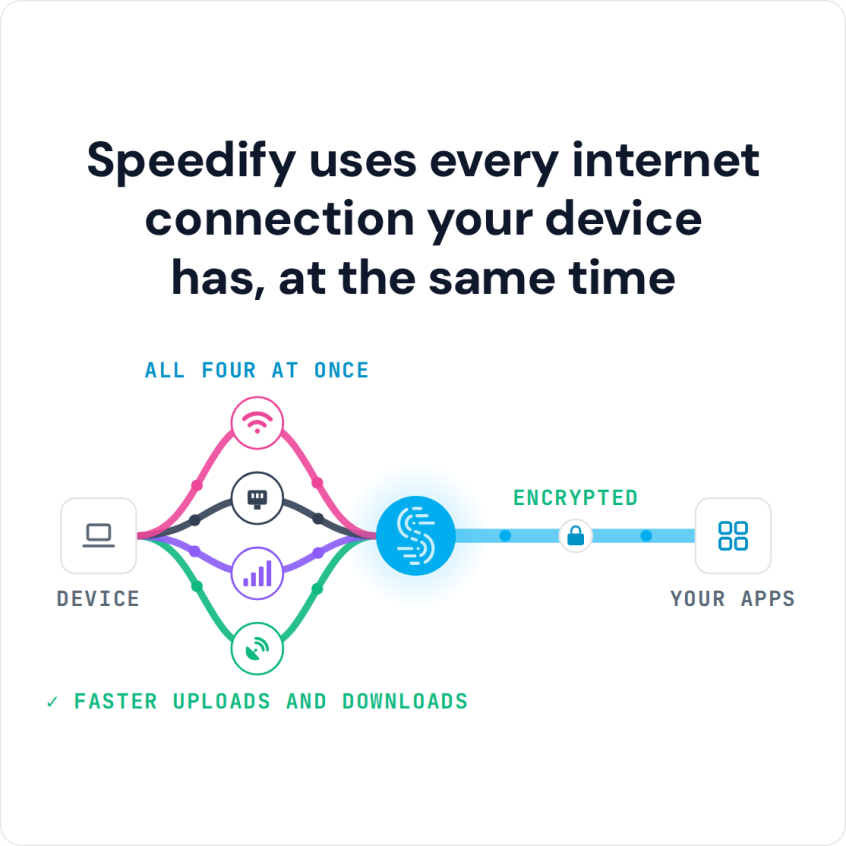
Speedify uses every internet connection your device has, at the same time
How do I use WiFi and 4G/5G cellular at the same time with Speedify?

Pick your two internet connections and your device below and we'll take you to the step-by-step setup guide.


Why You’d Want to Combine Multiple Mobile Hotspots
If your hotspot keeps slowing down or dropping, you are not the only one with this problem. A single mobile hotspot is useful but limited. It depends on one carrier, one cellular radio, one data plan, and one device that’s at the same time running apps, managing heat, and serving Wi-Fi to everything connected to it. When that single point of failure fails, everything connected to it fails with it.
Combining multiple mobile hotspots solves this by pooling the bandwidth and redundancy of more than one cellular connection. Instead of putting all your connectivity in one carrier’s hands, you’re spreading the load across multiple networks. The result is more total bandwidth, automatic failover if one connection weakens, and coverage diversity across carriers that don’t share the same towers or congestion patterns.
Common Reasons a Single Hotspot Isn’t Enough
Carrier-Level Hotspot Throttling
Most mobile plans treat hotspot data as a separate, smaller bucket from your regular data. Even so-called unlimited plans routinely cap hotspot speeds, or throttle them after a monthly threshold regardless of signal strength. If you’re trying to support a video call, upload large files, or serve multiple devices, a throttled hotspot can’t keep up.
Cellular Tower Congestion
Cellular networks are shared infrastructure. At events, in dense urban areas, at conferences or venues (anywhere crowds use cellular data at once), towers get congested and individual speeds plummet. A single hotspot on one congested network leaves you at the mercy of everyone else on that tower. Spreading traffic across hotspots on two different carriers means congestion on one network doesn’t bring everything down.
Inconsistent Coverage
No carrier has perfect coverage everywhere. Signal strength varies by location, floor level, building materials, and distance from towers. One carrier may have strong LTE in a given spot while another has marginal 5G. A connection tied to one carrier is only as good as that carrier’s coverage at that exact moment. Multiple hotspots on multiple carriers means you’re always drawing on whichever network is strongest.
Hotspot Data Cap Exhaustion
Hotspot data allotments run out fast. Video uploads, cloud backups and multiple connected devices can exhaust a monthly hotspot cap in hours. Once you hit the limit, speeds drop to near-unusable levels on that plan. Having a second hotspot on a second plan means you have a second bucket of data to draw from when the first runs dry.
Thermal Throttling
Phones running as hotspots get hot. Extended hotspot use combined with active data transmission (especially while charging) pushes devices toward their thermal limits, at which point the phone throttles its cellular radio to cool down. Splitting the load across two devices means neither phone is pushed as hard, and thermal throttling is less likely to become a bottleneck.
How People Usually Try to Combine Hotspots (And Why It Falls Short)
People have tried creative workarounds for combining multiple mobile hotspots, but none of them actually combine the connections into one.
Connecting different devices to different hotspots. Assigning some devices to one hotspot and others to another distributes the load, but each device is still capped by one connection’s bandwidth. There’s no shared pool, no failover, and no way for one device to benefit from the other hotspot’s bandwidth.
Manually switching between hotspots. Disconnecting from one hotspot and reconnecting to another when signal degrades is disruptive by definition: active connections drop every time you switch. It’s reactive rather than proactive, and it only gets you the better of two connections rather than both at once.
Using a load-balancing router with two hotspots. Some travel routers can connect to two upstream sources and balance traffic between them. This comes closer to combining, but most consumer load balancers distribute connections, not individual packets, which means a single download or upload is still limited to one connection’s bandwidth, and failover can interrupt active sessions.
True combining, where individual packets are split across multiple connections in real time and failover is automatic, requires software built for it. Speedify’s cellular sharing feature does exactly that.
How Speedify’s Cellular Sharing Feature Combines Multiple Mobile Hotspots
Speedify combines Wi-Fi, 4G/5G cellular, Ethernet, Starlink and satellite internet connections, including tethered smartphones, into one faster, more reliable connection, and encrypts your traffic like a VPN. Speedify routes traffic packet by packet across all available connections based on real-time measurements of latency, jitter, packet loss, and available bandwidth. If one connection weakens, Speedify automatically shifts traffic to the stronger ones without dropping active sessions.
Speedify’s cellular sharing feature extends this to cellular connections between paired devices. Rather than each phone keeping its 4G/5G cellular to itself, paired phones share and use each other’s cellular connections at the same time, combining multiple personal hotspots for faster upload and download speeds for everyone in the group.
How Speedify’s Cellular Sharing Feature Works
One-Time Pairing
Devices running Speedify on the same local Wi-Fi network discover each other automatically and pair through a one-time setup. Once paired, the devices stay paired across sessions, with no repeated sign-in and no passwords to exchange each time. The devices set up encrypted peer-to-peer tunnels and remember each other going forward.
Bidirectional Connection Sharing
Once paired, each device acts as both a connection provider and a connection user. Phone A shares its 4G/5G cellular connection with Phone B; Phone B shares its connection with Phone A. Both devices now draw bandwidth from two cellular connections at once. Speedify spreads each device’s traffic across both connections continuously, routing packets to whichever connection is performing better at that moment.
This two-way model is what makes Speedify’s cellular sharing feature different from connecting to someone else’s hotspot. Traditional hotspot sharing goes one way: one device gives, the other takes. With cellular sharing, both devices give and take at the same time, combining multiple personal hotspots for faster upload and download speeds for everyone.
Automatic Failover
Because Speedify monitors all active connections in real time, it shifts traffic to the other connection when one degrades, without interrupting active sessions. If one carrier hits congestion or drops signal, the other connection picks up the slack, so video calls stay connected and uploads continue without restarting. The public IP address stays the same too, because the traffic still leaves through the same Speedify server.
Adding a Third Phone or More to the Combined Connection
Pairing works the same way for every extra phone. Pair each new phone in Speedify’s settings (Settings > Pair & Share, the in-app name for cellular sharing), and its shared 4G/5G cellular appears as one more connection on the receiving device’s Speedify dashboard. Each shared connection is capped at 10 Mbps by default, and you can change that cap in the same settings screen. Every sharing phone needs a plan that allows tethering, and the data it shares counts as hotspot data on that plan, so a group spreads its data use across several plans instead of draining one.
Who Benefits from Combining Multiple Mobile Hotspots with Speedify
Remote Workers and Traveling Professionals
For anyone working away from a fixed office, a single hotspot is a single point of failure. Speedify’s cellular sharing feature gives remote workers the combined bandwidth and automatic failover of multiple cellular connections, so video calls, cloud collaboration, and VPN access stay stable whichever carrier has the stronger signal at a given location. A laptop combining two phones’ hotspots on different carriers is more reliable than any single connection.
Live Streamers and Video Creators
Upload speed and consistency matter most for live streaming and video production. A dip in one connection mid-stream means quality drops or the stream cuts out entirely. By combining multiple hotspots with Speedify’s cellular sharing feature, creators get the combined upload bandwidth of all connected cellular sources, and automatic compensation if any one of them fluctuates. This helps most at events, concerts, sports venues, or any location where cellular networks are congested. Learn more about how Speedify helps live streamers stay connected.
Field Teams
Journalists, emergency responders, event production crews and field technicians, or any team that needs reliable internet away from fixed infrastructure, can use Speedify’s cellular sharing feature. Team members pair their phones, pool their cellular bandwidth, and everyone benefits from the combined connection. In areas with marginal coverage from any single carrier, multiple phones on different networks raise the odds that the group stays connected. Learn more about Speedify’s cellular sharing feature for teams and enterprise.
Failover Internet for a Home or Small Office
When your main internet connection goes down, three or more phones running Speedify’s cellular sharing feature can pool their 4G/5G cellular into one failover connection with more bandwidth than any one phone delivers alone. Instead of tethering one device to one phone’s hotspot and hoping it holds, the combined connection gives everyone in the household or office faster upload and download speeds. For households or small teams with several phones already on hand, it needs no extra hardware.
How to Combine Multiple Mobile Hotspots with Speedify’s Cellular Sharing Feature
Getting started is straightforward:
- Download and install Speedify on all the phones you want to combine (available for iOS and Android).
- Connect all phones to the same Wi-Fi network.
- If no Wi-Fi network is nearby, turn on Personal Hotspot on one phone and connect the other phones to it, so all phones are on the same network.
- Open Speedify on each device and go to the “Pair & Share” section.
- Pair the devices. Speedify handles peer discovery and the encrypted tunnel setup automatically.
- All paired phones now share and receive each other’s cellular connections at the same time, combining multiple personal hotspots for faster upload and download speeds for everyone.
Speedify works across iPhone and Android, so the phones don’t need to be the same type or on the same carrier. Phones on different carriers work best: they give the widest coverage, so congestion or an outage on one network doesn’t take down the combined connection.
Combining Multiple Mobile Hotspots with Speedify: Faster and More Reliable Than One
Splitting devices, switching by hand and load-balancing routers all leave speed and reliability on the table. Speedify’s cellular sharing feature combines multiple personal hotspots for faster upload and download speeds, with automatic failover and coverage across carriers. If you have two or more phones, you have everything you need.
Download Speedify and try cellular sharing with your other phones today. You can also learn how Speedify’s technology for combining internet connections works, or explore Speedify’s cellular sharing feature for teams and enterprise use cases.
Speedify
Get started with Speedify today.
Speedify combines Wi-Fi, 4G/5G cellular, Ethernet, Starlink and satellite into one faster, more reliable internet connection. Free to try: 5 GB a month with a free account. No credit card required.
🚀 Speed
Faster uploads and downloads, because Speedify uses all your internet connections at once.
📶 Stability
If one internet connection drops, Speedify moves your traffic to the others in milliseconds.
🔒 Security
AES-256 encryption on every internet connection, on any network you join.



15M+ downloads worldwide. 75K+ five-star reviews on iOS and Android.