
Get Stable Internet with a Raspberry Pi Bonded LTE Wi-Fi Hotspot
One cell tower carries your whole YouTube Live broadcast when you stream from a single modem, and the moment that tower gets busy the stream stutters. A better answer is to build your own hotspot (a small box that shares internet with your camera over Wi-Fi) and feed it more than one internet connection.
Speedify is software that runs on a Raspberry Pi and uses several cellular connections and Wi-Fi together, spreading the upload so no single connection can break the stream. With a single connection, Speedify works as an encrypted VPN and cannot stop that connection from dropping, so tether at least two phones or cellular adapters, ideally on different carriers. Step by step, this article shows the parts list and the build, ending with a hotspot that keeps your YouTube Live feed on air.
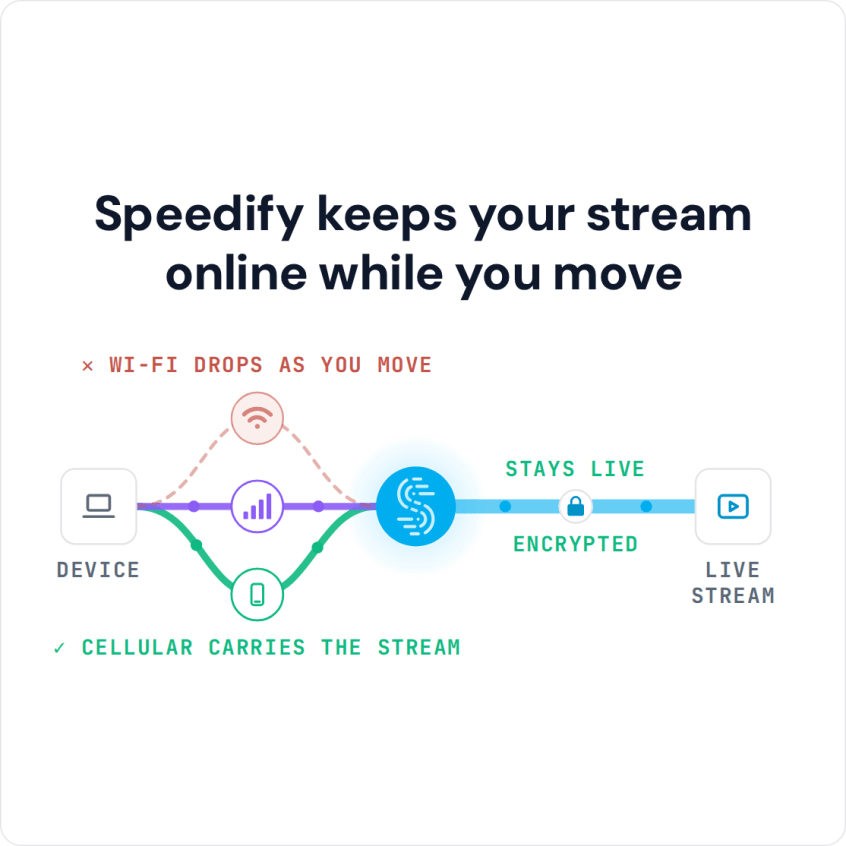
Speedify keeps your stream online while you move
Issues with IRL Streaming on YouTube Live
Many will argue that IRL live streaming on YouTube can be done with just your smartphone. You could use its 4G/5G cellular or turn your smartphone into a Wi-Fi hotspot for your GoPro or video camera. This is true in some cases, but not in all of them.
Cellular coverage is not homogenous or ubiquitous, especially when you’re at the outskirts of a city, or in an area that’s prone to poor mobile signal, like an underground passage or inside a building. That’s why it’s important to get your internet from at least 2 different cellular carriers. This way, if one’s network fails, you can use the other.
But there’s one more thing: suppose you have 2 internet sources with you. What will you do when one of them fails? Stop the YouTube IRL stream, set up the other connection and then resume it? Instead, you need a service that can combine both sources into one stable connection. Speedify, a VPN that combines internet connections, does that on a Raspberry Pi: it runs the connections from 2 smartphones together and keeps the stream going when one of them drops.
What You Need for a Raspberry Pi Wi-Fi Hotspot That Combines Cellular Connections
To keep an IRL stream on YouTube Live going, the build uses the following parts:
- Raspberry Pi 4
- Smartphones that you will tether to the Pi via USB
- Portable USB-C battery pack, to power the Raspberry Pi and, if needed, the smartphones you tether to it
- Smartphone or other Wi-Fi enabled camera to record (a GoPro, for example)
- Backpack to carry the devices
How to Get Stable Internet for an IRL Stream on YouTube Live
These steps turn the Raspberry Pi into a Wi-Fi router that combines internet connections:
- Set up the Raspberry Pi by installing Speedify. Speedify on Linux, including Raspberry Pi, needs a paid plan (there is no free tier on Linux).
- Plug the Raspberry Pi into the battery pack.
- Connect as many smartphones or cellular adapters as you can to the Pi and enable tethering. Make sure you leave the Pi’s internal Wi-Fi card not connected so you can use it as a connection sharing interface.
- Start the Wi-Fi hotspot: turn on Speedify and enable sharing.
To share over a Wi-Fi hotspot, select wlan0 as the sharing interface. Set a custom SSID and password for your hotspot and restart Speedify to apply the changes. If you’re using Speedify on the Pi graphically, you should see the connections show up as connection bubbles on the Speedify dashboard. - Connect your YouTube Live video streaming device to the Wi-Fi hotspot.
If you’re using a smartphone as your YouTube streaming device, you can also run Speedify on it, so the phone uses the Raspberry Pi’s Wi-Fi hotspot and its own cellular connection at the same time.
Use the YouTube app to customize your live streaming settings. While connected to the hotspot, you should be able to IRL stream in HD on the go, with far less risk of one weak signal cutting the stream.
Speedify
Get started with Speedify today.
Speedify combines Wi-Fi, 4G/5G cellular, Ethernet, Starlink and satellite into one faster, more reliable internet connection. Free to try: 5 GB a month with a free account. No credit card required.
🚀 Speed
Faster uploads and downloads, because Speedify uses all your internet connections at once.
📶 Stability
If one internet connection drops, Speedify moves your traffic to the others in milliseconds.
🔒 Security
AES-256 encryption on every internet connection, on any network you join.



15M+ downloads worldwide. 75K+ five-star reviews on iOS and Android.