
Combine Multiple Personal Hotspots Together for Faster Upload and Download Speeds for Everyone
A personal hotspot is a phone feature that turns the phone into a small Wi-Fi router: the phone shares its 4G/5G cellular connection with a laptop, tablet or another phone over Wi-Fi, Bluetooth or USB. Two people can use one hotspot at the same time, but they share that one phone’s connection, and a device normally connects to only one hotspot at a time. With Speedify you can join 2 personal hotspots at once, from two phones, for faster downloads and uploads.
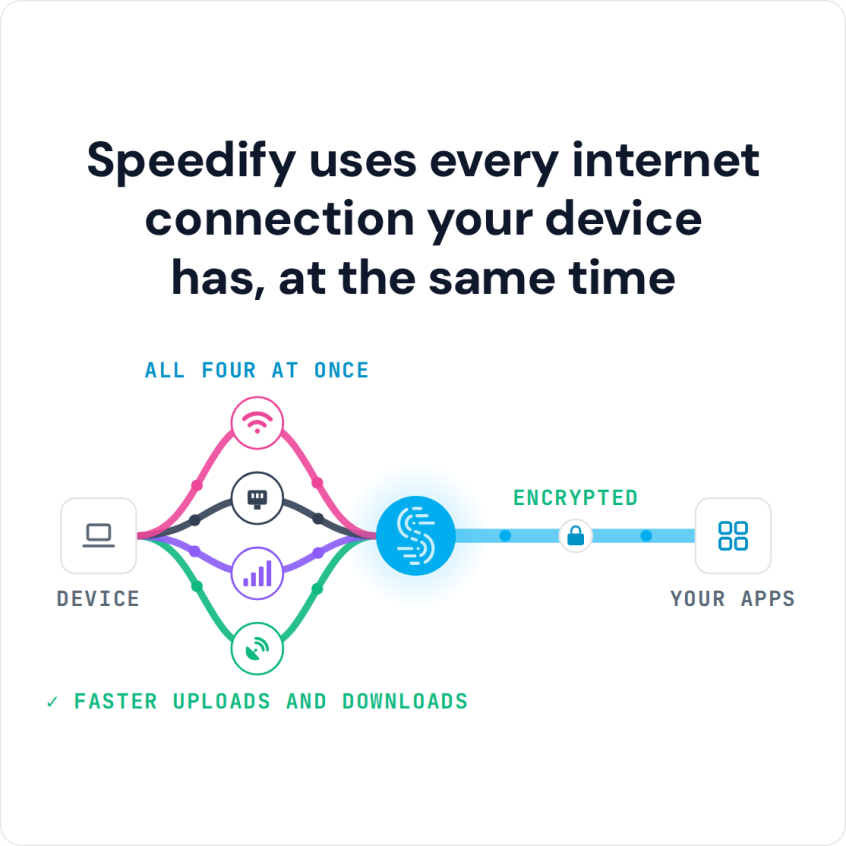
Speedify is an app that combines Wi-Fi, 4G/5G cellular, Ethernet, Starlink and satellite internet connections into one faster, more reliable connection, and encrypts your traffic like a VPN. Speedify’s cellular sharing feature lets two phones running Speedify share their 4G/5G cellular with each other, so you get the bandwidth of both and stay online if one hotspot drops.
Speedify uses every internet connection your device has, at the same time
How do I use WiFi and 4G/5G cellular at the same time with Speedify?

Pick your two internet connections and your device below and we'll take you to the step-by-step setup guide.


Why Joining 2 Personal Hotspots Makes Sense
If your hotspot keeps stalling on video calls or big uploads, you are not alone. A single personal hotspot gives you one carrier, one cellular radio and one data plan. That is fine for light use, but it hits its limits as soon as you need a video call to hold steady, a large upload to finish, or a connection where coverage is patchy.
Joining 2 personal hotspots gives you the combined bandwidth of two 4G/5G cellular connections, failover across two carriers, and a connection that automatically leans on whichever network performs better at that moment. The two hotspots do not compete; they work together.
Why a Single Personal Hotspot Runs Into Trouble
Carrier-Level Hotspot Throttling
Mobile plans often give hotspot use a separate, smaller allowance than the phone itself gets. Even unlimited plans often cap hotspot speeds, or throttle them after a monthly threshold regardless of your signal strength. One throttled hotspot cannot deliver the bandwidth a video call or a multi-device setup needs. Two hotspots on two separate plans give you two separate allowances, and speeds that do not get throttled at the same time.
Cellular Tower Congestion
When a crowd uses 4G/5G cellular in one place (a conference, a concert venue, a busy city block), the local tower gets congested and speeds drop for everyone on that carrier. A single hotspot tied to one carrier is stuck with whatever congestion that carrier’s local tower has. A second hotspot on a different carrier uses a different network, so congestion on one does not pull both down.
Patchy Coverage
No carrier blankets every location with the same signal quality. Strength varies by building, floor, neighborhood, and network type. What’s strong LTE on one carrier might be marginal 5G on another in the exact same spot. Tying yourself to one carrier means accepting its specific coverage gaps. Two phones on two carriers means you’re always able to draw on whichever one has the stronger signal where you are.
Hotspot Data Cap Exhaustion
Hotspot data runs out faster than most people expect. A few hours of video calls, a large upload or a handful of devices pulling updates can use up a monthly hotspot cap. Once the cap is used up, that plan’s hotspot slows to a trickle. A second hotspot on a second plan gives you a second allowance to draw from, so you are not stuck at throttled speeds because one plan ran dry.
Heat and Thermal Throttling
Running a personal hotspot is demanding on a phone. Sending and receiving data for hours, especially while charging, makes the phone hot. When a phone gets too hot, it slows itself down, including the cellular radio, to cool off. Splitting the load across two phones means neither one works as hard, so heat is less likely to become a speed bottleneck.
Common Ways to Use Two Hotspots and Where They Fall Short
People have come up with various ways to make use of two hotspots at once, but most of them don’t actually join the connections together in any meaningful sense.
Connecting to one hotspot and keeping the other in reserve. This is the most common approach: use one hotspot until it fails, then switch to the other by hand. The problem is that every switch drops active connections. Video calls restart. Downloads start over. Switching by hand is a workaround, not a solution, and you only ever use one hotspot at a time.
Splitting devices between two hotspots. Connecting some devices to one hotspot and others to the second spreads the load, but each device is still limited to the bandwidth of whichever single hotspot it’s connected to. There’s no pooling, no failover, and no way for a device on Hotspot A to take advantage of Hotspot B’s bandwidth.
Using a travel router that accepts two upstream connections. Some multi-WAN travel routers can connect to two hotspots and balance connections across them. This comes closer to combining the two hotspots, but consumer load balancers work per connection, not per packet, so a single download or upload is still limited to one hotspot’s speed. When failover happens on these routers, it is not instant either.
Genuinely joining 2 personal hotspots means both connections carry traffic for the same session at once, packets are spread across both in real time, and failover happens automatically without dropping your calls. Speedify’s cellular sharing feature does exactly this.
How Speedify’s Cellular Sharing Feature Joins 2 Personal Hotspots
Speedify sends your traffic packet by packet across every internet connection it can use (Wi-Fi, 4G/5G cellular, Ethernet, Starlink and satellite), weighing each connection’s latency, jitter, packet loss and available bandwidth in real time. If one connection weakens, traffic shifts to the others without dropping active sessions.
Speedify’s cellular sharing feature applies the same combining to two paired phones. Instead of each phone keeping its 4G/5G cellular to itself, the phones share their connections over the local network, and Speedify on the receiving phone combines its own 4G/5G cellular with the shared connection for faster downloads and uploads.
How Two Paired Phones Share 4G/5G Cellular and Fail Over
Pair the Two Phones Once on the Same Network
Both phones need to run Speedify and be on the same local network: the same Wi-Fi network or, if there is no Wi-Fi, a Personal Hotspot that one phone turns on and the other joins. You pair the phones once. They find each other automatically and stay paired for future sessions, with no passwords to share and no setup to repeat.
Both Phones Share and Receive 4G/5G Cellular at the Same Time
With Sharing and Receiving both turned on, each phone gives and uses cellular at the same time. Phone A shares its 4G/5G cellular with Phone B, and Phone B shares its 4G/5G cellular with Phone A. Both phones then draw on two cellular connections at once, and Speedify keeps spreading packets across both, favoring whichever performs better at that instant.
Two-way sharing is the key difference between Speedify’s cellular sharing feature and connecting to someone else’s hotspot. A standard hotspot works one way: one device gives, the other takes. With Speedify, both phones can give and take at the same time, so each one gets faster downloads and uploads from the combined connection.
Automatic Failover When One Carrier Drops
Speedify monitors both connections continuously. If one carrier loses signal or hits congestion, traffic shifts automatically to the other without dropping active sessions. Video calls stay up and uploads do not restart, because the switch happens packet by packet, before the apps you use notice a problem.
Who Benefits Most from Joining 2 Personal Hotspots with Speedify
Remote Workers and Road Warriors
If your work depends on staying connected away from the office, a single hotspot is a single point of failure. Speedify’s cellular sharing feature combines two phones’ 4G/5G cellular connections, giving you more bandwidth and automatic failover across two carriers. Video calls, cloud apps and your company VPN keep running if one carrier drops, whether you are on a train, in a hotel, or at a client site with unpredictable coverage.
Live Streamers and Content Creators
Live streaming needs steady upload speed. A dip in one hotspot’s bandwidth mid-stream lowers the stream quality or drops the stream. Joining 2 personal hotspots with Speedify’s cellular sharing feature gives you the upload bandwidth of both cellular connections, and Speedify shifts traffic to the other connection if one fluctuates. At crowded venues where one carrier’s network is congested, a second carrier can make the difference between a clean stream and a failed one. Learn more about how Speedify helps live streamers stay connected.
Teams Working in the Field
Journalists, event crews, emergency responders and field technicians all need reliable internet away from fixed infrastructure. With Speedify’s cellular sharing feature, team members pair their phones and pool their 4G/5G cellular, so each person running Speedify uses the combined connection. Where no single carrier has strong coverage, phones on two different networks give the group better odds of staying online. Learn more about Speedify’s cellular sharing feature for teams and enterprise.
Failover for Home and Small Office Internet
When home or office internet goes down, two phones running Speedify’s cellular sharing feature give you a 4G/5G cellular failover with more bandwidth than either phone has alone. Instead of everyone fighting over one phone’s hotspot, each computer or phone running Speedify can pair with the phones and draw on the combined pool, with no extra hardware.
How to Join 2 Personal Hotspots with Speedify’s Cellular Sharing Feature
Setup takes just a few minutes:
- Download and install Speedify on both phones (available for iOS and Android).
- Put both phones on the same local network by connecting them to the same Wi-Fi network. If there is no Wi-Fi, turn on Personal Hotspot on one phone and connect the other phone to it.
- Open Speedify on both phones and go to Settings > Pair & Share, the in-app name for cellular sharing. Turn on Sharing on the phone that gives its 4G/5G cellular and Receiving on the phone that uses it, or turn on both on each phone to share both ways.
- On one phone, tap Start by Pairing a Device and pick the other phone under Discovered Devices. Accept the request on the other phone.
- The shared cellular connection now appears on the receiving phone’s Speedify dashboard next to its own 4G/5G cellular, and Speedify uses both at the same time. Each shared connection is capped at 10 Mbps by default, and you can change that cap in the same settings screen.
Speedify’s cellular sharing feature works between iPhone and Android, and the two phones do not need to be the same type or on the same carrier. Phones on different carriers work best, because an outage or congestion on one network does not take down the combined connection. The sharing phone’s plan must allow tethering, and the data it shares counts as hotspot data on that plan. If the phones cannot find each other on a public Wi-Fi network, that network may block device discovery: use one phone’s Personal Hotspot instead.
Use Two Hotspots at the Same Time with Speedify
Switching between hotspots by hand, splitting devices across two separate connections, or relying on a load-balancing router all leave bandwidth and reliability unused. Speedify’s cellular sharing feature is built for joining 2 personal hotspots: the two phones’ 4G/5G cellular connections work as one, with faster downloads and uploads, automatic failover, and the coverage of two carriers. If you have two phones and the sharing phone’s plan allows tethering, you have everything you need to get started.
Download Speedify and try Speedify’s cellular sharing feature today. You can also learn how Speedify’s technology for combining internet connections works under the hood, or explore Speedify’s cellular sharing for teams and enterprise.
Speedify
Get started with Speedify today.
Speedify combines Wi-Fi, 4G/5G cellular, Ethernet, Starlink and satellite into one faster, more reliable internet connection. Free to try: 5 GB a month with a free account. No credit card required.
🚀 Speed
Faster uploads and downloads, because Speedify uses all your internet connections at once.
📶 Stability
If one internet connection drops, Speedify moves your traffic to the others in milliseconds.
🔒 Security
AES-256 encryption on every internet connection, on any network you join.



15M+ downloads worldwide. 75K+ five-star reviews on iOS and Android.