
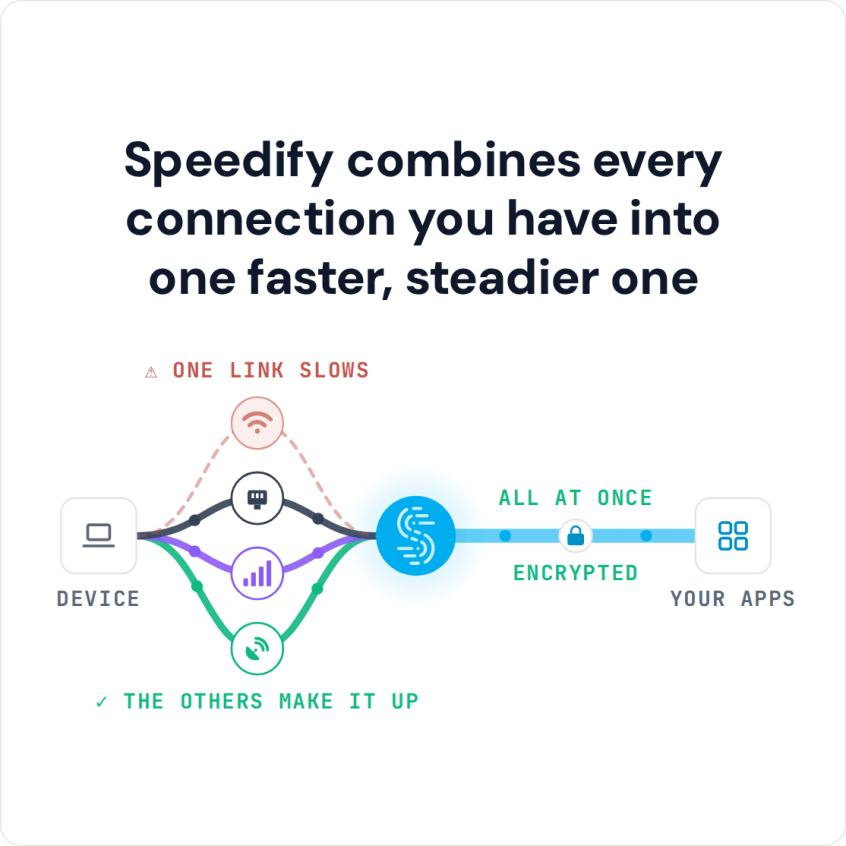
Peplink and Speedify both combine several internet connections into one faster, more reliable connection, a technique often called internet bonding. The difference is where it runs: Peplink sells hardware routers built for businesses with an IT department to handle setup and configuration, and those routers can cost thousands of dollars. Speedify is software that runs on the computer or phone you already own.
On your device, that means faster downloads and uploads from two or more internet connections at once, for example Wi-Fi plus your phone’s 4G/5G cellular, and if one connection drops, traffic moves to the others. On a single connection, Speedify works as an encrypted VPN and cannot make that connection faster or stop it from dropping. For live streaming gear, see this comparison of streaming solutions that combine cellular connections.
Speedify combines every connection you have into one faster, steadier one
How do I use WiFi and 4G/5G cellular at the same time with Speedify?

Pick your two internet connections and your device below and we'll take you to the step-by-step setup guide.


Speedify vs. Peplink: Software on Your Device or a Hardware Router
Speedify combines internet connections right on your computer or phone, with no extra hardware. To start, install the Speedify app on Windows, macOS, Linux, iOS or Android, and Speedify uses every connection available to that device: Wi-Fi, 4G/5G cellular, Ethernet, Starlink and satellite. A Peplink router combines the wired and cellular connections plugged into it and shares the result with every device on its network.
Peplink’s combining technology, SpeedFusion, needs a peer at the other end: a second Peplink device or Peplink’s paid SpeedFusion cloud service. Without one, a Peplink router load balances, spreading separate sessions across connections, so a single video call, upload or download still runs over one connection at a time. Speedify includes its own server network in the subscription: the Individual plan costs $89.99 per year, as low as $4.99 per month on a 3-year plan. A free Speedify account includes 5 GB per month on Windows, macOS, iOS and Android, so you can try Speedify free before you pay.
Combining Starlink and 4G/5G Cellular on a Router with Speedify
If you need combined internet for a whole home or office network rather than one device, Speedify also runs on routers: OpenWrt 23.05 or later (x86_64 and aarch64), GL.iNet firmware on supported models, and Powered by Speedify routers such as the Miri X510. A router running Speedify can combine Starlink with 4G/5G cellular for every device on the network. Routers need a Router License, and there is no free tier on routers.
For one computer or phone, Speedify is the simpler and cheaper way to combine internet connections. For a whole office network managed by an IT department, a hardware router, whether a Peplink or a router running Speedify, is the better fit.
Speedify
Get started with Speedify today.
Speedify combines Wi-Fi, 4G/5G cellular, Ethernet, Starlink and satellite into one faster, more reliable internet connection. Free to try: 5 GB a month with a free account. No credit card required.
🚀 Speed
Faster uploads and downloads, because Speedify uses all your internet connections at once.
📶 Stability
If one internet connection drops, Speedify moves your traffic to the others in milliseconds.
🔒 Security
AES-256 encryption on every internet connection, on any network you join.



15M+ downloads worldwide. 75K+ five-star reviews on iOS and Android.