
Connect to Starlink Wi-Fi and Ethernet at the Same Time for Better Internet
Ubuntu Linux can use Starlink and a wired Ethernet line at the same time, so the wired line covers for Starlink when it slows down or drops.
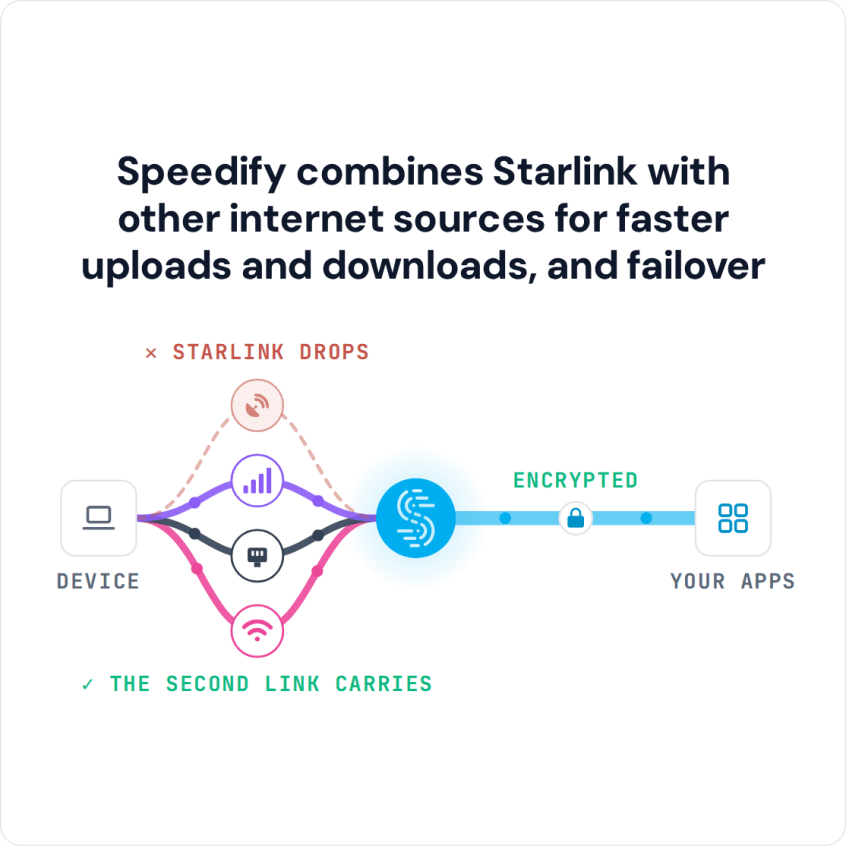
Speedify is an app that combines two or more internet connections at once, such as Starlink and wired Ethernet, so you get faster uploads and downloads and stay online if one connection drops. That needs the wired line in place: with Starlink alone, Speedify works as an encrypted VPN and cannot stop Starlink from dropping.
This guide shows how to combine Starlink with a wired Ethernet connection from a second provider, such as cable, DSL or fiber, on Ubuntu Linux using Speedify.
Note: Combine internet connections from different sources. Connecting to the same router over both Wi-Fi and Ethernet does not add speed, because both share one internet connection.
Speedify combines Starlink with other internet sources for faster uploads and downloads, and failover
3 Steps to Join Starlink and Ethernet on Ubuntu Linux Using Speedify
Step 1: Connect to Your Starlink Wi-Fi Hotspot
First, set up your Starlink with the instructions that came in the box. This includes your Starlink Wi-Fi network name and password.
On your Ubuntu computer, open the system menu at the right side of the top bar and click the arrow next to Wi-Fi. Choose your Starlink Wi-Fi network and enter its password to connect. On Ubuntu 22.04 and earlier, choose Wi-Fi > Select Network instead.
Step 2: Connect the Ethernet Cable to Your Ubuntu Linux Computer
Connect an Ethernet cable from your router or modem to the Ethernet port on your Ubuntu computer. If your computer has no Ethernet port, use a USB to Ethernet adapter. Ubuntu starts using the Ethernet connection on its own, and the system menu at the top right shows it as a wired connection.
Step 3: Download and Install Speedify
Download and install Speedify. Speedify is an app that combines your Starlink with the other internet connections on your device, so your internet is faster, more reliable, and more secure.
Once running, Speedify finds your internet connections on its own and splits your traffic across them. If Starlink drops, Speedify moves your traffic to the internet connections that still work. Video calls and live streams get priority over background downloads and updates.
To see how each internet connection is doing, or to set a data limit on one, click or tap it in Speedify.
Speedify's cellular sharing adds more 4G/5G cellular: phones and computers running Speedify on the same local network share their 4G/5G cellular with each other.
Speedify
Get started with Speedify today.
Speedify combines Wi-Fi, 4G/5G cellular, Ethernet, Starlink and satellite into one faster, more reliable internet connection. Free to try: 5 GB a month with a free account. No credit card required.
🚀 Speed
Faster uploads and downloads, because Speedify uses all your internet connections at once.
📶 Stability
If one internet connection drops, Speedify moves your traffic to the others in milliseconds.
🔒 Security
AES-256 encryption on every internet connection, on any network you join.



15M+ downloads worldwide. 75K+ five-star reviews on iOS and Android.