
Want faster uploads and downloads and internet that stays online even if one connection drops out? Run two internet connections at the same time, even a neighbor’s Wi-Fi alongside your own.
Speedify is an app that combines two or more internet connections at once, such as your own home internet and a neighbor’s Wi-Fi network, into one connection. This setup needs Speedify on a Windows PC or Mac.
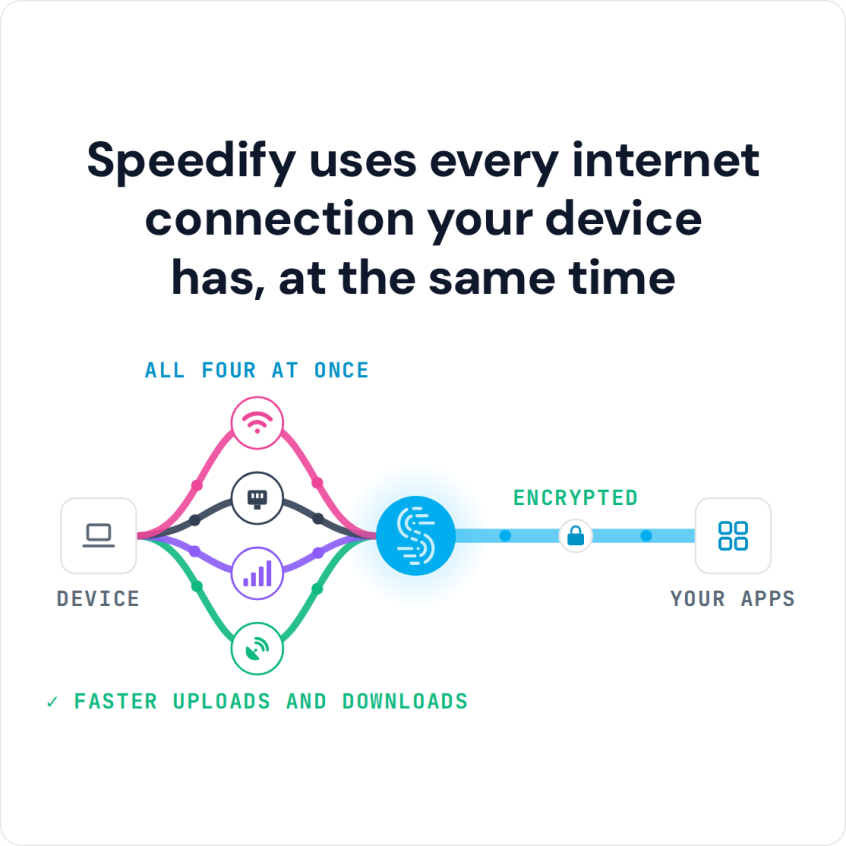
Speedify uses every internet connection your device has, at the same time

How do I use WiFi and 4G/5G cellular at the same time with Speedify?

Pick your two internet connections and your device below and we'll take you to the step-by-step setup guide.


As long as each neighbor is in range of the other’s Wi-Fi network, setting up Speedify to combine both connections takes a few minutes. One Speedify user, Keith, set this up with his neighbor: both signed up for Speedify and installed the Speedify app on their Mac or Windows PC at home. Each of them stayed plugged into their own home internet as usual and also joined the other’s Wi-Fi network. With Speedify running, both internet connections carry traffic at the same time, so downloads and uploads are faster, and if one connection drops, the other keeps them online. Keith says they now get “double the speed [they] used to.” If you and a neighbor can reach each other’s Wi-Fi, the steps below set up the same thing.
How to Combine Your Wi-Fi with a Neighbor’s Wi-Fi Using Speedify
- Download Speedify on the Windows PC or Mac you want to speed up.
- Connect the computer to your own router with an Ethernet cable. If the computer has no Ethernet port, use a USB Ethernet adapter.
- Join your neighbor’s Wi-Fi network with the computer’s built-in Wi-Fi, using the password your neighbor gives you.
- Open Speedify and sign in, or create a free account (the free tier includes 5 GB per month). Speedify finds both internet connections and uses them at the same time.
- Your neighbor can do the same on their own computer: Ethernet to their router, Wi-Fi to yours.
Speedify
Get started with Speedify today.
Speedify combines Wi-Fi, 4G/5G cellular, Ethernet, Starlink and satellite into one faster, more reliable internet connection. Free to try: 5 GB a month with a free account. No credit card required.
🚀 Speed
Faster uploads and downloads, because Speedify uses all your internet connections at once.
📶 Stability
If one internet connection drops, Speedify moves your traffic to the others in milliseconds.
🔒 Security
AES-256 encryption on every internet connection, on any network you join.



15M+ downloads worldwide. 75K+ five-star reviews on iOS and Android.