
Stop Relying on One Internet Connection When You Can Use Them All with Speedify
Want faster, more reliable internet without depending on a single provider? Run several internet connections at the same time.
Speedify is an app that combines two or more internet connections at once, such as 4G/5G cellular, Starlink and Wi-Fi, so you get faster upload and download speeds and stay online if one connection drops out. This guide explains why using multiple connections makes sense and how to do it.
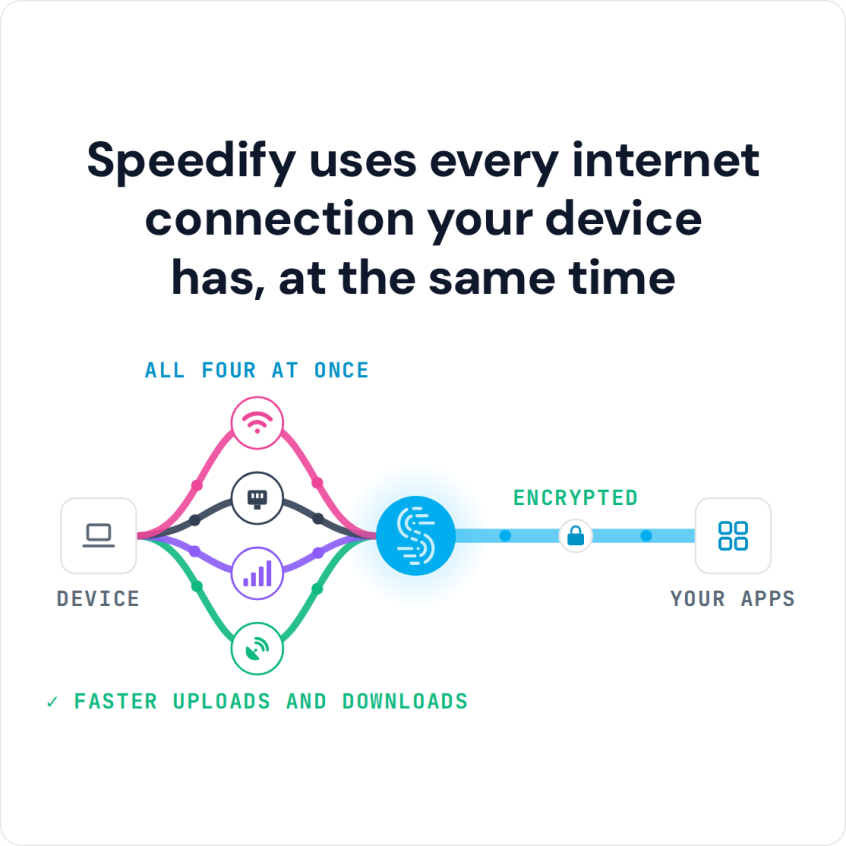
Speedify uses every internet connection your device has, at the same time
How do I use WiFi and 4G/5G cellular at the same time with Speedify?

Pick your two internet connections and your device below and we'll take you to the step-by-step setup guide.


Why Your Internet Keeps Acting Up
Your internet problems usually come down to a few common issues:
Everyone’s online at the same time: Typically between 7 PM and 11 PM, your neighborhood is streaming Netflix, gaming, and video calling all at once. Your ISP’s network gets clogged up like a traffic jam.
Infrastructure breaks: Cables get cut, equipment fails, storms knock things out. When you’re depending on just one connection, any hiccup kills your internet completely.
Your ISP has issues: Sometimes their routing is inefficient, sometimes they’re doing maintenance, sometimes their equipment just isn’t keeping up with demand.
Wi-Fi interference: Your neighbor’s router, your microwave, even baby monitors can mess with your wireless signal.
You live in an area with poor coverage: Too far from the cell tower? End of the cable line? Your location might just be cursed when it comes to internet.
Why Restarting the Router and Other Usual Fixes Only Help One Connection
When your internet acts up, you probably do the same things everyone does:
Unplug everything and plug it back in: This might clear up minor glitches, but it’s not going to fix your ISP’s overloaded network.
Run speed tests: You’ll get numbers that confirm your internet is slow, but that doesn’t make it faster.
Change your DNS: Switching to Google’s DNS (8.8.8.8) might speed up some websites, but it won’t give you more bandwidth.


Mess with Wi-Fi settings: You can optimize channels and move your router around, but you’re still stuck with the same internet connection.
Close apps and kick devices off: This helps temporarily, but then you can’t use your internet the way you want to.
All of these fixes try to squeeze better performance out of one connection that has built-in limits.
Why Using 2 Internet Connections at the Same Time Works Better
Yes, you can use 2 internet connections at the same time, and doing so works better than trying to tune one connection that keeps letting you down.
Here’s how it works: instead of putting all your eggs in one internet basket, you spread your data across multiple connections. If one connection is having a bad day, the others pick up the slack. If you need more speed, you’re combining the bandwidth of multiple sources.
You probably already have more connections than you think: your home Wi-Fi is one connection. Your phone’s hotspot is another. Maybe there’s a coffee shop Wi-Fi nearby, or a neighbor who’s shared their guest network password. Some people have access to multiple ISPs in their area. There are satellite options like Starlink that work completely independently from traditional internet.
The trick is getting all these connections to work together instead of switching between them manually.
When a Second Internet Connection Is Worth Getting
A second internet connection is worth getting when both run at the same time. A second line kept unused until the first one fails only helps during an outage; with Speedify using both every day, you get the extra bandwidth all the time and failover when either one drops.
Pick a second internet connection from a different provider than the first, ideally over a different kind of line, such as Starlink alongside cable or 5G home internet alongside DSL. That way one outage or one busy network does not take both down.
How Speedify Makes Adding Another Connection Actually Improve Your Internet
Speedify does the combining for you. Instead of managing multiple connections and switching between them by hand, you let Speedify use all of them at once.
What it actually does: Speedify creates encrypted tunnels through each of your available connections, then combines them into one connection. Your device sees a single internet connection, while Speedify spreads your traffic across all the networks underneath.
It works everywhere: Whether you’re on your laptop, phone, or tablet, Speedify runs on Windows, macOS, Linux, iOS, Android and OpenWrt.
It’s smart about it: The software constantly monitors how well each connection is performing and adjusts where it sends your data in real-time. If your Wi-Fi starts getting slow, more traffic goes through your mobile hotspot automatically.
Your data stays secure: Even if you’re using sketchy public Wi-Fi as one of your connections, everything gets encrypted through Speedify’s tunnels.
Peer-to-Peer Cellular Sharing: Add Nearby Phones’ 4G/5G Cellular Connections
Speedify’s cellular sharing feature lets you use other people’s 4G/5G cellular connections too. When you’re with friends or coworkers who also run Speedify, nearby phones can share their cellular connection with your computer or phone over Wi-Fi.
How this works: Everyone in the group shares their 4G/5G cellular connection, and everyone gets to use the combined pool. So instead of just your phone’s hotspot, you might be combining your Wi-Fi with three or four different people’s cellular connections.
How this improves your connectivity: Mobile carriers often perform differently in the same location. Your Verizon connection might be slow while your friend’s T-Mobile connection is fast. Cellular sharing lets you tap into the best-performing cellular networks in your area.
Perfect for groups: Whether you’re working as a team, traveling together, or just hanging out somewhere with terrible Wi-Fi, everyone benefits from the combined connectivity.
Real Situations Where You Want to Add Another Internet Connection
Working from home: Your cable internet goes out during an important video call. With Speedify combining your Wi-Fi and a phone hotspot, the call keeps going on the hotspot.
Streaming or content creation: You’re trying to upload a large video file. Instead of waiting hours on one connection, you’re using multiple connections to get it done way faster.
Travel situations: Hotel Wi-Fi is often slow, but combined with your phone’s 4G/5G cellular and maybe another phone through Speedify’s cellular sharing feature, you get usable internet.
Gaming: Instead of dealing with lag spikes from one unreliable connection, you’re using multiple connections to keep your ping times stable.
Stop Fighting One Bad Connection: Use Multiple Connections at Once with Speedify
You can keep restarting your router and running speed tests, but a second internet connection working alongside the first does more than any of those fixes. Instead of squeezing the most out of one connection, you rely on several at once.
When you combine internet connections with Speedify, you typically get:
Much better uptime: A single connection fails whenever its provider has an outage. With two or more connections from different providers combined, your internet stays up unless every connection fails at the same moment.
Real speed increases: You’re not limited to the speed of your fastest connection. Speedify splits each download and upload across all of your connections, so you get close to their combined speed.
Consistent performance: Instead of your speed varying wildly based on network congestion, you’re spreading the load across multiple networks that probably aren’t all congested at the same time.


The technology is here, it works on your devices, and you probably already have access to multiple connections. Instead of being at the mercy of one ISP’s bad day, you can build your own redundant internet setup that actually works when you need it to.
Speedify makes the whole thing automatic, and its cellular sharing feature lets you tap into other people’s connections when you’re working or traveling together.
Speedify
Get started with Speedify today.
Speedify combines Wi-Fi, 4G/5G cellular, Ethernet, Starlink and satellite into one faster, more reliable internet connection. Free to try: 5 GB a month with a free account. No credit card required.
🚀 Speed
Faster uploads and downloads, because Speedify uses all your internet connections at once.
📶 Stability
If one internet connection drops, Speedify moves your traffic to the others in milliseconds.
🔒 Security
AES-256 encryption on every internet connection, on any network you join.



15M+ downloads worldwide. 75K+ five-star reviews on iOS and Android.