
Where Delivery Robot Teleoperation Latency Comes From
Robot teleoperation latency on a stable internet connection comes mostly from the camera and the video pipeline, not the network. Transitive Robotics measured about 170 ms glass to glass over remote WebRTC. About 100 ms of the total sat in the camera and the USB bus. On cellular, the bigger problem is handovers between towers, which drop packets in bursts. WebRTC cuts the video bitrate when more than 10% of packets go missing and recovers only about 5% per update. A fraction of a second of loss can mean seconds of blocky video.
If your remote operators see frozen video at the same intersections every day, other delivery robot teams see the same pattern. Cell handovers along a route are a known cause of teleoperation video freezes.
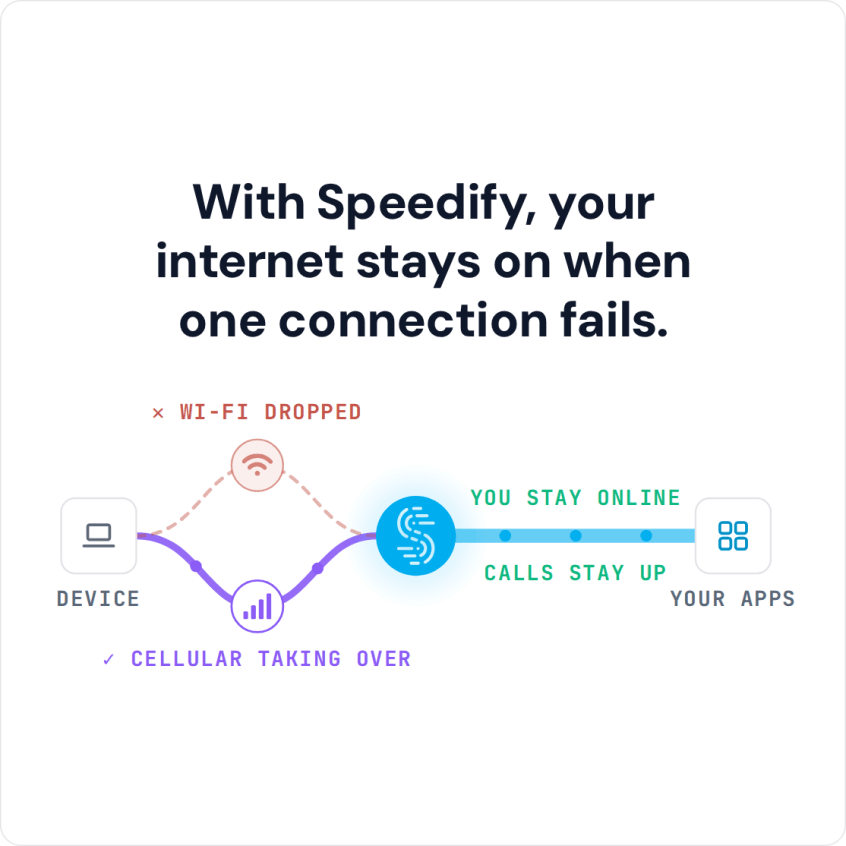
The short version: combining networks adds a detour through a Speedify server, a small cost on a healthy internet connection. The detour pays off during handovers, roams and obstructions, when a single connection stops delivering and the combined connection keeps sending. Speedify has not published a teleoperation measurement, so the diagram in this article is an illustration.
This article covers where teleoperation latency goes, what a handover does to video and why combining networks adds a hop. The article also shows how Speedify keeps latency low under load, and how robotaxis combine public 5G. Speedify is software that combines every network a machine can reach (Wi-Fi, 4G/5G cellular, Ethernet, Starlink and satellite) into one connection.
Where the Milliseconds Go in Robot Teleoperation Latency
Most of the latency sits before the network. Glass-to-glass latency runs from the camera lens to the operator’s screen, and the network is one stretch of the trip. The Transitive Robotics analysis measured remote WebRTC through a cloud relay. After the camera and the USB bus, encoding, decoding and the WebRTC stack took roughly 10 ms each. For scale: at 30 frames per second, one frame lasts 33 ms.
Teleoperation numbers deserve scrutiny. A team posted sub-40 ms teleoperation between San Francisco and London, and the replies asked the right questions. Is 40 ms the round trip or one way? Is the camera pipeline included? How were the clocks synchronized, given that a one-way ping between the two cities usually takes more than 60 ms? A useful latency figure states what is included and covers a whole shift, not a lab session.
What a Cell Handover Does to Teleoperation Video
A handover drops a burst of packets, and the video stack reads the burst as congestion. LTE handovers are break-before-make: the modem leaves one cell before attaching to the next. A clean handover interrupts data for tens of milliseconds. A handover after the radio has already lost the cell can take much longer.
Google Congestion Control, the congestion control in WebRTC, treats loss above 10% as congestion. The sender cuts the estimated bandwidth in proportion to the loss, then raises the estimate by only 5% per update while loss stays under 2%. RoboticsTomorrow describes teleoperation teams outgrowing browser-grade video stacks for this reason.
Why Speedify Adds a Server Hop, and What the Hop Costs
Speedify splits each stream packet by packet across every available internet connection. The stream therefore needs a point where the packets come back together. Packets from one video frame can arrive over two carriers at different times. A Speedify server puts the packets back in order before forwarding the stream, and gives the robot one stable address for every carrier.
The Speedify server waits for a late packet for twice the largest round trip among the active internet connections, recalculated every half second. One lost packet therefore cannot stall the combined connection indefinitely. Speedify can also order each flow separately, so teleoperation video never waits behind a retransmission on a log upload sharing the combined connection.
The extra hop adds the round-trip time between the robot’s carriers and the server, so server placement matters. A server near the teleoperation center keeps the detour short. On a single healthy internet connection, a direct path can still measure slightly lower latency than the combined connection. The payoff comes during a handover, a roam or an obstruction. The single connection stops delivering, while the combined connection keeps sending over the remaining connections.
How Speedify Keeps Teleoperation Latency Low Under Load
Speedify caps each send buffer at the bandwidth-delay product, which held latency under load at roughly 30 to 50 ms in testing. Left alone, the Linux kernel grows a send buffer as queuing delay rises. The larger buffer raises the measured delay, which grows the buffer again. Unchecked, tunnel latency under load passed 200 ms.
Speedify computes the cap from the delivery rate and the lowest round trip ever seen on the connection, recalculated every half second. The lowest round trip is the propagation delay with the queuing taken out. The cap costs a few percent of peak throughput.
How Speedify Switches Teleoperation Video Between Splitting and Duplicating
Speedify splits a stream across internet connections while every connection is stable, and duplicates the stream when a connection shows a loss or latency spike. Splitting maximizes throughput; duplicating maximizes delivery. Speedify’s Streaming Mode, the default in the Speedify app, makes the choice per stream at sub-second granularity. A duplicated stream goes out on every connection, and the Speedify server keeps the first copy to arrive. Bulk traffic keeps the split treatment in parallel.
Duplication has a price. While a stream is duplicated, the stream’s throughput is limited to a single internet connection, and every copy counts against the cellular plan. For a few seconds of real-time video during a handover, the trade is usually worth making. On a robot, the robot’s own software decides which traffic gets real-time treatment.
How Speedify Uses a Slower Carrier and Copes With Jitter and Loss
Speedify uses a slower carrier exactly as far as the slower carrier helps. In testing, a 100 Mbps internet connection plus a 20 Mbps connection delivered the full 114.3 Mbps sum over TCP. With a 100 Mbps connection plus a 5 Mbps connection, Speedify left the slow connection unused. A packet on the slow connection would arrive late enough to hold up the packets behind the late packet.
Combining also has limits worth knowing. In Speedify’s test matrix of emulated internet connections, two combined internet connections kept 2.07 times the throughput of one connection with 50 ms of jitter. With 1% packet loss, the pair kept 2.00 times. At 8% loss the result fell to 1.09 times, because head-of-line blocking on the TCP carrier dominates.
Robotaxis and Delivery Vehicles: Combining Public 5G in the Cloud
Vehicles combine public 5G from more than one carrier plus depot Wi-Fi at a Speedify Dedicated Server in the cloud. Vehicles that cross a city change cells constantly, and no single carrier is strongest along a whole route. A Dedicated Server is a private instance reserved for one organization. The instance has a static IPv4 address, up to 1 Gbps of throughput and 3 TB of monthly bandwidth.
A cloud server suits vehicles for three reasons. Every carrier can reach a public cloud address. A Dedicated Server in the region of the teleoperation center keeps the hop short. And a dedicated instance avoids the variability of shared infrastructure for real-time traffic. Depot Wi-Fi takes the bulk upload when the vehicle returns.
Speedify picks the server in two steps. Load and distance narrow the candidates cheaply. Speedify then measures the round trip to each remaining candidate from every internet connection and ranks each candidate on the slowest connection. A server fast from one carrier and slow from another is the wrong choice for a combined connection.
Why the Remote Operator’s Console Needs More Than One Internet Connection
The operator’s end of the session is a single point of failure too. Teams spend months on the robot’s connectivity and forget the operator. A remote operator on one office connection or one home broadband line can drop the session from the other end. The Speedify app runs on a teleoperation console, on Windows, macOS, Linux, iOS and Android, and combines the console’s internet connections the same way.
Failover Routers Move a Session; Speedify Keeps the Session
Multi-WAN and SD-WAN routers generally pin each session to one internet connection. When the connection fails, the router moves the session to another connection. The move usually means a new source address and a reset session. The video reconnects, the control channel renegotiates, and the operator loses a few seconds at the worst moment. Speedify combines internet connections at the packet level, so one session uses every healthy connection at once. A failing connection removes capacity instead of ending the session.
Some hardware reports a loss promptly, such as a modem that reports losing carrier. On that hardware, Speedify also resends the packets already committed to the lost internet connection. The resent packets go over the remaining connections under the original sequence numbers, so each packet fills the gap the packet left. In testing, the resend, together with a loss notice sent to the server, shortened a call’s audio break across a cable pull. The break fell from about 370 ms to the length of the reorder timeout.
Robotaxis tend to need remote assistance in unusual places: a construction zone, an underpass, the edge of a service area. A pilot on your own robots and routes shows the difference across a full shift. Speedify for physical AI covers the deployment options. Contact Us to book a demo with the Speedify team or to plan a pilot on your own hardware.
Speedify Business Solutions
Speedify Teams
Speedify for Routers

Speedify Embedded Solutions and Integrations
Add Speedify to your own app or hardware with the Speedify SDK. Your product then combines internet connections, fails over automatically when one drops, and encrypts the traffic, using the same technology as the Speedify app.