
Private 5G and Wi-Fi for Warehouse Robots, Combined Instead of Chosen
Private 5G and Wi-Fi for warehouse robots work best combined, not chosen. An autonomous mobile robot (AMR) crosses dozens of Wi-Fi access points per shift. Without 802.11r, each handover can mean a full 802.1X re-authentication lasting hundreds of milliseconds. The delay is long enough to miss heartbeats and show the robot as offline on the fleet manager. Private 5G moves the handover decision to the network, which suits moving devices better. A private 5G network is still one network, with one coverage plan.
If your AMRs appear offline in the same aisles every shift, your site is not an exception. Wi-Fi vendors such as 7SIGNAL publish guidance written specifically for AMR roaming.
The short version: treat private 5G as one more path, not the only path. Combined with facility Wi-Fi and a public carrier, every robot keeps one address through every roam and gets the capacity of all three networks.
This article explains how Wi-Fi roaming works and what private 5G changes. The article also shows how Speedify combines private 5G, Wi-Fi and public cellular into one connection on premises. Speedify is software that combines every network a machine can reach (Wi-Fi, 4G/5G cellular, Ethernet, Starlink and satellite) into one connection.
How Wi-Fi Roaming Works for Autonomous Mobile Robots
A Wi-Fi client roams in four steps: notice the signal falling, scan for other access points, pick the best candidate, and authenticate. Each step costs time. Three standards shorten the steps. 802.11k gives the client a list of neighboring access points, so the scan is short. 802.11v lets the network suggest a better access point. 802.11r lets the client skip most of the authentication. According to 7SIGNAL, robot makers often ship single-antenna radios with conservative roaming logic, and support for 802.11k, v and r varies.
Access point settings matter as much as the client. A common design practice for mobile clients is lower access point transmit power, not higher. A client stays attached as long as any signal gets through, so a weaker signal from the previous access point moves the robot on sooner. Steel shelving, freezers and loaded pallets absorb and reflect the signal. Automate.org points out that a robot depends on wireless connectivity for every route calculation, task assignment and status update.
Why a Wi-Fi Roam Makes a Robot Look Offline
The fleet manager knows nothing about roams, only about heartbeats. A robot that stays on a fading access point, then spends half a second re-authenticating, misses a few heartbeats. Depending on the timeout, the fleet manager marks the robot offline, pauses the robot or reassigns the task. A robot that fails over to a cellular modem instead gets a new IP address. Every open TCP connection resets, and the fleet manager sees a new session from what looks like a new device.
What Private 5G Is, and What Private 5G Changes for Warehouse Robots
A private 5G network is a cellular network for one site. The site or a partner runs the network on licensed or shared spectrum (CBRS in the United States). The key difference for robots: in a cellular network, the network decides when a device hands over, based on signal reports from the device. Handover is a core part of the design instead of an add-on. The site also controls which devices join the network.
The trade-off is a new network with a new coverage map. Coverage has to be planned around racking, mezzanines, cold rooms and the yard outside. Each robot needs one more radio to buy, mount and power.
Private 5G vs Wi-Fi vs a Public Carrier for Warehouse Robots
Each network is good at something different:
- Facility Wi-Fi is already installed and carries large uploads cheaply at the dock. Wi-Fi is least predictable during handovers and behind racking.
- Private 5G handles movement across the floor better, and is only as good as the coverage plan.
- A public carrier covers the yard, the trailers and the corners nobody planned for, and costs money per gigabyte.
Each network has a blind spot, and the blind spots sit in different places. A robot able to use all three never depends on a single blind spot.
How to Combine Private 5G and Wi-Fi With an On-Premises Server
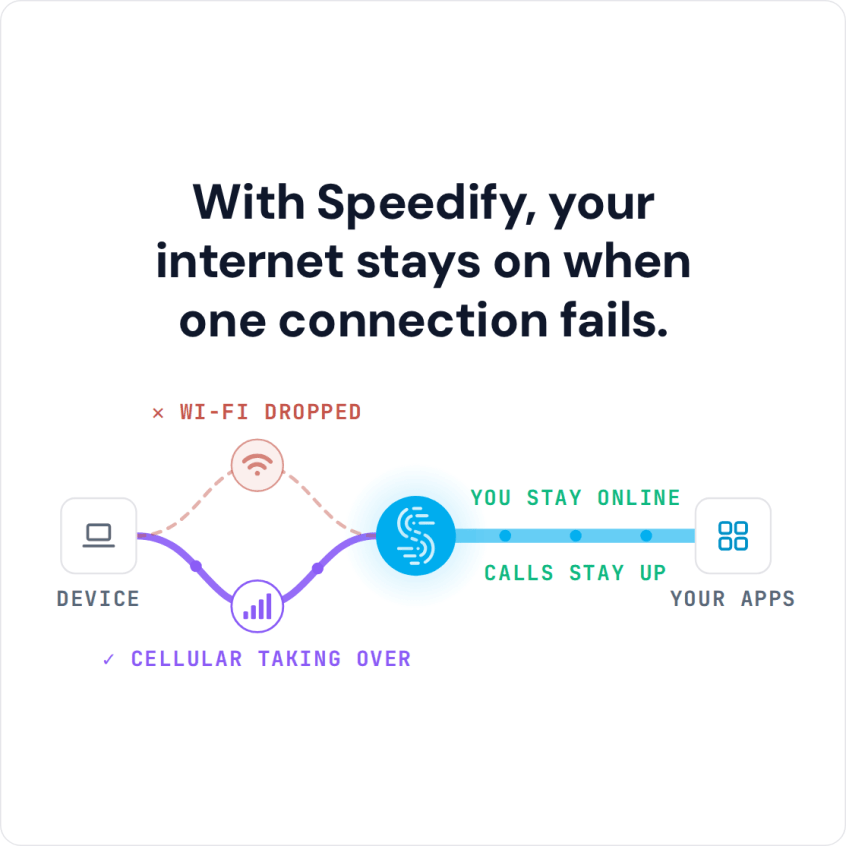
Run private 5G and facility Wi-Fi together on every AMR, and add a public carrier for the yard. Combine the internet connections at a Speedify Self-Hosted Server inside the facility. Speedify treats private 5G as one more IP connection. Each AMR splits traffic packet by packet across the connections, and the Self-Hosted Server reassembles the traffic next to the fleet manager.
Three engineering reasons favor an on-premises server in a warehouse. First, the extra hop through the Speedify server stays inside the building. The hop adds the latency of the local network, not a round trip to a cloud region. Second, Self-Hosted Server traffic has no Speedify bandwidth cap, which matters when dozens of AMRs upload sensor logs at the dock. Third, the reassembled traffic stays in your own infrastructure. Speedify works on the WAN side, so OT and IT separation and private 5G slices stay as designed.
Combining also adds bandwidth. Every internet connection carries traffic at the same time, so private 5G capacity and Wi-Fi capacity add up. Neither network waits idle as a failover path, which matters when many robots share a facility’s spectrum.
Speedify admits a new radio only after the radio reaches the Speedify server over the radio’s own path. Discovery is generous and qualification is strict: silently dropping a real internet connection would cost more than probing a dud. When an interface loses carrier, Speedify retracts the connection within milliseconds and adds the connection back when carrier returns.
Each robot keeps one tunnel to the Speedify server. The robot never re-authenticates or re-registers with the fleet manager when the robot changes access points or networks.
By default, the fleet’s services see traffic from the Speedify server’s address. On a Self-Hosted Server, Speedify can instead skip the server’s address translation and hand each robot’s traffic to the site’s firewall with the robot’s own address. Existing logging and access rules then see each robot separately, not every robot behind one shared address.
When a robot picks a server automatically, Speedify ranks a Self-Hosted Server first, a Dedicated Server second and the shared Speedify servers last. Latency and load count only within each group. Robots in a facility with an on-premises server therefore stay on that server, even when a public server measures a millisecond faster.
Speedify does not change how Wi-Fi roams. Each AMR needs a second radio for Speedify to have a second internet connection. During a change of connection, traffic can slow briefly while packets move.
How to Size a Speedify Server for a Warehouse Robot Fleet
Size the server by robots, not by radios. A robot combining three radios is one session on the Speedify server, and adding a fourth radio costs the server nothing in session capacity. A robot behind an onboard router is one session for everything behind the router.
Speedify runs one small process per robot session on the server. In testing, an idle session used 356 kB of private memory. A thousand concurrent idle sessions used about a quarter of the CPU of a four-core server with 16 GB of memory. Throughput per core at that density depends on the traffic, so a pilot measures throughput on your own fleet.
What to Measure Before Adding a Second Radio to Your AMRs
- Where robots go offline today, plotted against the access point map.
- Which of 802.11k, v and r the robot radios support, and which the network has enabled.
- Room, power and antenna placement for a second radio on each robot model.
- Public carrier signal inside the building, which is often far lower than outside.
- Server placement: a Speedify Self-Hosted Server on premises, or a Speedify Dedicated Server in the cloud for sites without on-premises compute.
Those measurements fit a short engineering conversation and a pilot on a handful of robots in the aisles where the offline events cluster today. Speedify for physical AI explains how the pieces fit for AMR fleets. Contact Us to book a demo with the Speedify team or to plan a pilot on your own hardware.
Speedify Business Solutions
Speedify Teams
Speedify for Routers

Speedify Embedded Solutions and Integrations
Add Speedify to your own app or hardware with the Speedify SDK. Your product then combines internet connections, fails over automatically when one drops, and encrypts the traffic, using the same technology as the Speedify app.