
Unbreakable VPN Connection for Captive Portals by Combining Starlink, Wi-Fi, 4G, 5G, and DSL with Speedify
Captive Portal Login is not something you installed. It is a small component built into Android that opens the sign-in page when you join a Wi-Fi network that asks for one. It shows up in your app list because it technically is an app, which is why it appears without you ever downloading it, and it cannot be removed.
Before that hotel or campus network lets you online, it asks for an email address, a room number, or a tick on a terms page. Handing those over on an open hotspot is the part nobody mentions, because the sign-in page itself does nothing to secure your internet connection.
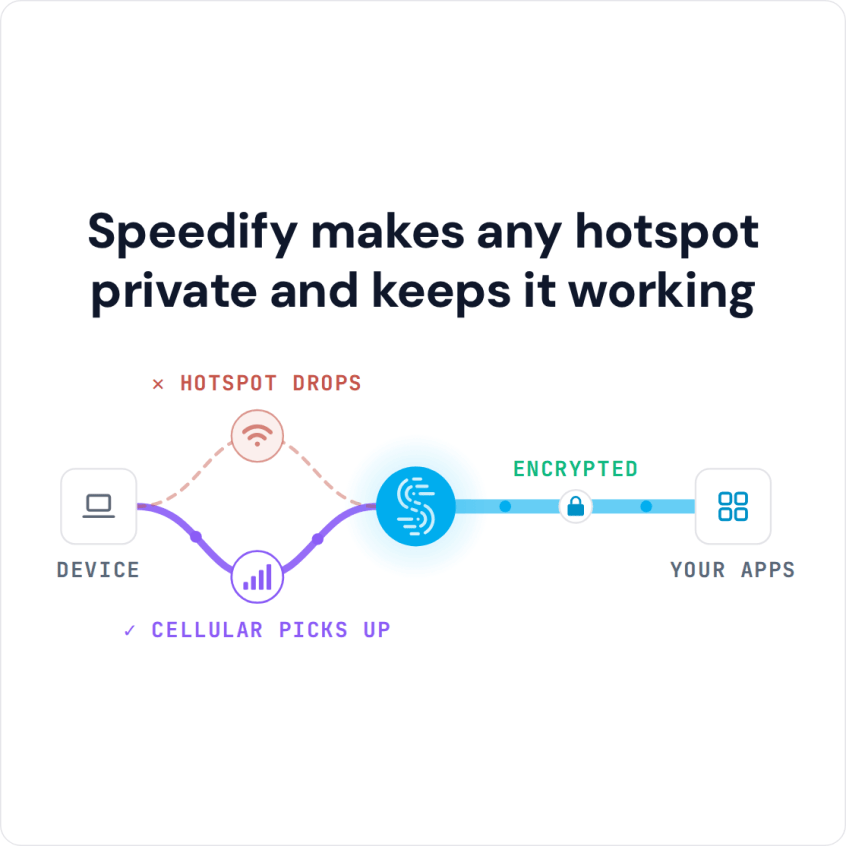
Speedify makes any hotspot private and keeps it working
Speedify encrypts everything you send after you sign in, and it carries that traffic over the Wi-Fi and your phone’s 4G/5G cellular connection together. The speed and failover gains need both connections; on the hotspot Wi-Fi alone, Speedify works as an encrypted VPN and can be a little slower.
Keep reading for what these sign-in pages do and do not protect, plus how using Speedify keeps the rest of your session private and your internet connection from dropping mid-task.
Captive Portal Login App Safety: The App Is Safe, the Hotspot Is Not
The Captive Portal Login app is safe. It ships with Android itself, it has one job, and that job is to show you the sign-in page a network is demanding. It is not spyware, it did not arrive with anything you downloaded, and removing it would only stop you signing in to public Wi-Fi.
What is worth worrying about is the network on the other side of that page. A captive portal is almost always an open hotspot: the Wi-Fi itself is not encrypted, so others on it can see which sites you reach and read anything not protected by HTTPS, before and after you sign in. The sign-in form itself often asks for an email address or a room number. The app is safe. The hotspot is the part that is not.
Speedify encrypts everything leaving your phone on that network, and carries it over the Wi-Fi and your 4G/5G cellular connection at the same time, so the hotspot cannot read it and a weak signal cannot strand you halfway through.
What the Captive Portal Login App Looks Like on Android
You join a Wi-Fi network and Android posts a notification reading “Sign in to Wi-Fi network”. The network shows as connected but carries a warning that there is no internet access. Tapping the notification opens Captive Portal Login, which loads the network’s sign-in page in a stripped-down browser window instead of in Chrome.
Android works out that a sign-in page exists by making a small test request the moment it joins a network. A network with nothing in the way answers with an empty reply. A network with a portal answers with a redirect instead, and that redirect is what triggers the notification.
Swipe the notification away and Android leaves the Wi-Fi connected but treats it as broken, sending your traffic over 4G/5G cellular instead. That is why a phone can sit on cafe Wi-Fi all afternoon while quietly spending your cellular data allowance. To bring the page back, open your Wi-Fi settings and tap the network name again.
Why the Sign-In Page Does Not Open on Android
Three things stop the page appearing, and two of them are Android settings you may not know are on. Menu names vary between Android versions and manufacturers, so the wording on your phone may differ slightly.
- Private DNS. A captive portal works by intercepting your name lookups and answering with its own page. If Private DNS is set to a specific provider rather than Automatic, those lookups are encrypted to that provider and the portal cannot redirect them, so nothing appears. Set Private DNS back to Automatic while you sign in.
- Randomized MAC address. Android gives each network a different hardware address by default. A venue that recognized you yesterday sees a new device today and makes you sign in again. If you use one network often, open its settings and switch it to use the device MAC instead.
- A VPN that was already running. Most VPNs swallow the test request and the sign-in page with it. This is the point at which people turn their VPN off on exactly the networks where they need it most, which is an open hotspot run by strangers.
Speedify handles that last one differently. Speedify keeps your 4G/5G cellular connection carrying your traffic while the sign-in page is open, shows you the page rather than blocking it, and moves traffic onto the Wi-Fi once you are through. With cellular on, you stay online while you sign in, and you never have to choose between reading the page and staying encrypted.
Captive Portal Login Keeps Stopping on Android: What to Try
If Android reports that Captive Portal Login keeps stopping, restart the phone first. Then update Android System WebView from Google Play, because the sign-in window is built on it, and install any pending system update. If it still crashes, forget the Wi-Fi network, join it again, and open a website that starts with http:// (not https) in your browser; most portals then redirect you to the sign-in page there.
Why Networks Put a Sign-In Page in Front of You
The sign-in page is there for whoever runs the network, not for you. Network operators use it to:
- Manage the bandwidth, session length and number of users on the Wi-Fi network.
- Keep unauthorized users off the network, so the people allowed on it get a usable connection.
- Log who has used the network, so the operator can block or remove suspicious users.
The goal is that a few heavy users cannot hog the Wi-Fi and slow it down for everyone else.
How Captive Portals Hijack DNS and Break VPNs
Wi-Fi networks with captive portals (the “Before we let you connect, you have to agree to our terms of use” pages) block normal internet access until you sign in, and they hijack your DNS requests to point them at their own sign-in web server. As a result, they mess with your browser tabs, confuse update managers, and may require you to turn off DNSSEC and VPNs.
Open networks carry their own risks. Attackers can gain backdoor entry to the network and use it to steal personal information, along with other malicious acts.
Three attacks come up again and again on public Wi-Fi. In a man-in-the-middle attack, someone places a device between you and the website and reads what passes through. In snooping, someone nearby captures Wi-Fi traffic with packet-capture software without sitting in the middle. And with a fake hotspot, an attacker sets up a network named like the cafe or airport, so people connect to it and send their traffic straight through the attacker’s equipment.
Security researcher Jayson Street has said that walking around with the right device can be enough to get into someone’s device on public Wi-Fi. So keep a VPN on whenever you use public internet, including while you connect through the captive portal login page. Many VPN apps have trouble with that login page; see how to fix CyberGhost connection problems.
How to Stay Safe on Captive Portal Wi-Fi
Four habits cut most of the risk on a hotspot with a sign-in page. Turn off auto-connect for open Wi-Fi networks, so your phone does not join a fake hotspot by itself. Use only sites that start with https and show the lock in the address bar. Log out of your accounts when you are done. And keep a VPN on, which is exactly where most VPNs struggle at the sign-in page.
How Speedify Gets You Through the Sign-In Page Safely
With most VPNs, you have to disconnect the VPN to reach a captive portal login page. Speedify combines internet connections, and on a captive portal it works like this:
- Speedify shows you a notification asking if you want to log in
- Other apps, such as Skype or Slack calls, keep working over your other active connections, for example 4G/5G cellular on your smartphone
- If you click the notification (or the message in the app), Speedify opens the login screen in a window.
- When you log in successfully, Speedify immediately starts using the Wi-Fi.
Speedify combines Wi-Fi, 4G/5G cellular, Ethernet, Starlink and satellite internet connections into one encrypted connection. Behind those steps, here is what happens to your traffic on a captive portal:
- when it detects a captive portal, it automatically moves the traffic to and from the captive portal login page outside of the encrypted VPN tunnel
- once you successfully log onto the network, Speedify moves that direct traffic back to the VPN tunnel
- you can always use the split tunneling feature (Bypass) for specific services, which sends traffic to and from those services outside Speedify’s encrypted tunnel.
Speedify gets you through captive portal login pages without switching your encryption off, and keeps you online by combining multiple Internet connections at once.
Speedify
Get started with Speedify today.
Speedify combines Wi-Fi, 4G/5G cellular, Ethernet, Starlink and satellite into one faster, more reliable internet connection. Free to try: 5 GB a month with a free account. No credit card required.
🚀 Speed
Faster uploads and downloads, because Speedify uses all your internet connections at once.
📶 Stability
If one internet connection drops, Speedify moves your traffic to the others in milliseconds.
🔒 Security
AES-256 encryption on every internet connection, on any network you join.



15M+ downloads worldwide. 75K+ five-star reviews on iOS and Android.