
Unblock VPNs where Restricted and Access Your Favorite Websites and Services
The VPN you already pay for works at home and fails the moment you join a work, campus or hotel network. You are not the only one: some networks, and some countries, filter VPN traffic on purpose.
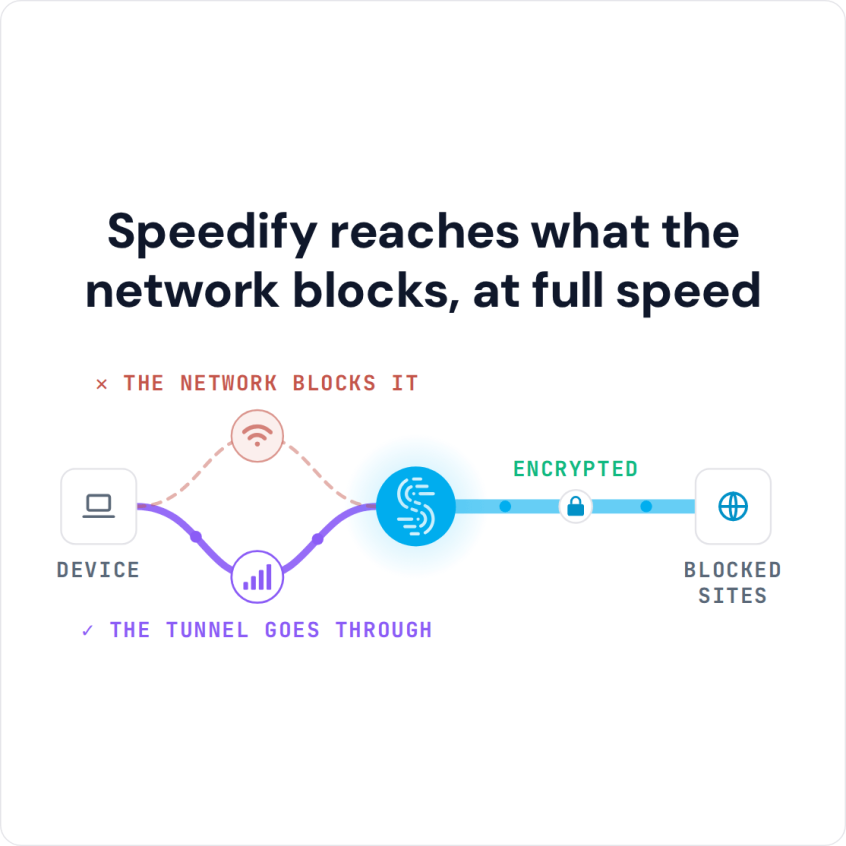
Speedify is an app that encrypts your internet traffic like a VPN and, unlike a regular VPN that uses a single path, runs over Wi-Fi, 4G/5G cellular, Ethernet, Starlink and satellite internet connections at once. If one internet connection is filtered, another (a phone’s 5G, for example) is already carrying your traffic. This post covers why networks block VPNs, other ways around a block, and how Speedify keeps you online and private. No tool can guarantee access on every network.
Speedify reaches what the network blocks, at full speed
How to Get Online with Speedify When a Network Blocks Your VPN
- Download Speedify on the phone or computer you use on the restricted network (Windows, macOS, iOS, Android and Linux).
- Open Speedify and create a free account (the free tier includes 5 GB per month), or sign in.
- On a phone, tap Allow when your phone asks to add a VPN configuration.
- Speedify connects to a Speedify server automatically. The network now sees only an encrypted connection to that server, not the apps and sites you open.
- On a phone, keep 4G/5G cellular turned on next to the Wi-Fi. If the Wi-Fi blocks Speedify, your traffic keeps moving over cellular.
Why Governments and Networks Block VPNs and Websites
Over sixty percent of internet users live in countries where criticism of the government or military is subject to censorship.
Government agencies have several tools to implement restrictions. A common one is reading and blocking DNS requests, which stops a website’s name from resolving. Encrypted DNS (DNS over TLS or HTTPS), backed by companies like Cloudflare, Mozilla and Google, makes those requests harder to intercept.
Work, school and hotel networks block VPNs for their own reasons: a VPN hides traffic from the network’s content filter, so the network blocks the addresses and connection types that VPN apps use.
A VPN is the most common way around these blocks. A VPN encrypts your Internet activity, so anyone listening in sees only scrambled data: not what you are doing, and not even which sites you visit.
Think of a VPN as a mask: the sites you visit see the VPN server’s IP address instead of yours.
Four Ways to Get Online When a Network Blocks Your VPN
Network admins and censors keep updating their blocks, but you still have options when a VPN stops working:
- Use proxy websites. If your network blocks VPNs and you need to get online, a proxy website can help. Hundreds of proxy websites load the blocked site for you, so the network sees only the proxy’s address and not the blocked site.
- Use IP Rather Than URL! Every website has an IP address, its identifier on the Internet. When a network admin blocks a site by name, the site’s IP address is sometimes left open.
All you need to do is type “ping example.com” (with the blocked site’s name in place of example.com) in a command prompt or terminal and press Enter. You get the site’s IP address, which you can paste into your web browser. This trick fails on many sites, because most large sites share IP addresses with other sites and only load when you use their name. - Change your DNS. DNS is like the phone directory of the internet: it matches an easy to remember name like speedify.com or google.com with the IP address behind it. Google and CloudFlare offer free DNS services, and switching to one of them gets past blocks that work only through the network’s own DNS.
- Try other VPNs and test before buying. In some places VPN use is blocked almost completely, and most VPN services make you pay before you can test them. Speedify has a free tier with 5 GB per month on a free account, so you can check whether Speedify works on your network before you pay. Speedify encrypts your traffic and combines your internet connections for faster downloads and uploads.
Why Speedify Keeps You Online and Private on Filtered Networks
Speedify encrypts your traffic and sends it through a Speedify server, which helps with unblocking websites that a local network filters. Speedify was designed to give you the security of a VPN without giving up speed. Your traffic is safe from prying eyes and protected on compromised Wi-Fi networks, and a network filter that blocks Facebook or other sites no longer sees which sites you open.
Get started with Speedify today for FREE. The free tier includes 5 GB per month with a free Speedify account, and Speedify keeps no record of the sites you visit.
Speedify
Get started with Speedify today.
Combine Wi-Fi, 4G/5G cellular, Ethernet, Starlink, and more into one faster, steadier connection. Free to try — no credit card required.
🚀 Speed
Faster uploads and downloads by bonding all your connections at once.
📶 Stability
Automatic failover in under a second when any connection drops.
🔒 Security
AES-256 encryption on every connection, on every network you join.



15M+ downloads worldwide. 75K+ five-star reviews on iOS and Android.