
Unbreakable VPN Connection for Public Wi-Fi by Combining Starlink, Wi-Fi, 4G, 5G, and DSL with Speedify
Yes, using a VPN on public Wi-Fi protects you from the people around you: the VPN encrypts your internet traffic, so anyone else on the hotspot who intercepts it sees nothing usable, not the password you type and not the pages you open. Without a VPN, one session on an open hotspot is enough for someone on that network to capture a password.
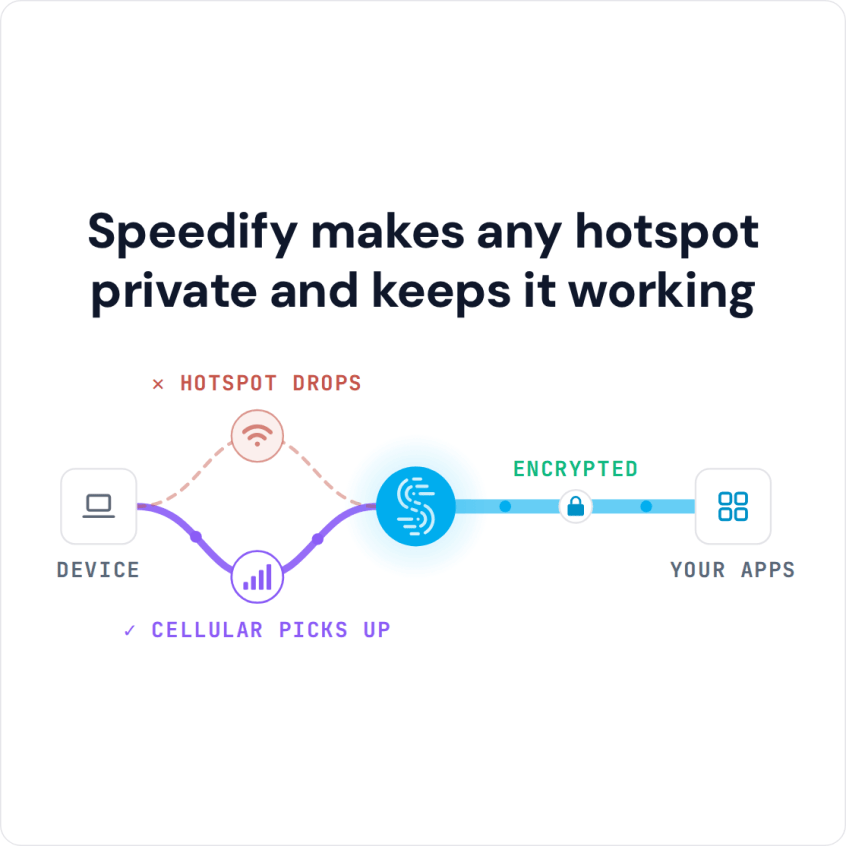
Speedify is an app that combines Wi-Fi, 4G/5G cellular, Ethernet, Starlink and satellite internet connections into one faster, more reliable connection, and encrypts your traffic like a VPN. On public Wi-Fi, Speedify can use the hotspot and your phone’s 4G/5G cellular at the same time, so the VPN stays up when the hotspot drops. That needs two or more internet connections; on public Wi-Fi alone, Speedify works as an encrypted VPN and can be a little slower.
Speedify makes any hotspot private and keeps it working
Below: why you should use a VPN on public Wi-Fi, what the VPN encrypts and what it does not, and how Speedify keeps the encrypted connection up when the hotspot drops.
How to Set Up Speedify Before You Join Public Wi-Fi
- Download Speedify on the phone or laptop you take out with you (Windows, macOS, iOS, Android and Linux).
- Open Speedify and create a free account (the free tier includes 5 GB per month; Linux needs a paid plan), or sign in.
- On a phone, tap Allow (iPhone) or OK (Android) when your phone asks to add a VPN connection.
- Join the public Wi-Fi. If the network has a sign-in page, Speedify shows a notification; open it and sign in without disconnecting Speedify.
- Keep 4G/5G cellular turned on too. Speedify connects to a Speedify server automatically, encrypts your traffic, and moves it to cellular if the Wi-Fi drops (this counts against your cellular data plan).
Why You Should Use a VPN on Public Wi-Fi
Businesses and public places offer free Wi-Fi to attract customers or as a public service. The people who run public Wi-Fi are rarely IT or security professionals, so public Wi-Fi security is not their focus. Owners of free Wi-Fi hotspots often fail to:
- Secure Wi-Fi access. Something as simple as a password to join the hotspot, or a sign-in page before going online, makes the network harder to abuse.
- Update the firmware on routers and other networking equipment.
- Have security compliant (or at least harder to guess) admin usernames and passwords
- Periodically check to see if the networks have been compromised
Public Wi-Fi networks are attractive targets for hackers: they are usually easy to compromise, and so many people use them that there is always a new target.
Unfortunately, public Wi-Fi networks are not just convenient for you. They are also convenient for cyber criminals, who can snoop on traffic that is not encrypted and capture social media logins, credit card numbers and email passwords.
How Secure a VPN Is on Public Wi-Fi: Encryption Between Your Device and the Server
In practice, a VPN is your safest bet on public Wi-Fi. The VPN encrypts everything between your device and the VPN server, so the hotspot owner and anyone else on the network cannot read it. When you are traveling to work or on vacation, public Wi-Fi is hard to avoid, so that protection matters.
A VPN does not protect you from everything, though. Your traffic is decrypted at the VPN server before it goes on to the internet, so a VPN cannot make an unsafe website safe, stop a phishing page from asking for your password, or remove malware you download. Keep using https sites, strong passwords and care with links.
However, not all VPNs are the same in terms of security and performance, so it helps to know how to choose the right VPN for public Wi-Fi. A common problem is that a VPN can slow down your web browsing, because all your traffic has to pass through the VPN server first.
Some VPN services also stay disconnected after your Internet connection drops and comes back, for example while roaming between hotspots or when connecting to a bad Wi-Fi hotspot, and VPNs without kill switches let your apps keep sending unencrypted traffic in the meantime.
How Speedify Keeps Public Wi-Fi Secure and the Connection Up
Speedify handles both security and slow speed concerns: it encrypts your traffic, and its technology for combining internet connections lets it use all available Internet connections simultaneously, such as hotel Wi-Fi and your phone’s 4G/5G cellular.
A common reason a VPN will not connect on public Wi-Fi is the hotspot’s sign-in page: until you sign in, the network blocks other traffic, including the VPN.
Speedify also works on Wi-Fi networks that run captive portals, the sign-in pages of hotels, cafés and airports. Speedify detects the sign-in page and shows a notification, so you can sign in without disconnecting from Speedify and being left unprotected. If the sign-in page does not appear, open an http:// (not https) website to bring it up. Speedify also keeps your browsing away from the prying eyes of hackers, internet providers and the hosts of the network.
On a phone, the Speedify mobile app (6.1 or later) also has an Internet Kill Switch under Settings > Privacy: while Speedify is disconnected, the phone’s internet traffic is blocked, so nothing goes out unencrypted over the hotspot.
The next time you are away from home, connect to public Wi-Fi through Speedify, a VPN that combines internet connections, and use hotel, café and airport networks for work or fun without putting your logins at risk. The free tier includes 5 GB per month with a free Speedify account.
Speedify
Get started with Speedify today.
Speedify combines Wi-Fi, 4G/5G cellular, Ethernet, Starlink and satellite into one faster, more reliable internet connection. Free to try: 5 GB a month with a free account. No credit card required.
🚀 Speed
Faster uploads and downloads, because Speedify uses all your internet connections at once.
📶 Stability
If one internet connection drops, Speedify moves your traffic to the others in milliseconds.
🔒 Security
AES-256 encryption on every internet connection, on any network you join.



15M+ downloads worldwide. 75K+ five-star reviews on iOS and Android.