
5G Home Internet Keeps Dropping? How to Stabilize It
When 5G home internet keeps dropping out, the cause is usually a congested tower, a weak signal or carrier throttling. To stay online anyway, run your 5G home internet alongside a second internet connection at the same time.
Speedify is an app that combines two or more internet connections at once, such as 5G home internet and a phone’s 4G/5G cellular or a wired line, so you get steadier downloads and uploads and stay online if one connection drops out.
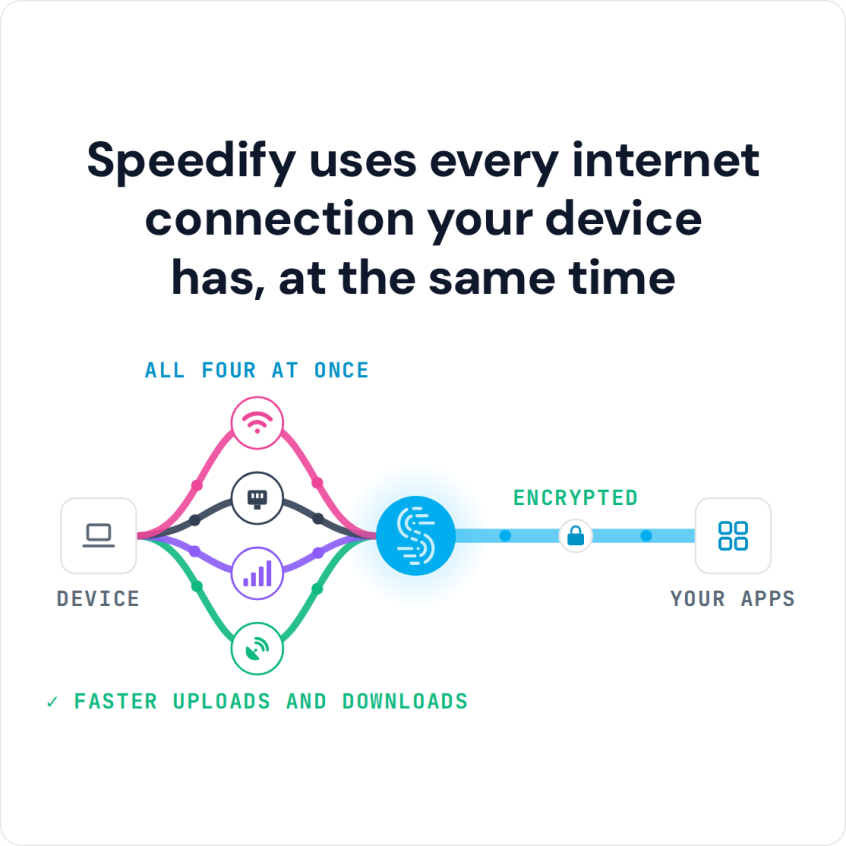
Speedify uses every internet connection your device has, at the same time
How do I use WiFi and 4G/5G cellular at the same time with Speedify?

Pick your two internet connections and your device below and we'll take you to the step-by-step setup guide.


Why 5G Home Internet Keeps Dropping Out: Tower Load, Signal and Throttling
- Tower congestion. Fixed-wireless 5G shares capacity with every phone and hotspot on the same tower, and evening peak hours push that shared capacity to its limit.
- Signal attenuation. Distance from the tower, weather, and obstructions between a home and the nearest mast weaken the signal enough to cause drops.
- Carrier throttling. Some fixed-wireless plans deprioritize data after a threshold, quietly slowing a connection during the exact hours it gets used most.
Add a Second Internet Connection to Stabilize 5G Home Internet
A single 5G connection, however strong, still has exactly one point of failure: whatever happens to that tower happens to the whole household. Adding a second internet connection (a cable line, a different carrier’s 4G/5G cellular, or a Wi-Fi hotspot from a nearby location) gives your home a failover path.
Speedify combines that second internet connection with the 5G line instead of switching to it only after the first one fails, which is the difference between a brief hiccup and a call that actually drops.
How Speedify Combines 5G Home Internet with a Second Internet Connection
Speedify runs on the router or on individual devices, splitting traffic across the 5G connection and the second internet connection, then reassembling it on a Speedify server. When the 5G tower gets congested and packets start arriving late or not at all, Speedify shifts more of the load to the healthier connection automatically.
Speedify’s Streaming Mode specifically protects video traffic during this process, prioritizing the packets that keep a stream or a call smooth over less time-sensitive background traffic.
Internet Failover with Speedify Keeps Work Calls Running When 5G Drops
When one of the two combined connections drops entirely rather than just slowing down, Speedify moves all active traffic to the remaining connection, usually before anyone on the call notices a pause. Failover matters most during a scheduled work call or a live stream, where a ten-second outage is the difference between a smooth meeting and an awkward reconnection. Some of what looks like a dropped connection is actually data deprioritization by the carrier rather than a true outage, and a second internet connection routes around that slowdown just as it routes around a real drop.
Setting Up Speedify for 5G Home Internet, and What to Expect
To combine 5G home internet with a second internet connection:
- Position the 5G receiver or router near a window with the clearest line of sight to the tower.
- Download Speedify on the router or on the devices that need the most stability.
- Connect a second internet connection: a second SIM, a different carrier’s hotspot, or a wired line.
- Run a speed test with Speedify connected to confirm both connections are contributing.
Combining connections has a real limit: it needs at least two working connections, and Speedify cannot add bandwidth that neither connection has. A home with one weak 5G signal and nothing else to pair it with will still see that weak signal.
5G Home Internet Stability: FAQ
Why does 5G home internet slow down every evening?
Evening is peak time: the tower shares its capacity with every phone and hotspot nearby, so each home gets less. Speedify combines the 5G connection with a second internet connection, so congestion on one tower does not decide the whole household’s experience.
Can Speedify run directly on a home router?
Speedify runs on compatible routers as well as on Windows, macOS, Linux, iOS and Android devices, so you can combine connections for the whole home or only on the devices that need it most.
Does Speedify help if the second connection is much slower than the 5G line?
Speedify still combines both connections, using the faster one for the bulk of traffic while the slower one adds capacity and a failover path.
What happens the moment the 5G connection drops completely?
Speedify moves all active traffic to the remaining connection, so calls and streams continue instead of stalling out.
Speedify
Get started with Speedify today.
Speedify combines Wi-Fi, 4G/5G cellular, Ethernet, Starlink and satellite into one faster, more reliable internet connection. Free to try: 5 GB a month with a free account. No credit card required.
🚀 Speed
Faster uploads and downloads, because Speedify uses all your internet connections at once.
📶 Stability
If one internet connection drops, Speedify moves your traffic to the others in milliseconds.
🔒 Security
AES-256 encryption on every internet connection, on any network you join.



15M+ downloads worldwide. 75K+ five-star reviews on iOS and Android.