
Full bars but slow mobile data usually means data deprioritization: a traffic-management rule every major carrier uses to serve higher-priority customers first when a cell tower gets crowded, so speeds crawl in busy places even on an unlimited plan.
Speedify is an app that combines Wi-Fi, 4G/5G cellular, Ethernet, Starlink and satellite internet connections at the same time, for example your phone’s 4G/5G cellular plus Wi-Fi, so traffic keeps moving when one network slows down. You are not the only one seeing full bars and slow data: here is what data deprioritization is and how to get around it.
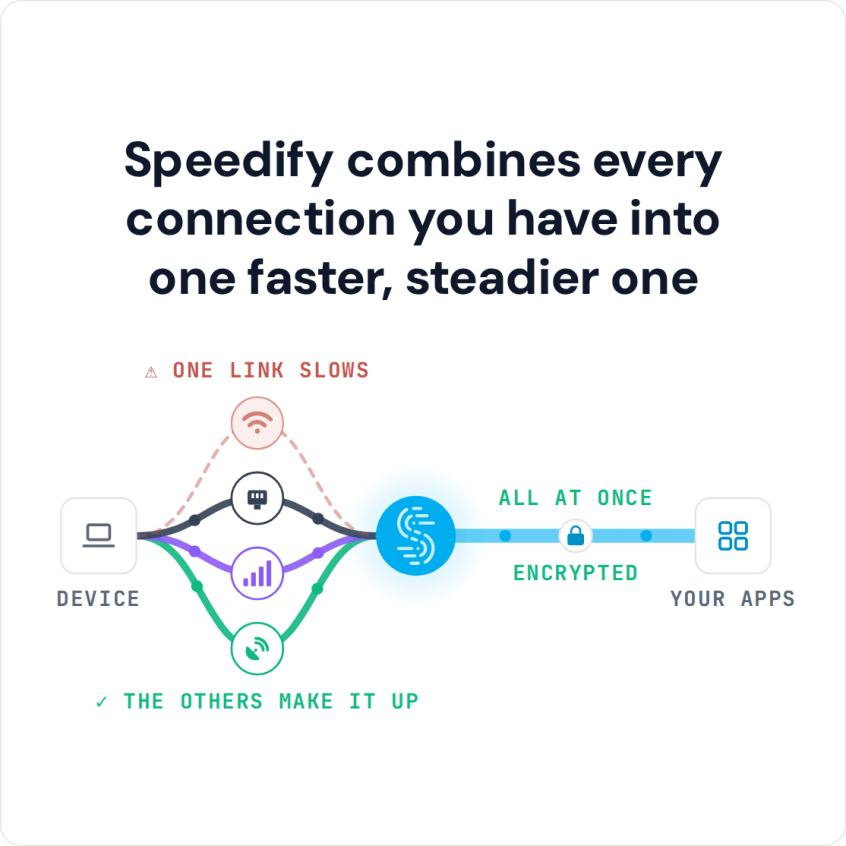
Speedify combines every connection you have into one faster, steadier one
How do I use WiFi and 4G/5G cellular at the same time with Speedify?

Pick your two internet connections and your device below and we'll take you to the step-by-step setup guide.


What Data Deprioritization Is
A cell tower has a fixed amount of capacity. When more people want data than the tower can serve at once, the carrier decides whose traffic goes first. Higher-priority customers get served ahead of lower-priority ones. If you are lower priority, your data does not stop. It waits behind everyone ahead of you, and that wait is what you feel as slow data with full bars. Data prioritization and data deprioritization are the same rule seen from two sides: prioritization moves some customers to the front of the line, and deprioritization moves everyone else back.
Deprioritization only kicks in when a tower is actually congested. On a quiet street at noon, a low-priority and a high-priority customer see almost identical speeds. Put them both in a sold-out stadium and the gap becomes obvious. Carriers describe these rules openly. T-Mobile, for example, publishes its network management practices and spells out how data is prioritized during congestion.
Deprioritization Is Not Throttling
These two get mixed up constantly. Throttling is a hard speed cap that applies for the rest of your billing cycle, usually after you pass a data limit. Deprioritization is temporary and only happens during congestion. Once the crowd thins out, your speed returns to normal on its own. Throttling follows you everywhere. Deprioritization only shows up where the network is busy.
Who Gets Served First
Carriers sort traffic into priority levels (the technical name is QCI, short for QoS Class Identifier). The exact tiers vary by carrier, but the order is consistent:
- Premium postpaid plans usually sit at the top and are served first.
- Standard postpaid plans sit in the middle.
- Prepaid plans rank lower.
- MVNO plans (budget carriers that rent space on a larger network) usually sit at the bottom.
The pattern is simple. The less you pay, and the further you are from a direct postpaid account with a major carrier, the sooner your data gets pushed back when the network gets busy.
Why MVNOs Get Squeezed First
MVNOs do not own towers. They rent capacity from one of the big networks and resell it, which is how they keep prices low. Part of that lower price is lower priority. When the network they rent from gets busy, that network’s own customers get served first, and the MVNO’s traffic waits. For most of the month, in most places, you never notice. In a crowd, you notice right away.
Where You Feel It Most
Deprioritization needs congestion to appear, so it clusters in predictable places: rush-hour commutes, dense downtowns, concerts, festivals, and sports venues. A packed stadium is the worst case, with tens of thousands of phones leaning on a handful of towers at the same second. That is why full bars but no internet is so common at stadiums, concerts and festivals.
How to Fix Slow Data From Deprioritization
There is no single fix, because it depends on what you are willing to change.
- Move to a higher-priority plan. The most direct option. A premium postpaid plan from a major carrier sits near the top of the priority order, so it slows down last. It also costs the most.
- Keep a higher-priority line for crowds. Some people carry one premium line for events and travel and a cheaper line for everyday use.
- Combine connections instead of switching. If you do not want to change plans, you can pool whatever capacity is nearby. This is where Speedify comes in.
How Speedify Helps Without Switching Plans
Speedify combines Wi-Fi, 4G/5G cellular, Ethernet, Starlink and satellite into one connection, and sends your traffic over whichever one has room. Deprioritization slows one connection at a time, so the fix is to stop depending on one. Crowded events make it worse; see how to get online at Burning Man.
Two ways that plays out in a crowd. First, Speedify combines venue Wi-Fi with your cellular, so a slow deprioritized signal and a crowded Wi-Fi signal add up to something usable. Second, Speedify’s cellular sharing feature lets phones on the same local network share their 4G/5G cellular connections both ways, so a group on mixed carriers and plans is no longer stuck behind one deprioritized connection.
One honest limit: Speedify combines capacity, it does not create it. If every connection around you is equally deprioritized and jammed, no app can fix that. Speedify helps when something in the mix has room: venue Wi-Fi, a different carrier, or a higher-priority line.
Data Deprioritization: FAQ
Why is my data slow if I have an unlimited plan?
Unlimited refers to how much data you can use, not how fast it moves. Most unlimited plans are still subject to deprioritization, so during congestion your speed can drop.
Do all carriers deprioritize?
Yes. Every major US carrier uses priority levels. The difference is where your plan sits in the order. Hotspot data often sits lower still; see how carriers deprioritize tethering data.
Is my MVNO ripping me off?
No. Lower priority is part of the trade for a lower price, and it only matters during congestion, which for many people is rare.
Will a VPN fix deprioritization?
A standard VPN runs over one connection, so it cannot escape a deprioritized one. Speedify is different. Speedify combines several connections at once and can route around the congested one when another has room. Here is more on why a VPN does not have to slow your speeds.
Download Speedify for iPhone, Android, Mac, Windows or Linux. The free tier (5 GB per month with a free account) covers every platform except Linux.
Speedify
Get started with Speedify today.
Combine Wi-Fi, 4G/5G cellular, Ethernet, Starlink, and more into one faster, steadier connection. Free to try — no credit card required.
🚀 Speed
Faster uploads and downloads by bonding all your connections at once.
📶 Stability
Automatic failover in under a second when any connection drops.
🔒 Security
AES-256 encryption on every connection, on every network you join.



15M+ downloads worldwide. 75K+ five-star reviews on iOS and Android.