


How Data Throttling is Changing and Affecting You
It’s useless to deny the facts: data throttling is real and it’s happening all over the world. Internet service providers (ISP) and carriers use bandwidth throttling and data deprioritization to regulate network traffic and minimize bandwidth congestion. This can happen in a number of ways: ISPs can throttle all Internet traffic or just bandwidth-intensive traffic such as video streaming content (Netflix, Hulu, Amazon Prime, YouTube, Twitch, etc.) or peer-to-peer traffic (BitTorrent, etc.).
Basically, data throttling means that your Internet service provider or carrier slows down certain websites or services. You may see this in the form of:
- slow speeds on YouTube videos
- videos taking forever to load and buffer on Netflix or other streaming video services
- slow download / upload speed when exchanging information on BitTorrent.
Keep reading to learn how to find out if your ISP is limiting bandwidth and what you can do about it.
Should you have a backup 4G, 5G, Starlink, or cable internet connection?
Yes — every internet connection goes down, including Starlink, which drops for ~34 minutes a day on average. A backup connection from a different provider means one outage never takes you fully offline. The most common options are a 4G/5G cellular hotspot, a cable or DSL line, or a second satellite dish.
4G/5G cellular
Works anywhere. Just a SIM or hotspot — no installation needed.
Learn more →Cable / DSL
Best for fixed locations. Different network, so outages rarely overlap.
Learn more →Second Starlink
Adds redundancy and throughput for remote sites or heavy usage.
Learn more →Speedify bonds any two connections into one — automatic failover, more speed, no dropped calls.
Try Speedify free →How to Tell If Your ISP or Carrier is Data Throttling: Test Your Internet Connection
Before jumping to any conclusions, you need to read the contract that you have with the ISP or carrier to see how much bandwidth you should be getting from them. With that information, here are 4 steps to determine if your ISP is throttling bandwidth:
- Run an online speed test on the device(s) you’re using with high bandwidth applications, such as streaming video, online gaming, etc. This will give you an idea of the real bandwidth available for you.
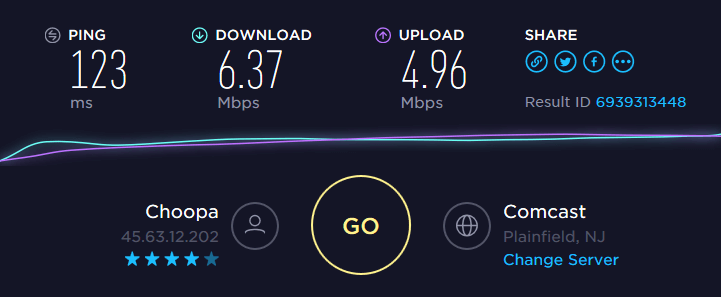

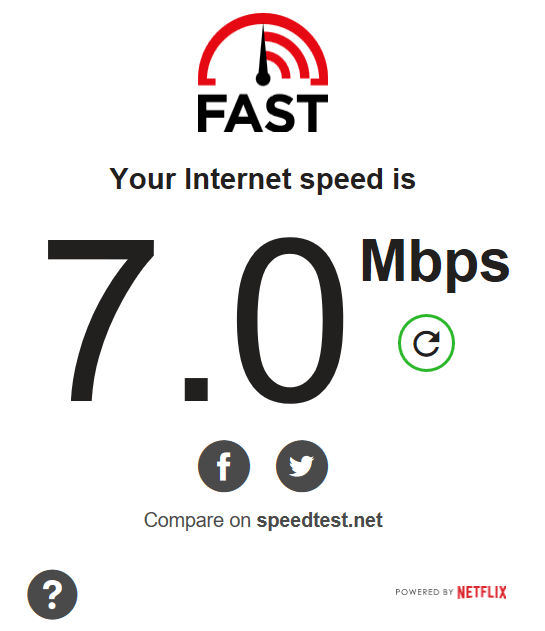
- If you’re having trouble with Netflix loading slowly or even buffering, run the Netflix FAST speed test. If the speed is much lower than the speed test at step 1, then it’s most likely your ISP is data throttling connections to Netflix.

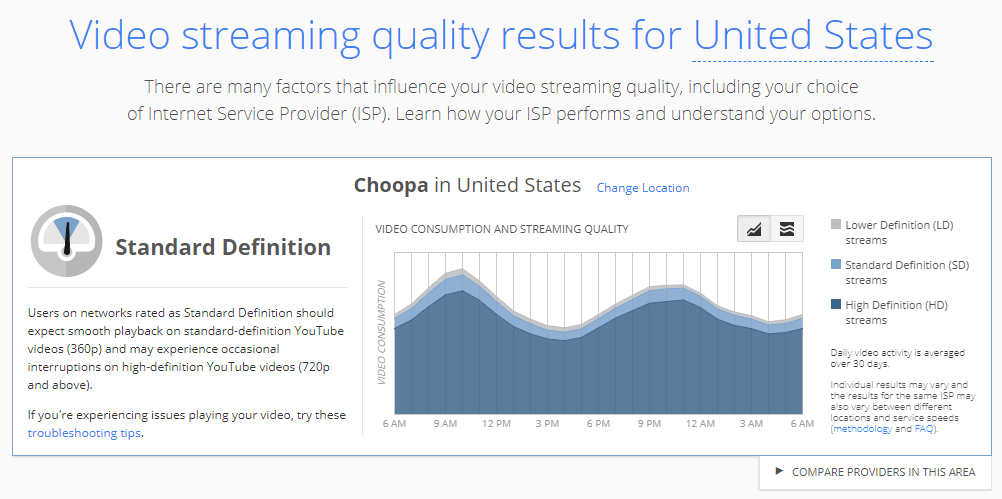
- If you’re having issues with YouTube, you can also check out the Google Video Quality report. It shows the performance of your Internet connections to YouTube’s servers. If the connection quality to YouTube is poor, but your Internet connection is fast, your ISP is most likely data throttling connections to YouTube.

- Run the Internet Health Test by Battle for the Net. This checks your Internet connection to see if there are problems at points of interconnection – sometimes ISPs may throttle the performance at these points so that the other ISP pays an additional fee. It checks a number of different routes and detects if you’re experiencing degraded performance at one or more interconnection points. So, if you see a big difference in speeds between consecutive tests, you’re being data throttled by your ISP.
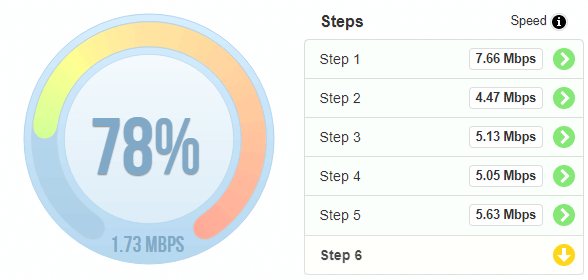

If there’s no evidence of data throttling done by your ISP or carrier after running the tests above, you may just need to upgrade to an Internet plan that delivers more bandwidth to you.
Speedify Fast Bonding VPN: Forget About Carriers and ISPs Slowing Down Your Data Connection
Most cases of ISP and carrier data throttling are specifically tied to certain websites and services. They analyze your traffic usually througha technique called deep packet inspection and, depending on the services you’re accessing, it may have a policy to intentionally slow down that traffic.
If your ISP would not be able to “inspect” your traffic, it couldn’t throttle your Internet speed for certain services – this is the idea behind stopping data throttling. A VPN is the easiest and most affordable solution to fix data throttling, as it secures all Internet traffic on your device, so that ISPs will not be able to distinguish between traffic.
Speedify is a next generation fast mobile VPN that works seamlessly on your computer and mobile device to secure your online data and deliver fast and reliable Internet via its unique channel bonding capabilities with Internet failover protection.
Stop Data Throttling with Speedify Fast Bonding VPN: It’s Faster and More Reliable
There are many VPN alternatives out there from which you can choose from. And they all do the basic stuff: securing your online data and making your traffic anonymous so you can bypass data throttling since your ISP or carrier will not be able to monitor your traffic.
But when it comes to bandwidth-hungry applications like live audio and video streaming, Amazon Prime, Hulu, YouTube and other streaming websites, Twitch online gaming, business calls, etc – other VPNs slow down your connection, as all the traffic has to be encrypted first before being transmitted.
Speedify is different (better!): while securing your online data, Speedify can also combine multiple Internet connections at the same time via its unique patent pending channel bonding feature. So, if you’re at home, you can combine WiFi, Ethernet and LTE; if you’re travelling – WiFi and LTE; etc. This gives you increased bandwidth, lower latency and all the reliability you need to stay connected during critical moments.
If your ISP is limiting your Internet connection, it’s time you take a stand and stop data throttling. Get started with Speedify. Not only you’ll be able to use all your bandwidth – you will also benefit from online security and privacy, and increased Internet reliability.
Alex and the Speedify team are always exploring the latest in networking and security technology—like 5G, 6G, WiFi 7, laser and satellite internet—and sharing it in new discussion content across YouTube, TikTok, Instagram, and LinkedIn every week.
Got a tech question? Let's go deeper! Pop into Speedify Office Hours live every Wednesday at 10 AM Eastern. Speedify CEO Alex Gizis and our network engineers are standing by to break down your questions about networks, tech updates, and Speedify features.


Speedify
Get started with Speedify today.
Combine Wi-Fi, 4G/5G cellular, Ethernet, Starlink, and more into one faster, steadier connection. Free to try — no credit card required.
🚀 Speed
Faster uploads and downloads by bonding all your connections at once.
📶 Stability
Automatic failover in under a second when any connection drops.
🔒 Security
AES-256 encryption on every connection, on every network you join.





15M+ downloads worldwide. 75K+ five-star reviews on iOS and Android.