
Unbreakable VPN Connection to Fix Slow Hotspot Shield by Combining Starlink, Wi-Fi, 4G, 5G, and DSL with Speedify
Hotspot Shield is usually slow because of congestion on the one Wi-Fi or 4G/5G cellular internet connection carrying every byte to a VPN server, not because of encryption, which adds only some overhead. A slow Hotspot Shield VPN is not proof that a VPN has to be slow.
Speedify is an app that uses more than one internet connection at the same time (Wi-Fi, wired Ethernet, 4G/5G cellular and Starlink), encrypts your traffic like a VPN and adds the connections’ speed together, so protected browsing and big downloads stop competing. Speedify’s speed and failover gains need two or more internet connections; on a single connection, Speedify works as an encrypted VPN and can be a little slower.
To speed up Hotspot Shield itself, first test your speed with the VPN off to see whether your internet connection is the real bottleneck, then connect to a server closer to you and restart your router. The sections below explain why Speedify is faster when you have two internet connections and how to set it up. For a side-by-side view, see Hotspot Shield VPN compared with Speedify.
Why Speedify Is Faster than Hotspot Shield on Two Internet Connections
Speedify works differently from conventional VPNs like Hotspot Shield: besides encrypting your data, Speedify lets your computer or phone use several internet connections at the same time. Speedify’s technology for combining internet connections lets iOS and Android devices use Wi-Fi and 4G/5G cellular at the same time, for more bandwidth and faster downloads and uploads.
Speedify also:
- Encrypts your traffic with DTLS 1.2 and AES-256-GCM or ChaCha20-Poly1305
- Lets you set a priority for each internet connection (Primary, Secondary or Backup), for example to save 4G/5G cellular data
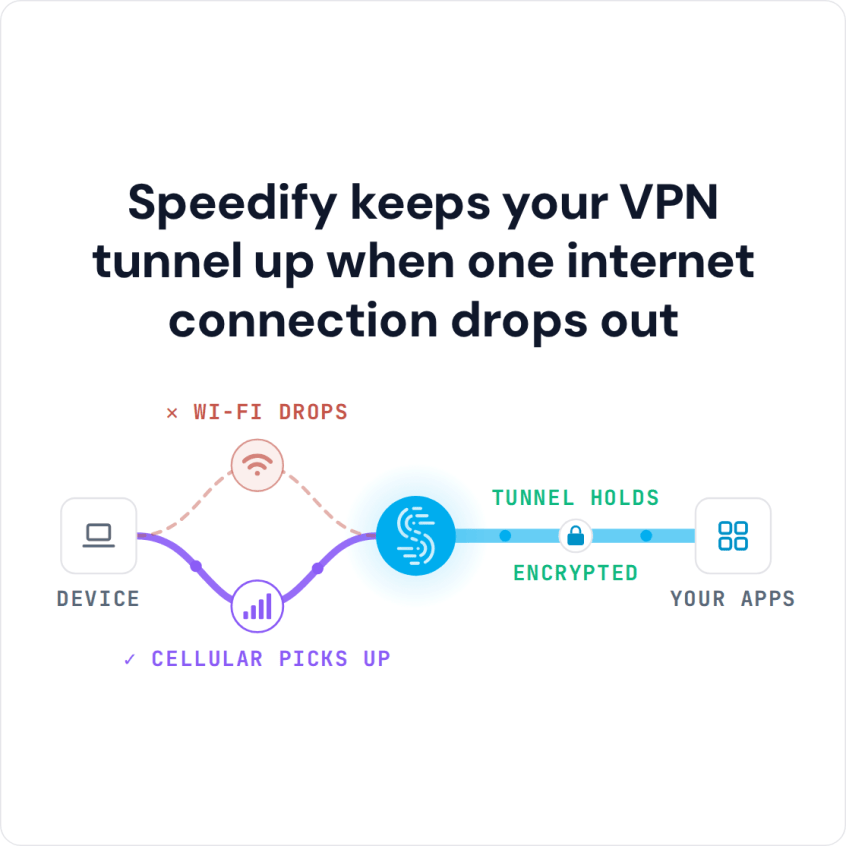
- Has automatic failover that keeps the same public IP address when one internet connection drops
Most VPN apps protect your connection but leave its speed and reliability as they are, or slow it down. Speedify protects the connection and, with two or more internet connections, also makes it faster and more reliable.
Speedify is available for Windows, macOS, iOS, Android and Linux, and setup takes a few minutes.
How to Set Up Speedify with Wi-Fi and 4G/5G Cellular
- Download Speedify on the phone or computer where Hotspot Shield is slow.
- Turn Hotspot Shield off so the two VPN apps do not compete, then open Speedify and create a free account (the free tier includes 5 GB per month; Linux needs a paid plan), or sign in.
- On a phone, tap Allow when your phone asks to add a VPN configuration.
- Keep two internet connections on: Wi-Fi and 4G/5G cellular on a phone, or Wi-Fi plus Ethernet or a USB-tethered phone on a computer. Speedify connects to a Speedify server on its own and uses both connections at once; if one drops, your traffic moves to the other.
Why a Phone’s Mobile Hotspot Is Slow
A phone’s mobile hotspot is a different thing from Hotspot Shield, but the two searches often get mixed up. A hotspot is usually slow because the phone’s 4G/5G cellular signal is weak where you are, because several devices share it, or because the phone plan slows hotspot data after a set amount. Speedify on the laptop can use the phone’s 4G/5G cellular together with another internet connection, such as Ethernet, or the laptop’s Wi-Fi while the phone is connected over USB, so the phone does not carry everything alone. An iPhone over USB works on Mac and Windows; an Android phone over USB works on Windows and often on a Mac.
Speedify
Get started with Speedify today.
Speedify combines Wi-Fi, 4G/5G cellular, Ethernet, Starlink and satellite into one faster, more reliable internet connection. Free to try: 5 GB a month with a free account. No credit card required.
🚀 Speed
Faster uploads and downloads, because Speedify uses all your internet connections at once.
📶 Stability
If one internet connection drops, Speedify moves your traffic to the others in milliseconds.
🔒 Security
AES-256 encryption on every internet connection, on any network you join.



15M+ downloads worldwide. 75K+ five-star reviews on iOS and Android.