
Speedify vs. Hotspot Shield: What Actually Makes Them Different
Hotspot Shield and Speedify both encrypt your traffic, and both call themselves a VPN, but they are built to solve different problems. Hotspot Shield is a traditional single-connection VPN: it takes one internet connection and routes it through an encrypted tunnel to a server. Speedify combines Wi-Fi, 4G/5G cellular, Ethernet, Starlink and satellite internet connections into one encrypted connection, and keeps you online when any one of them slows down or drops.
The difference between using one internet connection and using several decides which app fits you. If the goal is single-connection browsing with a focus on speed, a traditional VPN covers it. If the goal is staying fast and connected when networks are slow, crowded, or unreliable, Speedify is built for exactly that. Speedify’s technology for combining internet connections puts every internet connection you give it to work at the same time.
Speedify vs. Hotspot Shield at a Glance
| Capability | Speedify | Hotspot Shield |
|---|---|---|
| Core design | VPN that combines multiple internet connections at once | Single-connection VPN, one link at a time |
| Uses Wi-Fi, 4G/5G cellular, Ethernet, Starlink and satellite together | Yes, simultaneously | No, one internet connection only |
| Faster upload and download speeds | Yes, all your internet connections combined | Limited to the single active internet connection |
| Automatic failover with no dropped session | Yes, traffic moves to your other internet connections automatically | Reconnects on the same single link |
| Share cellular across nearby phones | Yes, with Speedify’s Pair & Share feature | No |
| Priority for calls, live streams and games | Yes | Standard tunnel, no combining of internet connections |
| Encryption | AES-256-GCM or ChaCha20-Poly1305 (DTLS 1.2) | Industry-standard encryption |
| Platforms | Windows, macOS, Linux, iOS, Android, OpenWrt | Major desktop and mobile platforms |
| Best suited for | Staying fast, connected and secure across unstable or multiple internet connections | Single-connection browsing with a focus on raw speed |
How a Traditional VPN Like Hotspot Shield Works
A traditional VPN takes the one internet connection your device is already using and wraps it in an encrypted tunnel to a remote server. That hides your traffic and changes your apparent location, which is the job Hotspot Shield is built to do.
The limitation is structural: the VPN can only be as fast and as stable as that single internet connection. If the Wi-Fi slows down, the VPN slows down. If the internet connection drops, the session drops with it.
For a primer on the basics, see what a VPN is and how it works. And if a single-connection VPN keeps cutting out on you, here is how Speedify keeps a VPN connection from disconnecting.
Why Hotspot Shield Can Feel Slow and What a Speed Test Measures
Hotspot Shield, like any single-connection VPN, can feel slow for three reasons: the internet connection underneath is slow or crowded, the VPN server is far away or busy, and encryption adds some overhead. Picking a closer server helps with the second reason. A speed test run with the VPN on measures that one internet connection plus the tunnel, so the result is capped by the internet connection underneath. Adding a second internet connection with Speedify is what raises that cap.
How Speedify Works Differently
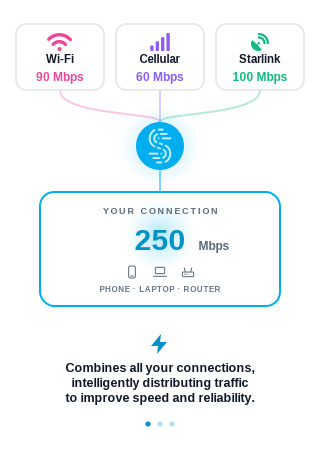
Speedify combines Wi-Fi, 4G/5G cellular, Ethernet, Starlink and satellite internet connections into one internet connection, then spreads your traffic across all of them at the packet level. This is not load balancing, which sends each app down one internet connection. Speedify splits individual flows across every available internet connection at once, so a single download or live stream can use up to 95% of their combined speed, as Speedify publishes.
- Faster uploads and downloads. Speedify puts the capacity of your internet connections together, so two networks that are each mediocre on their own work together as one faster internet connection.
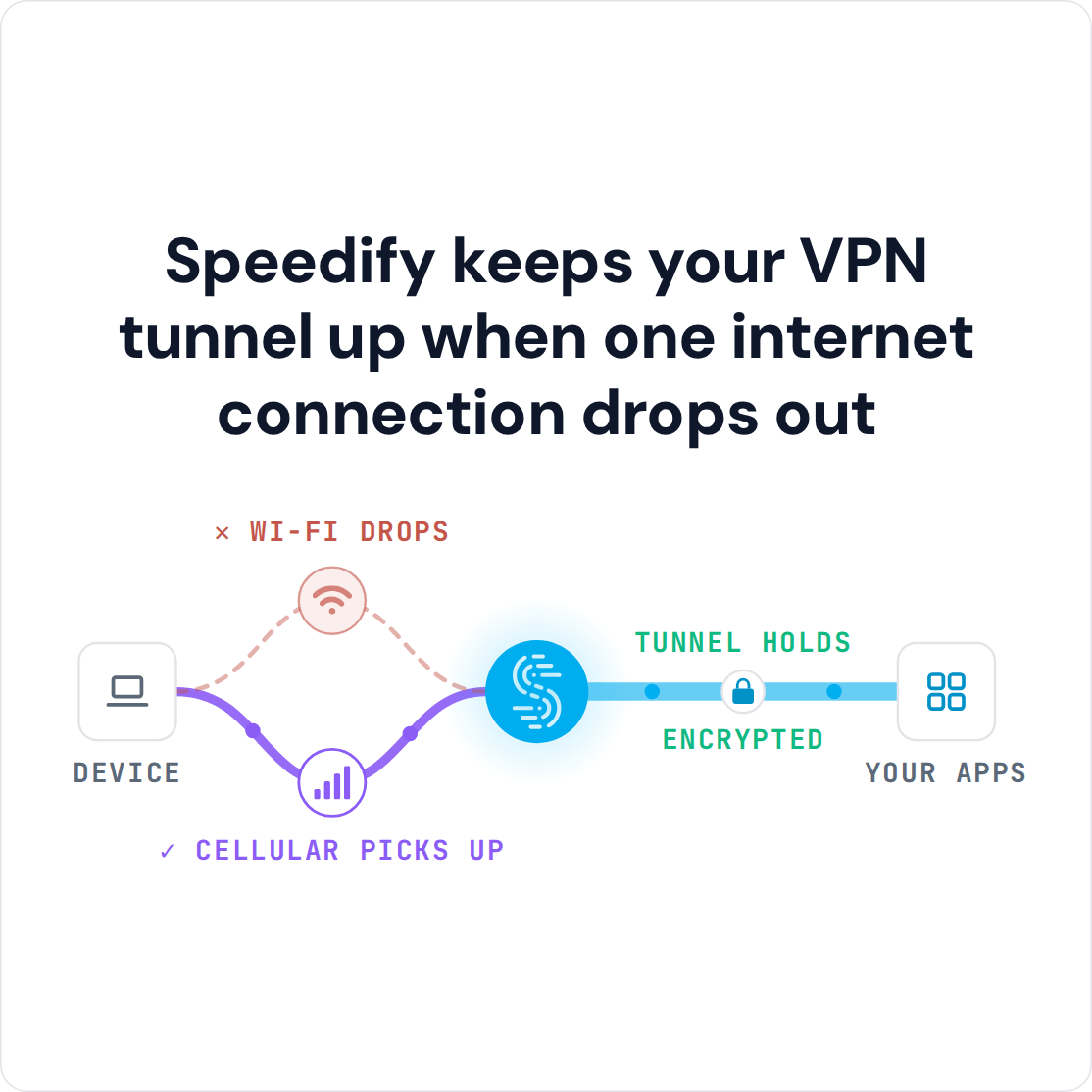
- No dropped sessions. Speedify watches every internet connection and moves your traffic off one that fails. If your Wi-Fi cuts out mid-call or mid-upload, Speedify keeps the session alive on cellular.
- Real-time priority. Speedify’s Streaming mode is on by default. It spots live traffic such as calls, live streams and games and gives it priority over background downloads and updates.
- Pair & Share. Speedify’s Pair & Share feature lets nearby phones running Speedify on the same local network share their 4G/5G cellular internet connections, so a group on different carriers has several cell towers working for it instead of one.
Security: Both Speedify and Hotspot Shield Encrypt, Speedify Adds Resilience
Speedify encrypts your traffic with DTLS 1.2, using AES-256-GCM (with hardware acceleration where the processor has it) or ChaCha20-Poly1305. In its default Auto mode, Speedify picks the transport itself, UDP, TCP or HTTPS, depending on the network. That gives Speedify the same class of encryption that protects banking and email sites, with better handling of lost packets on shaky internet connections. Speedify keeps no record of the sites you visit and does not sell personal data; it does record internet connection details such as IP address, device ID, connection time and data used. You can read the details on how Speedify handles encryption.
On public Wi-Fi the risk is real. The Federal Trade Commission explains how to tell whether your internet connection is encrypted, and the Federal Communications Commission recommends using a VPN on public hotspots. For practical steps, see Speedify’s guide on how to stay safe on public Wi-Fi networks. A traditional VPN like Hotspot Shield protects that single internet connection. Speedify protects every internet connection it combines, and keeps you online if one of them fails.
Choosing Between Hotspot Shield and Speedify
One honest comparison: if your only need is to hide your IP on a single stable home internet connection, a traditional VPN like Hotspot Shield does that job.
If you also want your internet connection to stay fast and unbroken on the move, on crowded Wi-Fi, or across several networks at once, Speedify is what you need. Speedify still works as an encrypted VPN when only one internet connection is available, though it can be a little slower there; the speed and failover gains need two or more.
How to Switch to Speedify
- Download Speedify and install it. Speedify runs on Windows, macOS, Linux, iOS, Android and supported OpenWrt routers.
- Open Speedify and sign in, or create a free account for 5 GB per month (the free tier is not available on Linux or on routers). Encryption is on by default, so your traffic is protected.
- Connect every internet connection you have, such as Wi-Fi plus Ethernet on a computer, or Wi-Fi plus 4G/5G cellular on a phone. Speedify combines them automatically and keeps the fast, secure connection running in the background.
Speedify vs. Hotspot Shield: FAQ
Is Speedify a VPN like Hotspot Shield?
Yes. Speedify is a VPN and encrypts all of your traffic. The difference is that Hotspot Shield routes one internet connection through an encrypted tunnel, while Speedify combines Wi-Fi, 4G/5G cellular, Ethernet, Starlink and satellite internet connections at once for faster upload and download speeds and a more reliable and secure internet connection.
Can Speedify use more than one internet connection at the same time?
Yes. Speedify combines Wi-Fi, 4G/5G cellular, Ethernet, Starlink and satellite internet connections and uses all of them at the same time. A traditional VPN uses one internet connection at a time.
Does Speedify still work on a single internet connection?
Yes. With one internet connection, Speedify behaves like a standard encrypted VPN. Add a second internet connection and Speedify combines them for extra speed and automatic failover.
Which is better for streaming and video calls?
Speedify. Speedify prioritizes real-time traffic and keeps the session alive if one internet connection drops, so calls and live streams hold up where a single-connection VPN would stall.
Speedify
Get started with Speedify today.
Speedify combines Wi-Fi, 4G/5G cellular, Ethernet, Starlink and satellite into one faster, more reliable internet connection. Free to try: 5 GB a month with a free account. No credit card required.
🚀 Speed
Faster uploads and downloads, because Speedify uses all your internet connections at once.
📶 Stability
If one internet connection drops, Speedify moves your traffic to the others in milliseconds.
🔒 Security
AES-256 encryption on every internet connection, on any network you join.


15M+ downloads worldwide. 75K+ five-star reviews on iOS and Android.