How to Align a Starlink Dish by Ear with Speedify’s Audio Tracking

Speedify’s Audio Tracking Lets You Align a Starlink Dish Without Watching the Screen

Aligning a dish usually means one hand on the hardware and both eyes on a phone you can’t quite see. Speedify solves that in the Starlink Control Center with audio tracking: as you rotate the dish toward its target, Speedify plays beeps that speed up as the alignment error shrinks.

This article explains how audio tracking works, when it helps most, and how it fits into aiming a multi-dish setup.

How Speedify’s Starlink Alignment with Audio Tracking Works

Select any dish in the Dish Orientation card to open the Alignment Wizard for that dish. From there:

  1. Speedify calculates the target heading for the selected dish.
  2. As you physically rotate the dish, Speedify measures the gap between its current heading and the target.
  3. The beeps get faster as that gap closes, and reach a steady fast tone at the target.

You keep your hands on the dish and your eyes on the mount instead of on a screen you can’t reach.

Speedify Starlink Index — real-world performance from 6,209 Starlink users: 2.4% downtime, about 34 minutes a day for always-on connections

Speedify Starlink Index
May 28 – Jun 10, 2026 · 14-day window

Starlink goes down every day.
Here’s what that actually looks like.

Speedify passively monitors every connection it bonds. These figures come from 6,209 Starlink users over 14 days — compared in real time against the other connections on the same devices. No speed tests, no lab conditions.

Median latency

60 ms

p90 spikes to 257 ms

Avg packet loss

0.17%

vs 0.08% on T-Mobile

Jitter measures how much latency varies moment to moment — high jitter causes choppy calls and frozen video even when average latency looks fine.
Starlink28.1 ms
Comcast22.4 ms
T-Mobile15.9 ms
Verizon14.9 ms
AT&T11.3 ms
71%
of users

71% ran at least one other connection simultaneously — 4,381 of 6,209 users. Cellular is the most common backup.

Cellular 51% Cable / DSL 38% Corporate 11%
6,209 users · 144 countries · 1.26M records · passive measurement, aggregates only Full dataset →

Use Speedify to stay online during satellite handoffs every 15 seconds

Research confirms Starlink switches between satellites every 15 seconds on a fixed schedule.  Each satellite handoff is a potential dropout, and on a congested network or with any obstruction, those Starlink dropouts become real interruptions.

Speedify fixes Starlink connection drops by combining your Starlink internet connection with another satellite dish, Wi-Fi, 4G/5G cellular, or wired Ethernet at the same time. When Starlink drops, Speedify keeps your traffic moving on the backup internet connection instantly. 

ImageImage
ImageImage

Speedify alerts you about your Starlink dish status

Speedify software alerts you about your Starlink dish status as soon as your dish experiences an issue - e.g. when your actuator motor is stuck, the mast is not vertical or there's a thermal throttle. 

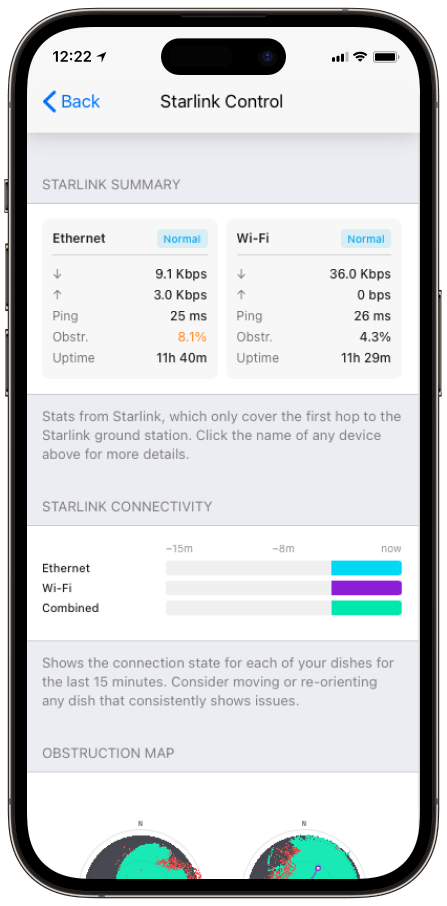
Speedify's Starlink Control Center helps you monitor all your Starlink dishes, read obstruction maps, and align multiple dishes all in the Speedify app. Get a real-time view of each dish's health and optimize the position of each Starlink dish, so you get the best possible performance out of your Starlink connections. 

Speedify makes your uploads and downloads faster, more reliable, and more secure.

Speedify combines Wi-Fi, 4G / 5G cellular, Ethernet, Starlink, and other satellites for faster internet uploads and downloads

Speedify is the only software app that combines Wi-Fi, 4G / 5G cellular, Ethernet, Starlink and other satellites at once for secure, faster, and more reliable internet uploads and downloads so you stay online without interruptions.

Speedify will automatically detect and start using any available Internet connections on your device while intelligently distributing your online traffic between them for optimal performance. If you need help we have quick start guides available for most common set ups.

Speedify gets you faster uploads and downloads from the devices around you 

Speedify's Pair & Share feature lets you and the devices around you pair up and share 4G/5G cellular both ways, so every paired device gets faster uploads, faster downloads, and a steadier internet connection. All sides share and use each other's cellular at once, unlike a personal hotspot, where one device gives and the rest take.

Speedify's Pair & Share feature runs over the local network between devices already running Speedify, with no extra hardware and no new data plans. Speedify creates an encrypted pool of shared 4G/5G cellular connections across all paired devices. Each device taps into that shared pool of combined connections for faster upload and download speeds and a more reliable internet connection.

See how you can use Speedify to combine different Internet connections:

I want to combine

Use the selectors below to find the setup guide for your exact combination of connections.

Or view articles for

Get started with Speedify today!

Speedify combines Wi-Fi, 4G / 5G cellular, Ethernet, Starlink, and other satellites for faster internet uploads and downloads.

Image

When Speedify’s Starlink Audio Tracking Earns Its Keep

Audio tracking matters most exactly where dishes tend to go: on a roof, on a mast, on a vessel’s hardtop, or anywhere the screen is out of sight while your hands are on the hardware. It also speeds up the work of getting two dishes onto different sky, since you can aim each one to its Speedify-calculated heading without climbing back down to check. Starlink’s guidance on giving each antenna a clear, unobstructed view sets the target; audio tracking helps you hit it.

How Proper Starlink Dish Alignment Improves Speedify’s Bonding

Good alignment isn’t the goal on its own. The point is two dishes on different sky, each with a low obstruction percentage, feeding Speedify’s channel bonding technology. Speedify combines the aligned dishes into one connection, distributes traffic across them at the packet level, and fails over instantly if one is blocked. The cleaner each dish’s aim, the more capacity Speedify has to work with.

Who Benefits from Speedify’s Starlink Audio Tracking

  • Rooftop and mast installers. No more squinting at a phone propped on a ladder.
  • Maritime crews. Aligning a dish on a moving deck is far easier by ear than by eye.
  • Anyone aiming two dishes apart. Audio tracking makes the second dish quick to set without constant screen checks.

Speedify and Starlink: Align Fast, Then Bond

Audio tracking gets each Starlink dish onto its target heading with your eyes on the hardware. Speedify’s channel bonding technology takes the well-aimed dishes and combines them into one faster, more resilient connection. For the full set of alignment tools, see how to use Speedify’s Starlink Control Center.

Image

Get started with Speedify today!

With Speedify you can combine Wi-Fi, 4G / 5G cellular, Ethernet, Starlink and other satellites into one bonded super-connection to improve livestreaming, video calling, gaming, web browsing, and everything else you do online.

Speed

Get faster uploads and downloads for everything you do online.

Stability

Avoid buffering and disconnects while streaming, gaming, and browsing.

Security

Keep your personal data safe from hackers, snoops and cyber criminals

Speedify engineers love talking tech on YouTube, Tiktok, and Instagram!

Alex Gizis and the Speedify engineers discuss and explain technology including Starlink satellites, Wi-Fi 7 routers, Apple networking features, fiber optics, broadband internet, 5G mobile networks, AI, networking protocols, and much more. Follow Speedify on YouTube, TikTok, Instagram, and LinkedIn!

Alex and the Speedify team are always exploring the latest in networking and security technology—like 5G, 6G, WiFi 7, laser and satellite internet—and sharing it in new discussion content across YouTube, TikTok, Instagram, and LinkedIn every week.

Got a tech question? Let's go deeper! Pop into Speedify Office Hours live every Wednesday at 10 AM Eastern. Speedify CEO Alex Gizis and our network engineers are standing by to break down your questions about networks, tech updates, and Speedify features.

Image