
Use Speedify to Combine Wi-Fi, 4G/5G Cellular, Starlink, Ethernet and Other Internet Sources for Faster, More Reliable Internet
Paying more every month rarely cures an internet connection that keeps dropping out, because the fault is usually not on your provider’s side of the wall: it is the Wi-Fi between your router and your devices, aging cabling, or too many devices on one home network.
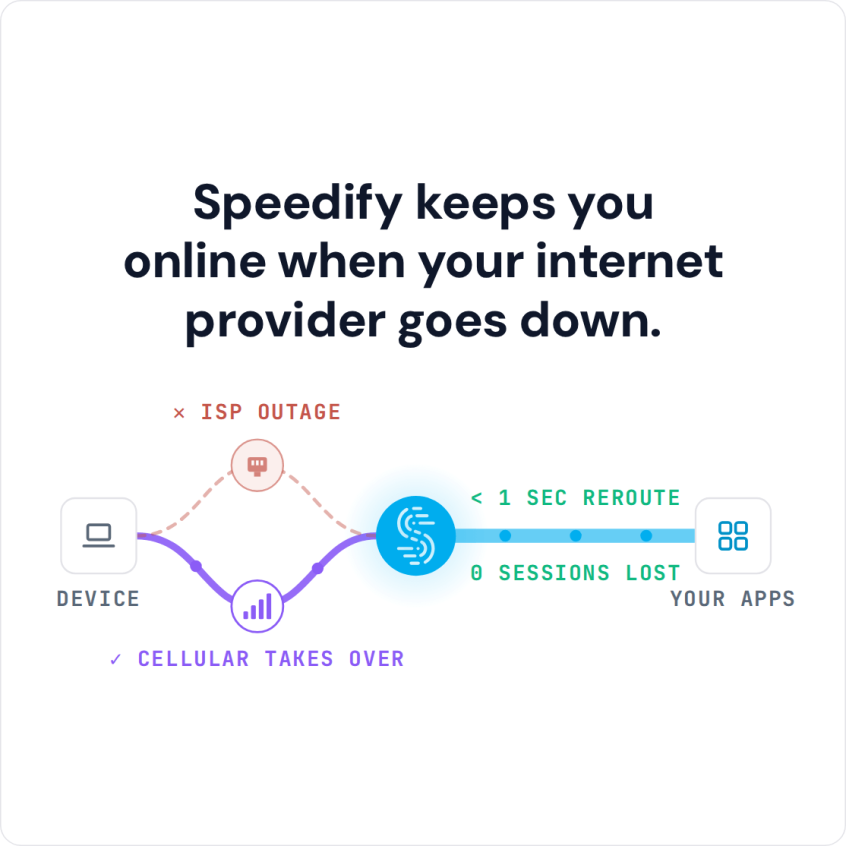
Speedify is an app that runs your internet over Wi-Fi, 4G/5G cellular, Ethernet, Starlink and satellite internet connections at the same time, so one weak line no longer takes everything down with it. Speedify can only keep you online through a drop when it has two or more internet connections to work with, for example Wi-Fi plus your phone’s 4G/5G cellular. On a single connection, Speedify works as an encrypted VPN and cannot stop that connection from dropping. This article explains what actually makes an internet connection unstable, why a new router will not solve it, and how using Speedify keeps you online without switching provider.
Speedify keeps you online when your internet provider goes down.
Why Your Internet Connection Remains Unstable Despite Paying Your ISP
Your internet instability likely isn’t your ISP’s fault. Most connectivity problems originate from the last-mile wireless segment between your router and devices, not the fiber or cable delivering data to your home. Your ISP guarantees a certain speed at the modem; what happens after that depends entirely on your Wi-Fi environment. Upgrading your plan won’t fix interference, signal degradation, or protocol conflicts within your home network.
The reality is that Wi-Fi operates in a crowded spectrum shared with Bluetooth, microwaves, cordless phones, and dozens of neighboring networks. Even properly configured routers can’t overcome this fundamental limitation. Understanding this distinction prevents expensive ISP upgrades that won’t solve your actual problem.
Wi-Fi Issues: The Real Cause of Slow Internet
Here are a few reasons your Wi-Fi is slow and unreliable.
Wi-Fi Signal Attenuation and Dead Zones
Wi-Fi signal strength diminishes predictably as you get farther away from the router. Walls, especially those containing metal studs or concrete, significantly attenuate signal. Your router broadcasts at fixed power, creating zones where signal strength drops below the threshold required for stable connections. Devices experience reduced throughput or complete disconnection when they enter these zones, explaining why certain rooms or areas consistently underperform.
Co-Channel Interference and Network Congestion
Your Wi-Fi operates on specific channels (1-13 on 2.4GHz, dozens on 5GHz) that neighboring networks also use. When multiple networks broadcast on overlapping channels, their signals interfere destructively, causing packet collisions and retransmissions. Your router tries to compensate by reducing data rates, resulting in dramatically slower speeds despite full signal bars displayed on your device.


Wi-Fi Protocol Negotiation Failures
Modern Wi-Fi standards (802.11ac, 802.11ax) require specific negotiation sequences with your router and adapter. When this negotiation fails (due to driver bugs, incompatible firmware, or temporary network congestion), your connection drops to legacy standards (802.11g), reducing maximum throughput from gigabit-capable speeds to 54 Mbps or lower.
Wi-Fi Band Steering and Device Handoff Issues
Routers attempt to steer devices between 2.4GHz and 5GHz bands automatically. This steering sometimes fails, leaving devices on congested bands even when less-congested bands are available. Additionally, when you move between router coverage areas, devices sometimes fail to “hand off” to the stronger transmitter, maintaining connections to weakening signals instead of roaming to better coverage.
Why Your Current Wi-Fi Router Can’t Solve This Alone
Upgrading your router improves Wi-Fi performance marginally but doesn’t eliminate interference or dead zones. Advanced features like MIMO (Multiple-Input Multiple-Output) and beamforming require compatible devices; older smartphones often don’t support these technologies. Mesh networks provide better coverage but cost hundreds of dollars and still face the same spectrum congestion and interference problems as single routers.
The fundamental issue remains: Wi-Fi has intrinsic limitations you can’t overcome through equipment upgrades alone. The spectrum is finite and shared. Your devices can’t simultaneously improve their position in this crowded environment through hardware alone.
Stabilizing Internet by Combining Connections with Speedify
Rather than fighting Wi-Fi limitations, use Speedify to combine Wi-Fi on your computer or mobile device with a second internet connection that does not depend on local spectrum congestion. Smartphones include 4G/5G cellular connections that operate on different frequencies than Wi-Fi. Speedify combines Wi-Fi and 4G/5G cellular simultaneously, creating redundancy and increased throughput without changing your ISP or upgrading your Wi-Fi equipment.
How Speedify Combines Connections, Technically
Speedify creates a VPN tunnel that distributes network traffic across multiple connections simultaneously. Each data packet can travel through Wi-Fi or the other available connections (4G/5G cellular, Starlink, wired Ethernet), whichever path offers better performance at that moment. If Wi-Fi experiences packet loss from interference, Speedify automatically routes subsequent packets through the other connection(s). Your application layer never detects these transitions because Speedify manages all routing at the tunnel level.
The system monitors latency, jitter, and packet loss on both connections in real-time. High-priority traffic (VoIP, video calls) routes through the connection with lowest latency. Bulk data (downloads, file transfers) distributes across both connections to maximize combined throughput. This dynamic optimization requires no manual intervention.
Speedify Practical Setup and Configuration
Download Speedify on your device. If you’re using a smartphone or tablet, you can just enable both Wi-Fi and 4G/5G cellular. If you’re on a laptop or computer, alongside your Wi-Fi or wired Ethernet connection, you can tether your smartphone.
Open Speedify and toggle to connect. Within seconds, both connections combine into a single logical tunnel.
You can also add other types of connections to the mix. Speedify will use them all and provide you with a faster, more reliable internet connection.
The application displays real-time metrics on both connections: current speeds, signal quality, and packet loss percentage. You can monitor how Speedify distributes traffic and observe performance improvements during Wi-Fi interference events.
Speedify
Get started with Speedify today.
Speedify combines Wi-Fi, 4G/5G cellular, Ethernet, Starlink and satellite into one faster, more reliable internet connection. Free to try: 5 GB a month with a free account. No credit card required.
🚀 Speed
Faster uploads and downloads, because Speedify uses all your internet connections at once.
📶 Stability
If one internet connection drops, Speedify moves your traffic to the others in milliseconds.
🔒 Security
AES-256 encryption on every internet connection, on any network you join.



15M+ downloads worldwide. 75K+ five-star reviews on iOS and Android.