
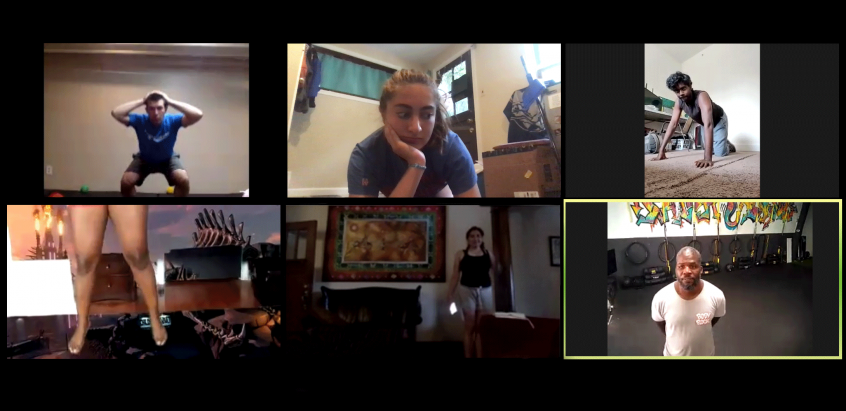
Forget About Buffering and Disconnects While Steaming your Yoga Classes
Are you a Yogi or a fan of Yoga? Hosting or attending classes virtually for a few months now and may continue to do so for awhile? It’s pretty convenient and safe to do yoga from the comfort of our home and practice social distancing. But you still need to watch over your participants or have your Yogi keep an eye on your positions to ensure you are aligned properly. Good solid uninterrupted steaming is important to both, participant and instructor.
In the most simple setup, you only need a smartphone with solid Internet access. Set it up on a tripod, choose the platform you’re streaming to (YouTube, Twitch, Facebook Live, Zoom, etc.) and you’re done. If you want it to be more professional, you can go with a video system with several cameras and a specialized streaming software to change views.
A solid Internet connection is the most important things when you live stream yoga classes. You need Connection:
- reliability – no disconnects
- speed – bandwidth & latency, no drops in upload bandwidth to generate poor quality video being streamed
- security – no vulnerabilities while streaming
This article will share how to live stream yoga classes and not get into any of those pesky Internet problems.
Use Speedify to increase your bandwidth: Combine internet connection sources like WiFi, 4G, 5G, & Starlink together

Combine multiple internet connections to fix slow Internet
Speedify is the only app that seamlessly combines all of your connections, including WiFi, 4G, 5G, Ethernet, and Starlink, into one stronger connection to keep you online and secure.
In most cases, Speedify will automatically detect and start using any available Internet connections on your device while intelligently distributing your online traffic between them for optimal performance. If you need help we have quick start guides available for most common set ups.

Combine personal hotspots for better bandwidth and signal strength
Speedify's Pair & Share is a feature that enables you to connect to multiple hotspots at the same time and wirelessly share LTE, 4G, and 5G cellular connections back and forth between multiple Speedify users on the same local network to create a faster, more reliable connection for everyone.
For the first time, it's possible to share cellular data between multiple devices, including PCs, Macs, iPhones and Androids. Use multiple phones as hotspots for internet access and get increased bandwidth and mobile failover for all paired devices.
Problems During Your Yoga Classes Live Stream?
In most cases it’s about the capacity of your internet connection. A lot of bandwidth is required to ensure your yoga classes live stream is smooth with crisp audio and video.
Here’s what usually happens, from a more technical perspective:
- There’s not enough bandwidth available for your live stream so either the quality drops (jittery / choppy video) and/or you see disconnects
- The WiFi coverage is spotty – this leads to disconnects
- The WiFi hotspot is offline, but your device connects to it – your mobile device clings to it as it cannot tell it doesn’t work. So, instead of switching back to LTE to keep the stream going, it will disconnect it.
What can you do to livestream your classes without head aches? Read below.
Get a Stable Internet Connection - Live Stream Your Yoga Classes Stress Free
Bottom line – you want to avoid being disconnected while livestreaming your classes. And, of course, have a constantly good video streaming quality. Relying on a single ISP can get you in trouble. So, relying on two or more ISPs is better. Best case scenario for live streaming your event with solid Internet: you combine 2 or more connections at once from different ISPs with a channel bonding app designed for streaming like Speedify.
Speedify utilizes channel bonding technology allowing you to use 2 (or more) connections at the same time. It’s the only software bonding service that can run on any device, whether it’s a desktop or laptop computer, smartphone or tablet.
If one of your connections fails, Speedify automatically reroutes all the traffic through your other available connection(s). This happens in the background without you having to do anything. When the dropped connection is back online, Speedify will pick it up and start using it again.
Speedify Helps Live Stream Your Yoga Class Without Internet Issues
At least that’s what our customers say. Here’s an example.
As a fast bonding VPN, Speedify acts like a power-up for your device. Instead of only using a single Internet connection at a time, Speedify allows your device to use multiple connections simultaneously. You’ll get more bandwidth and more stable livestreams.
Speedify constantly monitors the quality of your Internet connections. If the Wi-Fi becomes unreliable, it’ll automatically reroute data through cellular data until Wi-Fi is available again.
Moreover, it automatically identifies audio and video streams, and provides quality of service (QoS) by prioritizing streams over other traffic. Web browsing and software updates can’t mess up your calls and live streams.
Wondering how to live stream your yoga class without dealing with connection issues? Try Speedify! Download here!

Get started today!
With Speedify you can combine multiple internet sources into one bonded super-connection to improve livestreaming, video calling, gaming, web browsing, and everything else you do online.
Speed
Stability
Security
We love talking about connectivity!
Alex and the Speedify team are always exploring the latest in networking and security technology—like 5G, 6G, WiFi 7, laser and satellite internet—and sharing it in new discussion content across YouTube, TikTok, Instagram, and LinkedIn every week.
Got a tech question? Let's go deeper! Pop into Speedify Office Hours live every Wednesday at 10 AM Eastern. Speedify CEO Alex Gizis and our network engineers are standing by to break down your questions about networks, tech updates, and Speedify features.
