
Speedify Uses Backup Wi-Fi Alongside Starlink on Ubuntu Linux to Keep You Online
Your Ubuntu computer can use Starlink Wi-Fi and a second Wi-Fi network at the same time, like a cable or DSL router, an office Wi-Fi network or a phone’s hotspot. Plug in a USB Wi-Fi adapter so Ubuntu can join both Wi-Fi networks, and Speedify uses them together. If your Starlink internet connection drops, Speedify switches your traffic to the other Wi-Fi network automatically. On a Windows PC, see how to run Starlink and Wi-Fi at once.
Ubuntu’s built-in Wi-Fi joins one network at a time, so the USB Wi-Fi adapter is the only extra hardware you need.
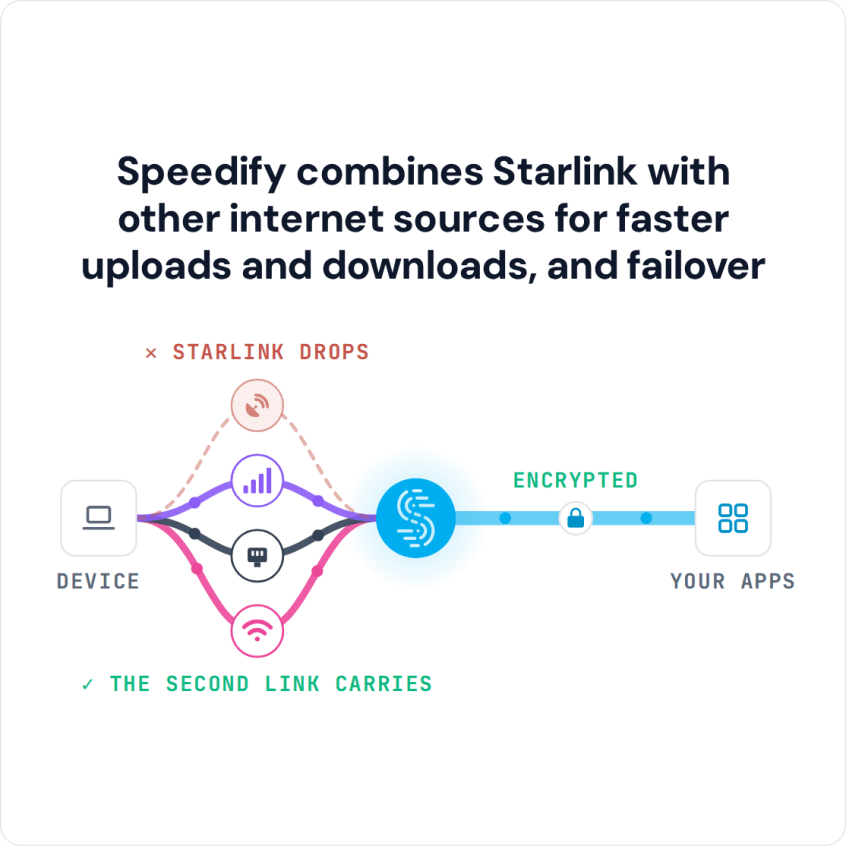
Speedify combines Starlink with other internet sources for faster uploads and downloads, and failover
Starlink Internet Connection Dropouts Happen to Everyone
Speedify measures thousands of Starlink users in more than 150 countries. From 29 September to 12 October 2026, fixed Starlink dishes went offline for about 37 minutes a day on average, and Starlink dishes on RVs and boats for about 61 minutes a day.
Starlink also switches each dish to a new satellite every 15 seconds, and a switch can cause a short dropout. Even a perfectly installed Starlink dish goes offline, and about 7 in 10 Starlink users on Speedify use Starlink together with a second internet connection, like 4G/5G cellular.
Why Add a Second Wi-Fi Network to Starlink on Ubuntu Linux
Starlink slows down or drops when something blocks your Starlink dish’s view of the sky, when bad weather moves in, and when the Starlink network is busy in the evening. Your Starlink dish also switches satellites about every 15 seconds, which can cause a short drop each time. With only Starlink Wi-Fi, your Ubuntu computer has nothing to fall back on.
A second Wi-Fi network that gets its internet another way, like a cable or DSL line or a phone’s 4G/5G cellular, isn’t affected by any of that. With Speedify, both Wi-Fi networks carry your traffic at the same time, and when Starlink drops, the other one keeps you online without breaking what you’re doing.
How Speedify Uses Two Wi-Fi Networks on Ubuntu Linux
Your computer’s built-in Wi-Fi joins your Starlink Wi-Fi network. The USB Wi-Fi adapter joins your second Wi-Fi network. Speedify sends your traffic over both at once, for the speed of both together, and moves it all to the working one when the other drops. Speedify needs that second internet connection: with Starlink alone, it can’t add speed or stop drops.
Speedify also encrypts all your internet traffic on both Wi-Fi networks.
How to Use Starlink Wi-Fi and a Second Wi-Fi Network Together on Ubuntu Linux with Speedify
Step 1: Plug a USB Wi-Fi Adapter into Your Ubuntu Computer
Ubuntu recognizes most USB Wi-Fi adapters on its own, but before you buy one, check that the box or product page says it works with Linux. Plug it in and open Settings > Wi-Fi: you should now see a choice between two Wi-Fi devices, the built-in one and the USB adapter. To join two Wi-Fi networks at once, see how to combine 2 Wi-Fi connections on Ubuntu.
Step 2: Connect the Built-In Wi-Fi and the USB Wi-Fi Adapter to Different Wi-Fi Networks
In Settings > Wi-Fi, choose the built-in Wi-Fi and connect it to your Starlink Wi-Fi network. Then choose the USB Wi-Fi adapter and connect it to your second Wi-Fi network. Check that both show as connected.
Step 3: Install and Open Speedify on Your Ubuntu Computer
To download Speedify for Ubuntu, open the Terminal app, paste this command, press Enter, and type your Ubuntu password if it asks for it:
bash -c "$(wget -qO- https://get.speedify.com)"
When it finishes, open Speedify from your apps menu. Speedify finds both Wi-Fi connections on its own and starts using them together, and you don’t need to set up any routing yourself. Speedify’s Linux install steps have more detail.
If your second Wi-Fi network is a phone hotspot with a data cap, open that connection in Speedify and set its priority to Backup. Speedify then uses it only when Starlink drops.
Speedify Also Shows Your Starlink Dish Status on Ubuntu Linux
Speedify shows real-time Starlink dish alerts in the app on your Ubuntu computer. If the dish’s motor is stuck, its mast is tilted or it is overheating, Speedify shows an alert, so you know your Starlink dish needs attention.
Speedify
Get started with Speedify today.
Combine Wi-Fi, 4G/5G cellular, Ethernet, Starlink, and more into one faster, steadier connection. Free to try — no credit card required.
🚀 Speed
Faster uploads and downloads by bonding all your connections at once.
📶 Stability
Automatic failover in under a second when any connection drops.
🔒 Security
AES-256 encryption on every connection, on every network you join.



15M+ downloads worldwide. 75K+ five-star reviews on iOS and Android.