

Speedify’s Starlink Control Center Lets You Monitor All Your Starlink Dishes in One Place
Starlink disconnects all the time for ALL Starlink users. The Speedify Starlink Index report found that Starlink connections are down for an average of ~33 min per day. Plus, all Starlink dishes experience small drops and packet loss every 15 seconds, when the moving Starlink satellites hand off the connection to the next satellite overhead.
The best way to fix Starlink's connection drops is to combine your Starlink connection with another internet connection, such as 4G/5G cellular, cable, fiber, DSL, or another Starlink connection. Speedify makes this possible with channel bonding.
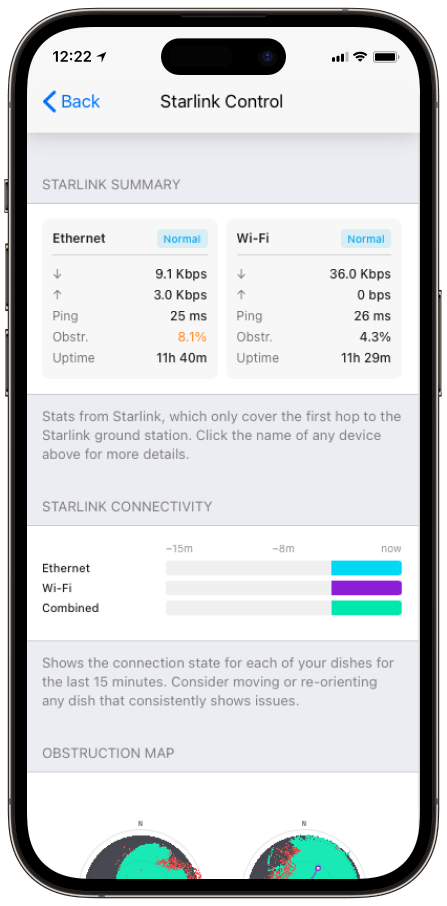
Monitor your Starlink dish performance inside Speedify.
Speedify’s built-in Starlink Control Center gives you real-time visibility into your dish’s health — without opening a separate app.
What Is the Starlink Control Center in Speedify?
Starlink dishes expose a local API on your network. Speedify reads that API and brings the data into Speedify’s own interface as the Starlink Control Center. You don’t need the Starlink app open. Speedify gives you a single dashboard showing your Starlink connection performance alongside your other internet connections: Wi-Fi, 4G/5G cellular, Ethernet. All in one place.
Speedify’s Starlink Control Center works on any device where Speedify is installed and where the Starlink dish is reachable on the local network.
What Speedify’s Starlink Control Center Shows You
- Real-time signal quality and connection state. Speedify displays your Starlink dish’s current signal strength, uptime, and connection status live.
- Obstruction maps. Speedify pulls the obstruction map directly from your Starlink dish, showing which parts of the sky are blocked by trees, buildings, or other structures.
- Latency, download speed, and upload speed history. Speedify tracks your Starlink connection’s performance over time so you can identify when Starlink slows down or drops.
- Hardware temperature and device stats. Speedify reads hardware telemetry from the dish, including operating temperature. Overheating is a known issue with Starlink hardware in high-temperature environments.
- Multiple dish visibility. If you run more than one Starlink terminal, Speedify’s Starlink Control Center shows all of them side by side.
How Speedify Uses Starlink Data to Optimize Your Connection
Speedify’s channel bonding technology monitors every internet connection’s live performance: speed, latency, packet loss, and jitter. Speedify’s Starlink Control Center extends that visibility into the Starlink hardware itself.
When Speedify sees your Starlink signal degrading from an obstruction or weather event, Speedify shifts more traffic to your other available connections like 4G/5G cellular or Ethernet, automatically. When Starlink recovers, Speedify brings it back.
Because Speedify operates at the packet level, not the session level, these transitions happen without interrupting video calls, downloads, or VPN sessions.
How to Access Speedify’s Starlink Control Center
- Make sure your Starlink dish is connected to your local network and powered on.
- Install Speedify on any device on the same network as your Starlink dish.
- Open Speedify and connect. Speedify detects the Starlink dish on your local network automatically.
- Navigate to the Starlink Control Center section in the Speedify app. Speedify displays your dish’s signal data, obstruction map, and hardware stats immediately.
No extra configuration needed. Speedify reads from the Starlink dish’s local API without requiring your Starlink account credentials.
How Speedify Works with Starlink Data Pooling
Starlink’s data pooling feature is available on Business and Priority service tiers, not on standard Residential plans. If you’re a home user with two Starlink dishes, each dish has its own separate data allocation. Data pooling doesn’t apply to Residential subscriptions.
For businesses on Starlink Business or Priority plans, data pooling lets multiple terminals under the same account share one combined data allowance. Instead of each terminal having a fixed per-dish cap, all terminals draw from a central pool. A busy site uses more of the pool; a quiet site leaves capacity for others. Billing and quota management consolidate under one account.
Speedify’s Starlink Control Center shows each terminal’s individual usage and signal data, which matters more when those terminals are drawing from a shared pool. If one terminal is consuming a disproportionate share of your pooled data – due to a congested location or a performance issue – Speedify surfaces that in the per-dish stats before it becomes a problem.
Beyond visibility, Speedify’s channel bonding technology actively distributes traffic across all active Starlink terminals simultaneously, based on each dish’s live performance. This means Speedify spreads your traffic more evenly across your pooled terminals rather than routing everything through one dish until it slows down. Your pooled data gets used more efficiently, and no single terminal becomes a bottleneck.
Data pooling handles the billing side of running multiple Starlink terminals. Speedify’s channel bonding technology handles the performance side. The two work together.
Who Benefits from Speedify’s Starlink Control Center
- Starlink users troubleshooting slow speeds or dropouts. Speedify’s obstruction map and signal history let you identify the cause: a tree in the dish’s field of view, a mounting location that catches afternoon shadows, or a recurring satellite handoff at a specific time of day.
- Households and businesses running two Starlink dishes. Speedify’s Starlink Control Center shows both dishes simultaneously, so you can compare signal quality and see how Speedify’s channel bonding technology distributes traffic between them.
- IT managers overseeing remote sites. Speedify’s Starlink Control Center gives you visibility into dish health without needing to physically access the site or log into a separate platform. For businesses on Starlink data pooling plans, Speedify’s per-terminal stats help you track which sites are consuming the shared data pool and flag performance issues early.
- Anyone who wants less app-switching. Speedify gives you Starlink dish data alongside your full connection picture in one screen instead of two.
Speedify and Starlink: Getting the Most from Multiple Dishes
Whether you’re running two Starlink dishes at home for redundancy or managing a fleet of Starlink Business terminals across multiple sites, Speedify’s Starlink Control Center and channel bonding technology give you two things the Starlink app alone doesn’t: visibility into how all your dishes are performing relative to each other, and the ability to use all of them simultaneously instead of one at a time.
For businesses combining Starlink data pooling with multiple terminals, Speedify adds the performance layer that makes the pooled setup actually work at full capacity.
Learn more about Speedify’s channel bonding technology and how Speedify works with Starlink.
Speedify
Get started with Speedify today.
Combine Wi-Fi, 4G/5G cellular, Ethernet, Starlink, and more into one faster, steadier connection. Free to try — no credit card required.
🚀 Speed
Faster uploads and downloads by bonding all your connections at once.
📶 Stability
Automatic failover in under a second when any connection drops.
🔒 Security
AES-256 encryption on every connection, on every network you join.



15M+ downloads worldwide. 75K+ five-star reviews on iOS and Android.