
Use Speedify as Your Starlink Companion
On Starlink, “stow” means your Starlink dish folds into its storage position and stops its internet connection, so you can unplug it, pack it or move it. The “Starlink Stow Requested” alert means a stow was asked for, in the Starlink app or automatically by the Starlink dish because of the conditions around it, and your internet stops until the Starlink dish is set up again.
Speedify is an app that uses your Starlink internet connection together with a second internet connection, like your phone’s 4G/5G cellular connection, so you stay online while your Starlink dish is stowed.
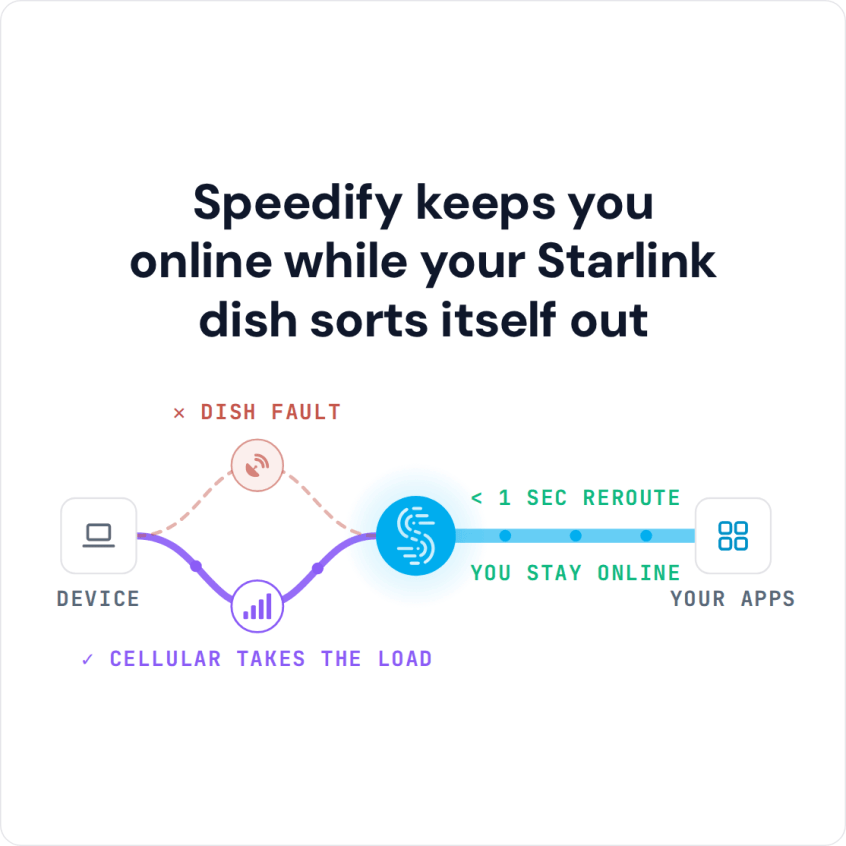
Speedify keeps you online while your Starlink dish sorts itself out
Starlink Internet Connection Dropouts Happen to Everyone
Speedify measures thousands of Starlink users in more than 150 countries. From 29 September to 12 October 2026, fixed Starlink dishes went offline for about 37 minutes a day on average, and Starlink dishes on RVs and boats for about 61 minutes a day.
Starlink also switches each dish to a new satellite every 15 seconds, and a switch can cause a short dropout. Even a perfectly installed Starlink dish goes offline, and about 7 in 10 Starlink users on Speedify use Starlink together with a second internet connection, like 4G/5G cellular.
What Stow Means on Starlink, and When to Stow Your Starlink Dish
You stow your Starlink dish when you are about to put it in storage, move it to a new spot, or return it. Stowing tilts the Starlink dish into its storage position, so it’s ready to unplug and pack.
How to Stow Your Starlink Dish
- In the Starlink app: open Settings > Starlink and drag the slider to “Stow Starlink”. This works on Starlink Standard (Circular), Starlink Standard Actuated and Starlink Performance (Gen 1).
- By hand: if your Starlink dish isn’t connected to the Starlink app, leave the dish plugged in, take it out of its base and lay it face down on a flat surface like a table. After about a minute, the mast tilts into the stow position on its own. Once the dish has stowed, unplug it so it stays in the stow position. See Starlink’s instructions to stow your Starlink dish.
Not every Starlink dish needs stowing. Starlink Performance and Starlink Performance (Gen 2) don’t need it, and to store a Starlink Standard 4, Standard 4 X or Starlink Mini, you fold the kickstand under the dish instead.
As soon as stowing starts, Starlink shows the “Starlink Stow Requested” alert in the Starlink app, and Speedify shows the same alert. So if your internet stopped and you see this alert, nothing is broken: your Starlink dish is stowing. To bring it back, see what to do when your Starlink dish is stowed.
Why a Second Internet Connection Keeps You Online While Starlink Is Stowed
While your Starlink dish is stowed, your Starlink internet connection is off. A video call, live stream or online game running at that moment drops. If you are packing up your Starlink dish to move it, you also lose your internet for as long as the move takes.
Speedify uses your Starlink internet connection together with any other internet connection you have:
- 4G/5G cellular
- A DSL or cable line
- Public Wi-Fi in range
- A mobile hotspot
When your Starlink dish stows and its internet connection stops, Speedify moves your internet traffic to your other internet connection right away, so you stay online without a break.
How to Stay Online When Your Starlink Dish Stows, with Speedify
- Get the Speedify app on your devices. It runs on Windows, Mac, Linux, Android, iOS and even on OpenWrt routers.
- Connect your computer or phone to Starlink and to your second internet connection at the same time. On a phone, stay on your Starlink Wi-Fi and keep the phone’s cellular connection turned on. On a computer, use your Starlink Wi-Fi plus an Ethernet cable to your other internet line, or your phone plugged in with a USB cable to share its cellular connection.
- Turn Speedify on. It uses both internet connections at the same time on its own, with no settings to change.
- Stay online while your Starlink dish is stowed.


When your Starlink dish is set up again, you also get nearly the full speed of both internet connections combined, not only failover. Speedify needs that second internet connection: while your Starlink dish is stowed, the other internet connection is the only one Speedify can use.
Download Speedify now and stay online while your Starlink dish is packed away.
Speedify
Get started with Speedify today.
Combine Wi-Fi, 4G/5G cellular, Ethernet, Starlink, and more into one faster, steadier connection. Free to try — no credit card required.
🚀 Speed
Faster uploads and downloads by bonding all your connections at once.
📶 Stability
Automatic failover in under a second when any connection drops.
🔒 Security
AES-256 encryption on every connection, on every network you join.



15M+ downloads worldwide. 75K+ five-star reviews on iOS and Android.