
Watch the 2030 FIFA World Cup From Mexico Without Buffering, Using Speedify
The 2030 FIFA World Cup is expected to open on June 8 and 9, 2030, with three centenary matches in Uruguay, Argentina and Paraguay, then move to Spain, Portugal and Morocco from June 13, with the final expected on July 21. Who will broadcast it in Mexico has not been announced yet. In 2026, Televisa and TV Azteca showed every El Tri game, the opener and the Final free over the air.
Streaming the 2030 matches online is where your internet connection matters. Speedify is an app that combines Wi-Fi, 4G/5G cellular, Ethernet, Starlink and satellite internet connections into one faster, more reliable connection, and encrypts your traffic like a VPN, so a match stream keeps playing when one connection drops.
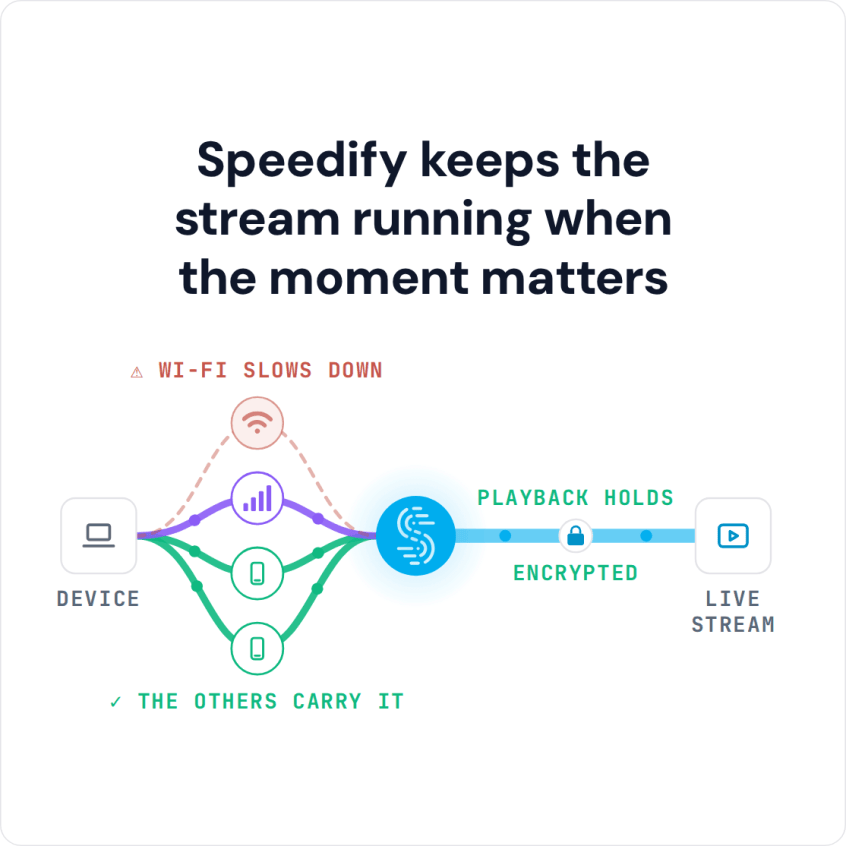
Speedify keeps the stream running when the moment matters
Read on for what is known about the 2030 broadcasts in Mexico, how Mexico watched the 2026 tournament, the kickoff times to expect, and what using Speedify does for a match watched on a phone. A steadier stream with Speedify needs two or more internet connections, such as home Wi-Fi plus your phone’s 4G/5G cellular; on a single connection, it works as an encrypted VPN, can be a little slower and cannot stop that connection from dropping.
Where to Watch the 2030 FIFA World Cup in Mexico: Rights Not Announced Yet
As of October 2026, FIFA has not announced who will broadcast the 2030 World Cup in Mexico; the Netflix deal announced on October 13, 2026 covers Spain and Andorra, not Mexico. Kickoff times are not published yet either. In June and July, Spain is 8 hours ahead of Mexico City and Portugal and Morocco are 7 hours ahead, so a 9 p.m. kickoff in Madrid is 1 p.m. in Mexico City. Until the Mexican deals are announced, the way Mexico watched in 2026 is the best guide, but it is not a promise:
Free over-the-air TV: TelevisaUnivision showed its free matches on Canal 5 and Las Estrellas, and TV Azteca showed its 32 free matches on Azteca Uno and Azteca 7, all in Spanish. A standard antenna got you every El Tri group game, the opener at Estadio Azteca, and the Final.
Free streaming from TV Azteca: TV Azteca streamed its 32-match package free, with no signup required, through Azteca Deportes and the TV Azteca Deportes app on iOS and Android.
Pay TV on TUDN: TUDN carried 72 of the 104 matches for cable and satellite subscribers, with streaming through TUDN En Vivo.
Every match on ViX: ViX was the only platform showing all 104 matches in Mexico. ViX Premium with the Pase Mundial 2026 add-on, a one-time MX$799, unlocked the full tournament, while the free tier streamed select group-stage matches with ads.
How Speedify Keeps Your World Cup Stream Stable in Mexico
Whichever channel or app carries the 2030 matches, the stream only plays smoothly if your internet connection holds up, and a live match is the worst possible time for the picture to stall. A regular VPN routes everything through one internet connection that can slow down or drop without warning. Speedify works differently, so a busy network or a weak Wi-Fi signal stops being the thing that costs you a goal.
Speedify combines your internet connections: Speedify uses Wi-Fi, 4G/5G cellular, Ethernet, Starlink and satellite at the same time for faster, steadier streaming. When the home Wi-Fi dips during a Mexico attack, Speedify shifts traffic to your 4G/5G cellular connection without buffering and without a reconnection.
Speedify steers around packet loss: packet loss is what causes the pixelation and freezing that hit during fast play. Speedify checks latency and packet loss on each internet connection and moves traffic away from a connection that starts to struggle, so a weak Wi-Fi signal does not freeze the picture during a counterattack.
Speedify fails over automatically: if one internet connection drops out completely, Speedify moves the stream to your other connections without stopping it. A penalty shootout is no place to be staring at a loading spinner.
Watching the Mexican Broadcast When You Travel
Mexican streaming services have been limited to viewers inside Mexico: in 2026, Azteca Deportes and ViX stopped working the moment you left the country. If you live in Mexico and travel to the 2030 tournament in Spain, Portugal or Morocco, Speedify can connect you through a Speedify server in Mexico City so you can reach the Mexican services and subscriptions you already use at home, such as your ViX account. Streaming services set their own regional rules in their terms, so check them before you rely on this. Speedify also keeps that connection stable, so a hotel Wi-Fi network does not turn El Tri into a slideshow.
How to Stream the World Cup in Mexico With Speedify
Setting up Speedify takes a few minutes before kickoff:
- Download Speedify for your device. Speedify is available for Windows, Mac, iOS, Android, Linux and OpenWrt.
- Open Speedify and sign in, or create a free account (the free tier includes 5 GB per month). Inside Mexico, connect to a nearby server for the steadiest stream. If you live in Mexico and are traveling, select the Speedify server in Mexico City (part of the full server list that comes with a paid plan) to reach the Mexican services you already use.
- Open the channel’s app or site once the 2030 rights holders in Mexico are announced. In 2026 the options were Azteca Deportes for the free package, ViX for all 104 matches, and TUDN for pay-TV subscribers.
- Start the match and let Speedify keep every connection working at once.
Plan 2030 World Cup Viewing From Mexico Before the June 8 Kickoff
Mexico co-hosted the 2026 World Cup; in 2030 the tournament moves to South America, Spain, Portugal and Morocco. Once the Mexican rights holders are announced, check which channel or app carries the matches. Speedify handles the other half of the problem: an internet connection that gives out at the wrong moment. With Wi-Fi and 4G/5G cellular in use at the same time, Speedify keeps the match playing when one of them drops, so you see every goal as it happens.
Speedify
Get started with Speedify today.
Speedify combines Wi-Fi, 4G/5G cellular, Ethernet, Starlink and satellite into one faster, more reliable internet connection. Free to try: 5 GB a month with a free account. No credit card required.
🚀 Speed
Faster uploads and downloads, because Speedify uses all your internet connections at once.
📶 Stability
If one internet connection drops, Speedify moves your traffic to the others in milliseconds.
🔒 Security
AES-256 encryption on every internet connection, on any network you join.



15M+ downloads worldwide. 75K+ five-star reviews on iOS and Android.