
A Reliable VPN for Public Wi-Fi Is One That Stays Connected
A VPN for public Wi-Fi has to cope with networks that are convenient and frequently unreliable, at hotels, airports and cafes alike. The signal fades as you move, the captive portal logs you out, and a crowded hotspot crawls right when you need it. A traditional VPN does nothing about any of that. It encrypts your one connection and rides whatever speed and stability that connection happens to have. When the Wi-Fi stalls, the VPN stalls with it.
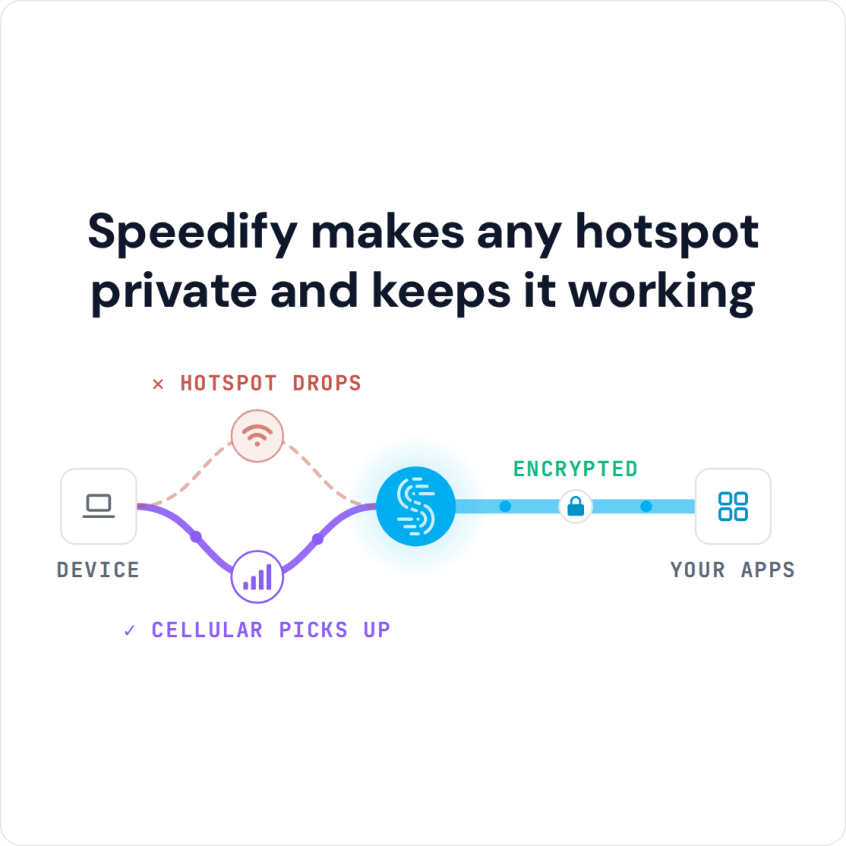
Speedify is built differently. Speedify combines Wi-Fi, 4G/5G cellular, Ethernet, Starlink and satellite internet connections into one connection, encrypts all of it, and keeps you online when the public Wi-Fi weakens or drops. That is what makes a VPN reliable on public Wi-Fi: reliability, not just encryption, is the part most VPNs leave out. Speedify’s technology for combining internet connections needs a second internet connection, such as your phone’s 4G/5G cellular, to add speed and failover; on the hotspot alone, Speedify works as an encrypted VPN and can be a little slower.
Speedify vs. a Traditional VPN on Public Wi-Fi
| On public Wi-Fi | Speedify | A traditional single-connection VPN |
|---|---|---|
| Encrypts your traffic | Yes, AES-256 over DTLS | Yes |
| Keeps working when the Wi-Fi weakens | Yes, adds your 4G/5G cellular automatically | No, slows down with the Wi-Fi |
| Survives a dropped hotspot | Yes, automatic failover to another connection | No, the session drops |
| Combines Wi-Fi and cellular for speed | Yes, both used at the same time | No, one connection only |
| Handles captive-portal logouts gracefully | Keeps cellular live so you stay online | Drops when the portal cuts the Wi-Fi |
| Real-time priority for calls and streams | Yes | No combining or prioritization |
Why Public Wi-Fi Lets You Down
A hotspot in a busy place is shared by everyone in range, so the capacity you actually get shrinks as the crowd grows. Signal strength on your screen says nothing about how much room is left on that connection. On top of that, captive portals, the login pages at hotels and airports, periodically force you to re-authenticate and can knock you offline mid-task.
A traditional VPN cannot fix a connection problem because it only has the one connection. It encrypts that link, which protects your privacy, but it inherits every slowdown and every drop the public Wi-Fi throws at it.
How Speedify Makes Public Wi-Fi Reliable
Speedify combines Wi-Fi, 4G/5G cellular, Ethernet, Starlink and satellite internet connections into one connection, then routes your traffic over whichever connections have room. On public Wi-Fi, that changes the experience in four ways.
- Combine the Wi-Fi with your cellular. Speedify uses the public Wi-Fi and your phone’s 4G/5G cellular at the same time, so a slow hotspot is propped up by your cellular instead of being your only option.
- Stay online through drops. When the hotspot cuts out or the captive portal logs you off, Speedify moves your traffic to cellular, and your call, upload, or download keeps going.
- Protect real-time traffic. Speedify automatically prioritizes video calls, live streams, and gaming, the traffic that suffers most when a network gets shaky.
- Share connections with your group. Speedify’s cellular sharing feature lets phones in your group that run Speedify share their 4G/5G cellular connections. The devices need to be on the same local network; if the public Wi-Fi keeps devices apart, turn on Personal Hotspot on one phone and connect the others to it.
Reliability and Security Together
Speedify encrypts your traffic with AES-256, using the hardware acceleration built into modern CPUs, and carries it over DTLS, which is TLS over UDP. Speedify keeps no record of the sites you visit and does not sell personal data; it does record connection details such as IP address, device ID, connection time and data used. You can read the details on how Speedify handles encryption.
The Federal Trade Commission explains how to tell whether your connection is encrypted, and the Federal Communications Commission recommends using a VPN on public hotspots. For a deeper walkthrough, see Speedify’s guide on how to stay safe on public Wi-Fi networks. A traditional VPN gives you the encryption. Speedify gives you the encryption and keeps the connection alive.
How to Get Reliable Public Wi-Fi with Speedify
- Download Speedify and install it. Speedify runs on Windows, macOS, Linux, iOS, Android and supported OpenWrt routers.
- Open Speedify and sign in, or create a free account for 5 GB per month (the free tier is not available on Linux or on routers). Encryption is on by default, so your traffic is protected the moment you join the hotspot.
- Connect to the public Wi-Fi and leave your cellular on. Speedify combines them automatically and keeps you online if the Wi-Fi falters.
Reliable VPN for Public Wi-Fi: FAQ
What makes a VPN reliable on public Wi-Fi?
Reliability comes from not depending on a single connection. A traditional VPN rides one connection, so it drops when the hotspot drops. Speedify combines Wi-Fi with cellular, so it stays online when one of them fails.
Does a VPN slow down public Wi-Fi?
A VPN adds a little overhead, so on the hotspot alone any VPN, Speedify included, can be a little slower. With your cellular added, Speedify uses both at the same time, so it can be faster than the Wi-Fi alone.
Can Speedify keep me online when a captive portal logs me out?
Yes. Speedify keeps your cellular connection live alongside the Wi-Fi, so a captive-portal logout does not knock you offline.
Is Speedify secure on public Wi-Fi?
Yes. Speedify encrypts every connection with AES-256 over DTLS, so your traffic is protected on any hotspot, and Speedify keeps no record of the sites you visit.
Speedify
Get started with Speedify today.
Speedify combines Wi-Fi, 4G/5G cellular, Ethernet, Starlink and satellite into one faster, more reliable internet connection. Free to try: 5 GB a month with a free account. No credit card required.
🚀 Speed
Faster uploads and downloads, because Speedify uses all your internet connections at once.
📶 Stability
If one internet connection drops, Speedify moves your traffic to the others in milliseconds.
🔒 Security
AES-256 encryption on every internet connection, on any network you join.



15M+ downloads worldwide. 75K+ five-star reviews on iOS and Android.