
Feature · Channel Bonding
Every connection you have, working as one.
Typically your phone or laptop can only use one internet connection at a time, even when you have more than one available. Speedify changes that, letting your device use every connection at once, so you get their combined speed and stay online even when one drops out.
⚡️
More speed
Add up every connection you have.
Speedify spreads your traffic across all your connections at once, so a single download, upload, or stream pulls the combined speed of every one of them instead of leaning on just one.
📶
Stays connected
A connection drops. You keep going.
If your Wi-Fi cuts out or your signal fades, Speedify reroutes to your other connections in milliseconds. Your call, your upload, your game keep going, with no stall and nothing to reconnect.
🔒
Built In
Quiet, secure, automatic.
Channel bonding runs in the background with encryption on every connection. Turn it on once and it just works, on every device you own, with nothing to manage.
01 · The Basics
Use all of your connections at the same time.
Picture your laptop on 60 Mbps Wi-Fi, with your phone's 5G sitting right there at another 40. On its own, your laptop uses the Wi-Fi and lets the 5G go to waste, because it can only hold one connection at a time.
Speedify's channel bonding technology ties the two together and treats them as one. That 60 and 40 become a single 100, a download pulls from both at once, and if the Wi-Fi cuts out you keep moving on the 40 with no stall. Add more connections and they'll automatically get added to the mix.
Uses every connection at once
Combines their speed
Survives a connection dropping
Keeps calls and streams alive
Encrypted by default
Speedify Channel Bonding
Splits your traffic across every connection at the packet level, then puts it back together at Speedify's Speed Server.
✓
✓
✓
✓
✓
A normal connection
Your device picks one connection and sticks with it. The others wait as backup, and switching over means the session drops.
✗
✗
✗
✗
✗
02 · What's happening underneath
Your traffic, split across everything.
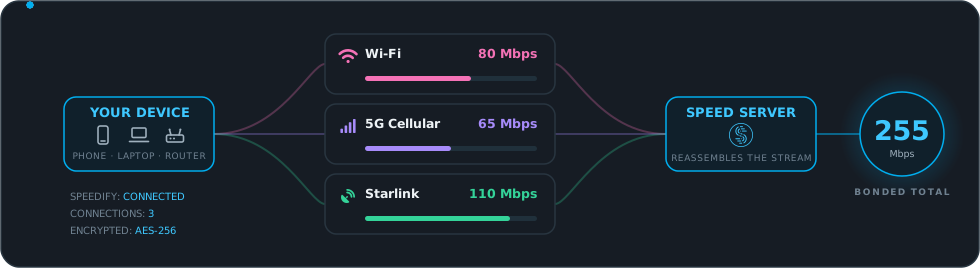
When you go online, Speedify doesn't pick one connection. It opens an encrypted link over each one you have, splits your traffic across all of them packet by packet, and bonds it into a single session that's reassembled at Speedify's Speed Server. To everything you use, it looks like one fast, steady connection.
01
It splits at the packet level
Speedify breaks your traffic into packets and sends them across every connection at once, so even a single download uses all of them, not just the fastest.
02
It favors your best connections
Faster, lower-latency connections carry more of the load. Speedify measures each one continuously and shifts the balance as conditions change.
03
It adapts as you move
Walk out of Wi-Fi range or into a dead zone and Speedify quietly shifts your traffic to whatever's still working. No stall, no reconnect.
04
Your data, your rules
Watching your data? Cap your cellular, keep it as backup only, or let it run free. The choice is yours, set per connection in the app.
🔒
Every connection, encrypted.
Each connection Speedify bonds runs through its own encrypted tunnel, under a strict no-logs policy. So combining your connections also keeps them private, on hotel Wi-Fi, public networks, anywhere you happen to be online.
03 · Where Channel Bonding Shines
Four everyday moments it quietly saves.
Channel bonding matters most when one connection isn't enough, or isn't steady. Most of the time you won't need to think about it. These are the moments you'll be glad it's on.
Scenario 01
The call that won't drop.
You're on a video call when your Wi-Fi hiccups. Normally the call freezes or drops and you're scrambling to dial back in. With your cellular already bonded in alongside it, the call doesn't even flinch.
Call holds at83 Mbps
Scenario 02
Streaming from the campsite.
Parked out at the campground, Starlink handles movie night until a tree line clips the satellite and the picture stalls. With your phone's 5G and the campground Wi-Fi bonded in, Speedify fills the gaps and the stream keeps rolling.
Stream holds at157 Mbps
Scenario 03
Gaming without the lag spike.
One lost packet on Wi-Fi is the gap between a clean play and a "what just happened." Speedify can run your game over more than one connection at once, so a blip on one never reaches the match.
Steady at167 Mbps
Scenario 04
Working from anywhere.
Cafe Wi-Fi alone is slow and flaky. Bond it with your phone's 5G and you get one connection that's faster and far steadier than the cafe's, so big files send and calls hold while you actually work.
Combined65 Mbps
04 · What you can pair with
Three modes, one smart default.
Different things you do online want different handling. A big file transfer wants raw speed. A live call wants every packet to land. Most of the time you're doing a mix, which is why Speedify runs Streaming Mode by default: it watches your traffic, spots the real-time parts, and blends the other two modes automatically. You can pick a mode yourself anytime.
🚀
Mode 01
Speed Mode
Splits your traffic across every connection to add up their speed, scaling close to the sum of all of them at once.
Best For
Big downloads and uploads, cloud backups, moving large files, anything you just want done fast.
🛡️
Mode 02
Redundant Mode
Sends every packet over every connection at the same time and keeps whichever copy lands first. You get the speed of your fastest connection, with the lowest possible loss and lag.
Best For
Video calls, VoIP, and anything where a single dropped packet is the difference between smooth and broken.
✨
Mode 03 · Default
Streaming Mode
The smart hybrid that runs by default. Speedify automatically spots your real-time traffic, video calls, live streams, VoIP, online gaming, and gives it priority, switching each one between bonding for speed and duplicating for reliability based on what your network is doing right now. Everything else keeps getting full Speed Mode treatment at the same time.
Best For
Real life, where you're streaming, calling, gaming, and downloading all at once. This is why it's the default.
WhERE SPEEDIFY INSTALLS
Going Further
Want it for your whole home? Run Speedify on your router and every device on your Wi-Fi gets bonding and failover automatically, with no per-device install. See Speedify for Routers →
Get more from the internet you already have.
Speedify bonds every connection you have into one that's faster, steadier, and works on every device you own.