
What to Do If You Can’t Connect to CyberGhost VPN – Get an Unbreakable VPN Connection by Combining Starlink, Wi-Fi, 4G, 5G, and DSL with Speedify
Public networks and VPN apps often fight each other. Airport, hotel and coffee shop Wi-Fi wants you to open its sign-in page first, and CyberGhost VPN starts protecting your traffic before that page can load, so nothing connects. Speedify, an app that combines internet connections and encrypts your traffic like a VPN, deals with the real problem by using the public Wi-Fi and a phone’s 4G/5G cellular at the same time, both protected, so you get online without waiting for the hotspot to behave.
The sections that follow explain why CyberGhost VPN stalls on public Wi-Fi, how to fix it, and what using Speedify gives you there: a working internet connection and traffic that strangers on that network cannot read. Speedify’s speed and failover gains need two or more internet connections; on a single connection, Speedify works as an encrypted VPN and can be a little slower.
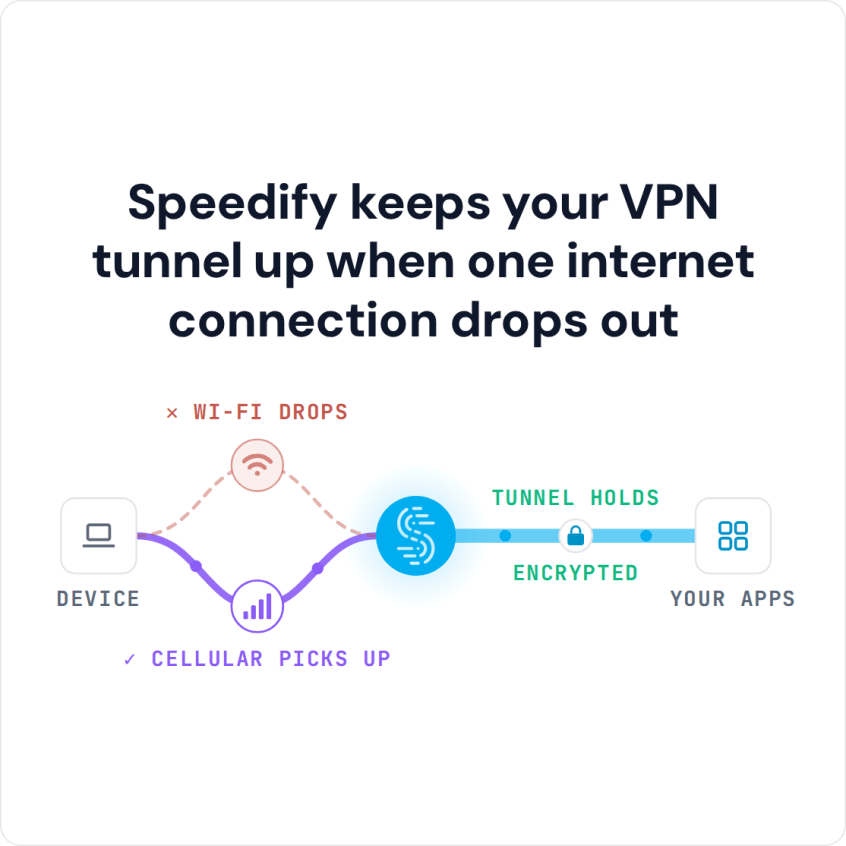
Speedify keeps your VPN tunnel up when one internet connection drops out
Why CyberGhost VPN Doesn’t Work with Public Wi-Fi
Some CyberGhost VPN users cannot get online on public Wi-Fi networks, such as Starbucks. The device starts loading the network’s captive portal (the Wi-Fi login page), but the VPN cuts that connection off, so the login page never appears.
The quickest fix is to turn CyberGhost VPN off, open the login page, sign in, and then turn the VPN back on. Until the VPN is back on, your traffic is unprotected, which matters on public Wi-Fi networks where strangers share the connection.
The clash comes from the way VPNs and captive portals work. A VPN creates an encrypted tunnel between your device and a server in the cloud and blocks traffic outside that tunnel. A captive portal needs your device to talk to the local network directly before it lets anything through, so the login page cannot load and you cannot connect to the internet.
How to Fix CyberGhost VPN Not Working or Not Connecting
Start with the connectivity troubleshooting articles on the CyberGhost support site. If CyberGhost VPN will not connect on any network, on Windows, Mac, iPhone, iPad, Android or Fire TV Stick, run the basic checks: make sure the internet works with the VPN off, update the CyberGhost app, restart the device, and try a different server location. Turn off any other VPN app, Speedify included, because two VPN apps on one device each set up their own virtual network adapter and get in each other’s way. School, workplace and some national networks block VPN connections on purpose; on those networks, follow the network’s rules.
Still having an issue? Check how the network’s login page is set up. A few captive portals accept connections on specific ports, so an advanced user who knows the port can reach the login page while CyberGhost VPN is running.
Most login pages, though, block outside connections such as the one from your CyberGhost VPN server. If you are an advanced user, you can try some of the solutions suggested here. Also, check out this interesting thread on the OpenWRT forum.
Netflix and other streaming services block many VPN server addresses, so CyberGhost VPN can connect and the streaming app still refuses to play. That is the service’s rule, not a fault in your connection. Speedify does not unblock geo-restricted content either: its Bypass setting sends a chosen service’s traffic directly from your device, outside the encrypted tunnel, so the service sees your normal connection and you get the library of the country you are in.
Remember to Stay Safe when Using Public Wi-Fi: Use a VPN
The best way to keep your information safe while accessing a public Wi-Fi is by using a VPN. A VPN encrypts your data so if there is someone monitoring the network, they won’t be able to read the information you’re sending.
But what if your VPN (such as CyberGhost VPN) is not working on public Wi-Fi? Here are a number of ways in which you can minimize public Wi-Fi security risks:
- Don’t allow your device to auto-connect to open Wi-Fi networks
- Don’t access http websites. Only access https websites as they are more secure
- Log out of all accounts once you’re done using them
CyberGhost VPN has two problems on public Wi-Fi:
- The VPN has to be off while you open a captive portal (the Wi-Fi login page); otherwise the page does not load.
- Like any VPN, CyberGhost VPN can make the connection slower, and public Wi-Fi is often slow to begin with, so using CyberGhost VPN on it becomes difficult.
How Speedify Handles Public Wi-Fi Login Pages and Keeps Traffic Protected
Speedify can tell a direct internet connection from one that requires a login page. When you join a Wi-Fi hotspot with a login page, Speedify’s captive portal assist takes over:
- Speedify shows a notification asking if you want to log in.
- In the meantime, calls, streaming and games keep running over your 4G/5G cellular connection, protected by Speedify.
- If you click the notification (or the message in the app), Speedify will pop up the login screen in a window.
- After you log in, Speedify starts using the Wi-Fi connection as well.
Speedify’s technology for combining internet connections sends your traffic over every connection you have at once: in the example above, the Wi-Fi and the 4G/5G cellular connection on your phone or computer. While the Wi-Fi login page waits for you, Speedify moves your traffic to the other connection until you sign in to the network.
Some Wi-Fi networks ask you to log in again every hour or so. With Speedify, games, streams and calls keep running on your other internet connections while you sign in again, because Speedify’s failover protection moves the traffic to the connections that still work and keeps the same public IP address, so logged-in sessions do not reset.
If CyberGhost VPN keeps failing on public Wi-Fi, try Speedify. As a VPN, Speedify was ranked as the fastest service by Tom’s Guide, and the free tier includes 5 GB per month with a free account.
Speedify
Get started with Speedify today.
Combine Wi-Fi, 4G/5G cellular, Ethernet, Starlink, and more into one faster, steadier connection. Free to try — no credit card required.
🚀 Speed
Faster uploads and downloads by bonding all your connections at once.
📶 Stability
Automatic failover in under a second when any connection drops.
🔒 Security
AES-256 encryption on every connection, on every network you join.



15M+ downloads worldwide. 75K+ five-star reviews on iOS and Android.