
Your Internet Connection Makes and Breaks the Gaming Experience
To make your internet faster for gaming, run two internet connections at the same time, so a lag spike or a dropout on one connection no longer ends the match. Speedify is an app that combines two or more internet connections at once, for example Wi-Fi plus 4G/5G cellular or Starlink, so game traffic no longer depends on a single unstable connection; on a single connection it works as an encrypted VPN and cannot make that connection faster.
With Speedify, a slow or unreliable Wi-Fi signal gets a second internet connection working alongside it, which means steadier ping and fewer disconnects mid-match.
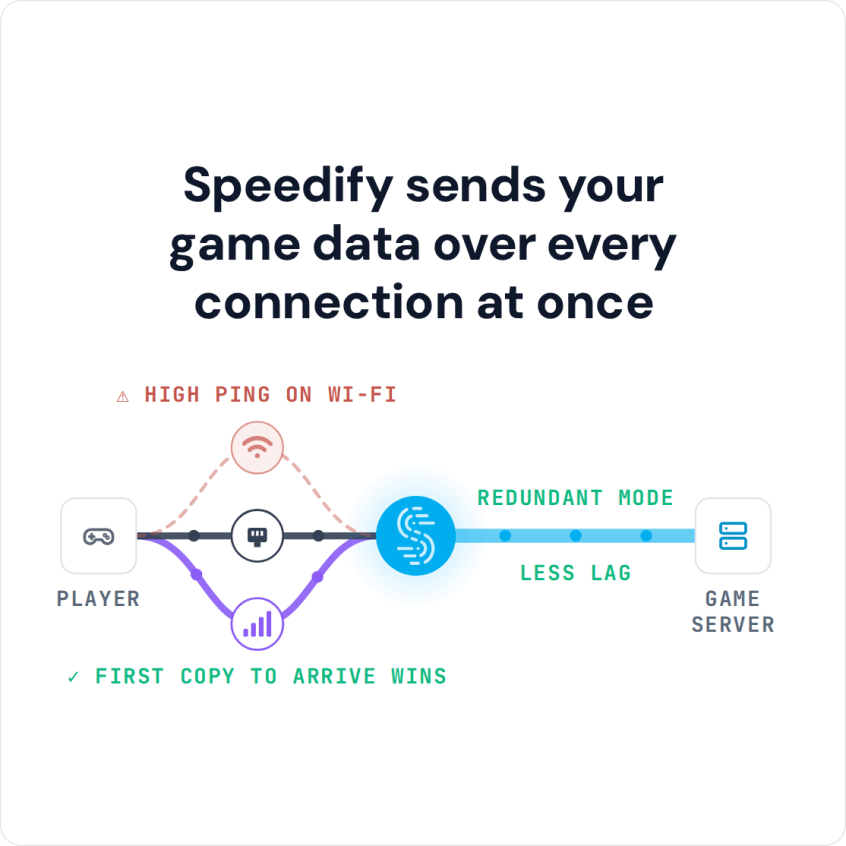
Speedify sends your game data over every connection at once
How do I use WiFi and 4G/5G cellular at the same time with Speedify?

Pick your two internet connections and your device below and we'll take you to the step-by-step setup guide.


How to Set Up Speedify for Online Gaming on a PC, Mac or Phone
- Download Speedify on the computer or phone you play on (Windows, macOS, iOS and Android).
- Open Speedify and create a free account (the free tier includes 5 GB per month), or sign in.
- Add a second internet connection: on a computer, plug in Ethernet or tether your phone by USB for 4G/5G cellular (iPhone on Mac or Windows, Android on Windows); on a phone, keep Wi-Fi on and turn on 4G/5G cellular.
- Speedify combines the connections automatically. For competitive matches, switch Speedify to Redundant Mode so every game packet goes over both connections.
- Launch your game and play as usual.
Improve Online Gaming Performance by Using 2 or More Internet Connections at Once
Combining is not the same as switching between connections. Every operating system already switches: when the default connection drops, it moves to another active connection after a delay, and the game can disconnect in the meantime. Speedify uses all connections at the same time, which is called combining internet connections, or link aggregation.
Combining multiple Internet connections helps most when your Wi-Fi is slow or has high latency: add another internet source, such as a phone’s 4G/5G cellular, Ethernet or Starlink, and Speedify uses both at once.
Check out these guides for Mac and Windows on how you can add more connections to improve your gaming experience. If your cellular data plan has a cap, you can control how to use those connections: set a metered connection’s priority to Secondary so Speedify leans on it less, or to Backup so Speedify uses it only if your main connection fails.
Try the UDP Transport Mode for Lower Gaming Latency
Are you experiencing slow speeds or high latency when gaming, even while running Speedify? Try setting your transport mode to UDP.
Also, switching the mode from Speed Mode (the default) to Redundant Mode sends every game packet over both connections, which cuts packet loss and lag spikes. For any other speed-related issues while using Speedify, check out this article.
Call of Duty and PUBG Ping Test Results With and Without Speedify
First person shooters (FPS) are the most ping-sensitive games, so two popular ones were tested with and without Speedify:
- Call of Duty: Modern Warfare on a Windows PC
- PUBG on an Android smartphone
The test used a slow Wi-Fi connection with high response time (ping) on its own, then the same Wi-Fi combined with a fast 4G cellular connection through Speedify, on Speedify’s fastest server with default settings. The results:
75 ms ping on Call of Duty: Modern Warfare on Wi-Fi alone, without Speedify

42 ms latency on Call of Duty: Modern Warfare with Speedify combining Wi-Fi and 4G, a 44% improvement

840 ms ping on PUBG on Wi-Fi alone, without Speedify

48 ms ping on PUBG with Speedify combining Wi-Fi and 4G, 94% better

To improve your gaming experience, start with your internet connection: Speedify combines the connections you already have for steadier ping and fewer disconnects.
Speedify
Get started with Speedify today.
Speedify combines Wi-Fi, 4G/5G cellular, Ethernet, Starlink and satellite into one faster, more reliable internet connection. Free to try: 5 GB a month with a free account. No credit card required.
🚀 Speed
Faster uploads and downloads, because Speedify uses all your internet connections at once.
📶 Stability
If one internet connection drops, Speedify moves your traffic to the others in milliseconds.
🔒 Security
AES-256 encryption on every internet connection, on any network you join.



15M+ downloads worldwide. 75K+ five-star reviews on iOS and Android.