

Next Normal remote productivity is the driver and differentiator
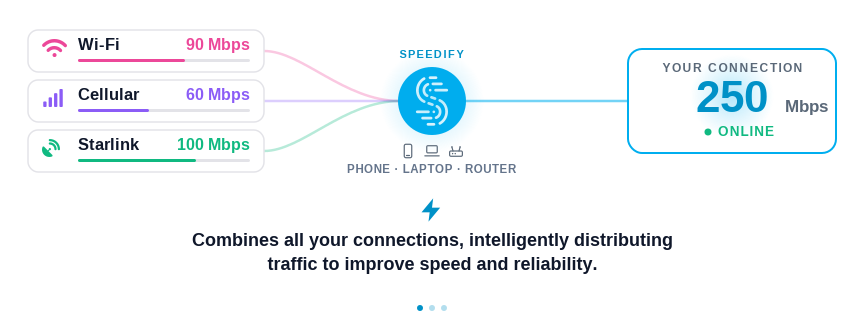
Getting ready for remote work starts with an internet connection that can carry a video call or an upload without cutting out at the wrong moment. Speedify is an app that combines Wi-Fi, 4G/5G cellular, Ethernet, Starlink and satellite internet connections into one faster, more reliable connection, and encrypts your traffic like a VPN. With two or more connections, for example home Wi-Fi plus your phone’s 4G/5G cellular, work keeps running even if one connection drops; on a single connection, Speedify still encrypts your traffic but cannot stop that connection from dropping. If you connect through a company VPN, here is how to stop a work VPN dropping at home.
How do I use WiFi and 4G/5G cellular at the same time with Speedify?
Pick your two internet connections and your device below and we'll take you to the step-by-step setup guide.


How Remote Work Grew During the Pandemic
Before the pandemic, only 7% of workers regularly worked from home. During 2020, 64% were working from home, and most had gotten used to it.
At the start of the lockdowns, most people expected a temporary inconvenience, with offices and classrooms reopening by Easter. Then the date slipped to Memorial Day, then to mid-summer, while the old normal slipped further away.
Work did not go back to the way it was. In this next normal, productivity is the driver and differentiator, and people who cannot keep up fall behind.
Remote Work Productivity: What Companies Found
Online learning company Chegg was one of many companies that believed productivity would plummet because of remote work, estimating its productivity loss at 15 to 20%, as detailed in a 2020 NY Times article. One senior executive tried to micromanage his way through the transition, which predictably didn’t work, and he eased off his employees.
Then a funny thing happened. Everything started to not only work, but work better than before.
Workers were ahead of schedule and asking for more tasks. While individuals have struggled with childcare, sickness and distractions at home, many companies found the overall productivity of their teams to be as high or higher than pre-pandemic levels. Chegg’s internal survey found that 86% of employees believed their productivity was as good as or better than before.
Cisco, Citrix, Deutsche Bank, Eventbrite and Microsoft are just a few other companies that have found that to be the case.
Remote workers are able to better focus without the distractions of the office. They save time by not commuting hours each day back and forth from their homes to the office. They take shorter lunches and have fewer unnecessary meetings. One extensive study from 2013 found that productivity increased by 13% when workers were at home.
Remote work pays off when a supportive corporate culture is in place and people are given the tools they need to make it successful. That doesn’t always happen, and you need to figure out how to make the best of your situation.

Remote Work After the Pandemic: What Workers and Companies Wanted
Despite those results, many companies in 2020 still treated remote work as temporary or as something to limit. Workers did not share that view.
According to 2020 research by Gallup, three-fifths (59%) of US workers who had been working remotely during the pandemic preferred to continue remote work as much as possible after public health restrictions were lifted. Before the pandemic set in, more than half (54%) of employees said they would quit their jobs for one that allows them to work remotely, according to Gallup‘s January 2020 survey.
On the other side of the employment equation, Gartner found in 2020 that 74% of companies expected at least some employees to keep working remotely after the pandemic.
Reliable Internet Decides Remote Work Productivity
Since the shift to remote work, employers and employees have had to create an office outside of an office, and for most the experience has been far from frictionless.
Without reliable internet connections, employees deal with interruptions and slow performance in VoIP calls, video, and virtual apps and desktops, and time that should go to work goes to reconnecting instead.
Over 60% of telecommuters face connectivity issues when working remotely. Don’t be one of them. If Zoom is where it hurts, see how to fix Zoom issues while working remotely.
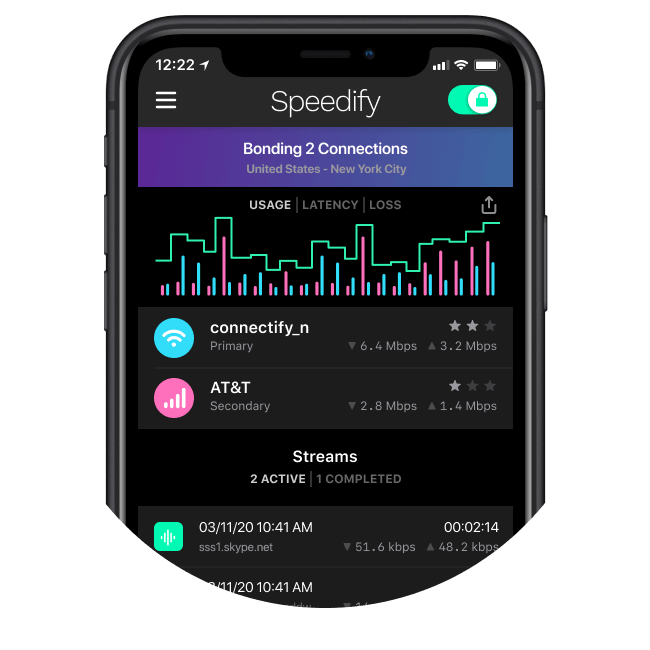
How Speedify Keeps Remote Work Connected
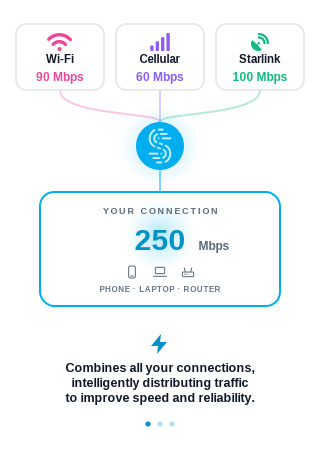
To be more productive at home, start with the internet connection. Speedify runs on your computer or phone and uses all of your internet connections at the same time, such as home broadband plus your phone’s 4G/5G cellular, so you get faster downloads and uploads and a call keeps going when one connection drops. Speedify also encrypts your traffic like a VPN and keeps no record of the sites you visit. Then choose the devices, equipment and tools that help you collaborate, video conference and take work anywhere.
Speedify
Get started with Speedify today.
Speedify combines Wi-Fi, 4G/5G cellular, Ethernet, Starlink and satellite into one faster, more reliable internet connection. Free to try: 5 GB a month with a free account. No credit card required.
🚀 Speed
Faster uploads and downloads, because Speedify uses all your internet connections at once.
📶 Stability
If one internet connection drops, Speedify moves your traffic to the others in milliseconds.
🔒 Security
AES-256 encryption on every internet connection, on any network you join.


15M+ downloads worldwide. 75K+ five-star reviews on iOS and Android.