
Use Speedify as Your Starlink Companion
The “Starlink Moving Too Fast for Policy” alert means your Starlink dish is moving faster than your Starlink plan allows. Residential plans are for one fixed address, so using one in a moving car, RV or boat can trigger it, and Starlink cuts your internet until you slow down. To use Starlink on the move, switch to a Roam or Priority plan.
Speedify is an app that uses your Starlink internet connection together with a second internet connection, like your phone’s 4G/5G cellular connection, so you stay online on the road even when Starlink cuts off.
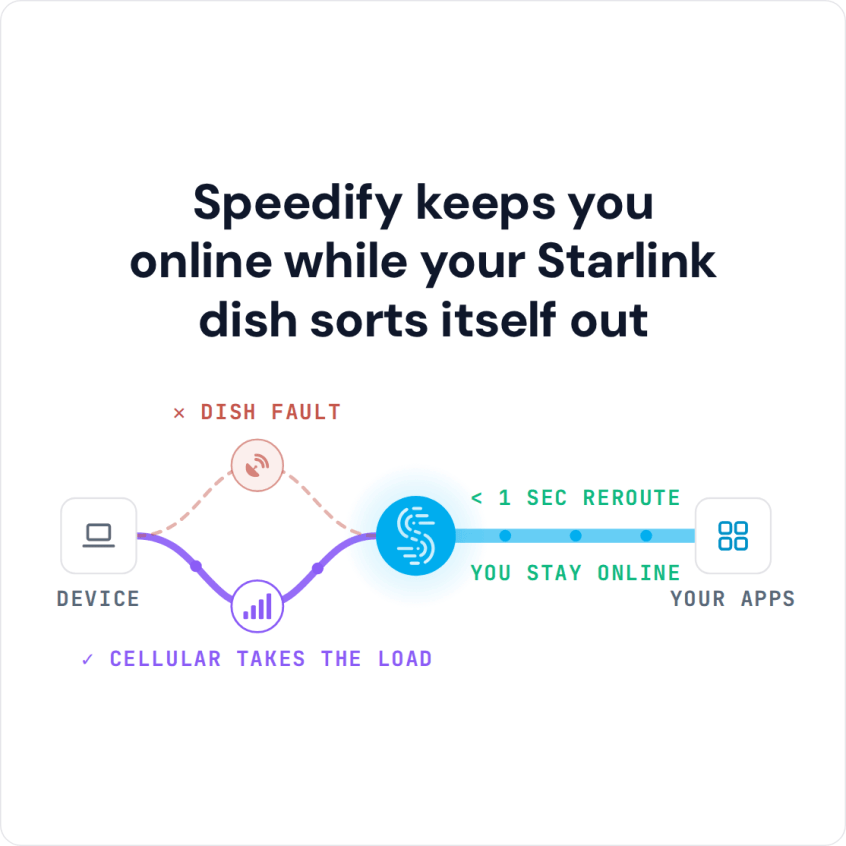
Speedify keeps you online while your Starlink dish sorts itself out
Starlink Internet Connection Dropouts Happen to Everyone
Speedify measures thousands of Starlink users in more than 150 countries. From 29 September to 12 October 2026, fixed Starlink dishes went offline for about 37 minutes a day on average, and Starlink dishes on RVs and boats for about 61 minutes a day.
Starlink also switches each dish to a new satellite every 15 seconds, and a switch can cause a short dropout. Even a perfectly installed Starlink dish goes offline, and about 7 in 10 Starlink users on Speedify use Starlink together with a second internet connection, like 4G/5G cellular.
Why Starlink Says You Are Moving Too Fast for Your Plan
Starlink sells different plans for different uses. A Residential plan is for one fixed address and assumes you won’t use your Starlink dish while you travel. For internet on the move, Starlink offers Roam plans and Priority plans.
The Starlink moving too fast alert comes up when your Starlink dish senses it is moving faster than your current plan supports. If you don’t slow down, Starlink turns off your internet.
How to Fix the Starlink Moving Too Fast for Policy Alert
- Slow down or stop. The alert clears once your Starlink dish is within what your plan allows. If you are packing the dish up to move it, here is what Stow means on Starlink.
- Check which Starlink plan you are on in the Starlink app or your Starlink account. Whether you can use Starlink while you move, and how fast you can go, depends on the plan.
- Switch to a plan made for travel if you use your Starlink dish on the road or on the water often. Roam and Priority plans work on the move; Residential plans don’t.
Why Cellular Keeps You Online When Starlink Cuts Off on the Move
If you know you’ll be traveling, switching to a Roam plan is the fix. But if you have to be on the move unexpectedly and still need the internet, you need a second internet connection that takes over on its own when Starlink turns off.
Speedify uses your Starlink internet connection together with any other internet connection you have:
- 4G/5G cellular
- A mobile hotspot
- Public Wi-Fi in range, when you stop
When Starlink cuts your internet because you are moving too fast for your plan, Speedify moves your internet traffic to your other internet connection right away, so you stay online without a break.
How to Stay Online When Starlink Says You Are Moving Too Fast, with Speedify
- Get the Speedify app on your devices. It runs on Windows, Mac, Linux, Android, iOS and even on OpenWrt routers.
- Connect your computer or phone to Starlink and to cellular at the same time. On a phone, stay on your Starlink Wi-Fi and keep the phone’s cellular connection turned on. On a computer, use your Starlink Wi-Fi plus your phone plugged in with a USB cable to share its cellular connection.
- Turn Speedify on. It uses both internet connections at the same time on its own, with no settings to change.
- Stay online on the road, even when Starlink turns off.


When your Starlink internet connection works, you also get nearly the full speed of both internet connections combined, not only failover.
Speedify needs that second internet connection: when Starlink is off, your phone’s cellular connection is what keeps you online, so it only helps where you have a cellular signal.
Download Speedify now and stay online wherever the road takes you.
Speedify
Get started with Speedify today.
Combine Wi-Fi, 4G/5G cellular, Ethernet, Starlink, and more into one faster, steadier connection. Free to try — no credit card required.
🚀 Speed
Faster uploads and downloads by bonding all your connections at once.
📶 Stability
Automatic failover in under a second when any connection drops.
🔒 Security
AES-256 encryption on every connection, on every network you join.



15M+ downloads worldwide. 75K+ five-star reviews on iOS and Android.