Speedify 16.7 Is Now Available
The latest version 16.7 of Speedify is now available for your devices running Android, iOS, macOS, Windows, Linux and OpenWrt. Speedify enables you to securely combine Wi-Fi, 4G, 5G, Ethernet, Starlink, satellite and more, to increase bandwidth, minimize latency and get failover protection.
Make sure you update Speedify on all your devices, including computers, smartphones, tablets and supported routers.
New Features in Speedify 16.7
This release is mostly Starlink. If you have one Starlink, Speedify now lets you monitor and tune it from inside the app. If you have two or more, it coordinates them as a bonded fleet. Outside Starlink: a custom adapter color picker, cellular ISP stats on Linux / Routers, Local Load Balancer Mode for Windows, and a handful of smaller improvements.
Starlink Control Center
Three new dashboard cards:
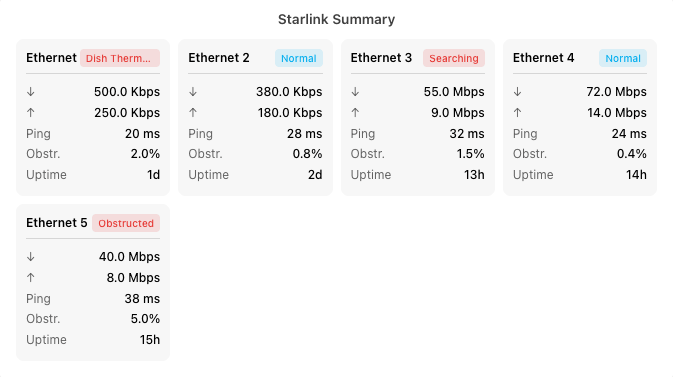
- Starlink Summary card: Status, throughput, ping, obstruction percentage, and uptime for each dish.
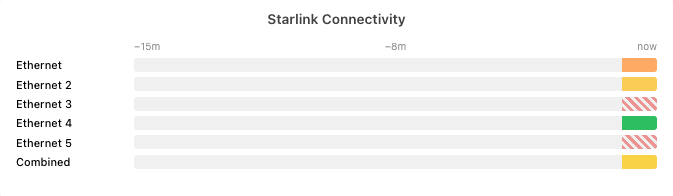
- Starlink Connectivity card: A 15-minute timeline per dish, plus a Combined row that shows whether your dishes overlap or fill each other's gaps.
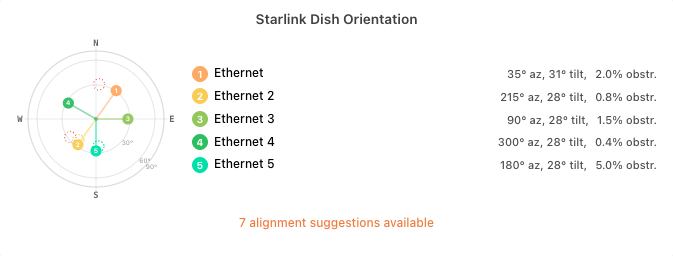
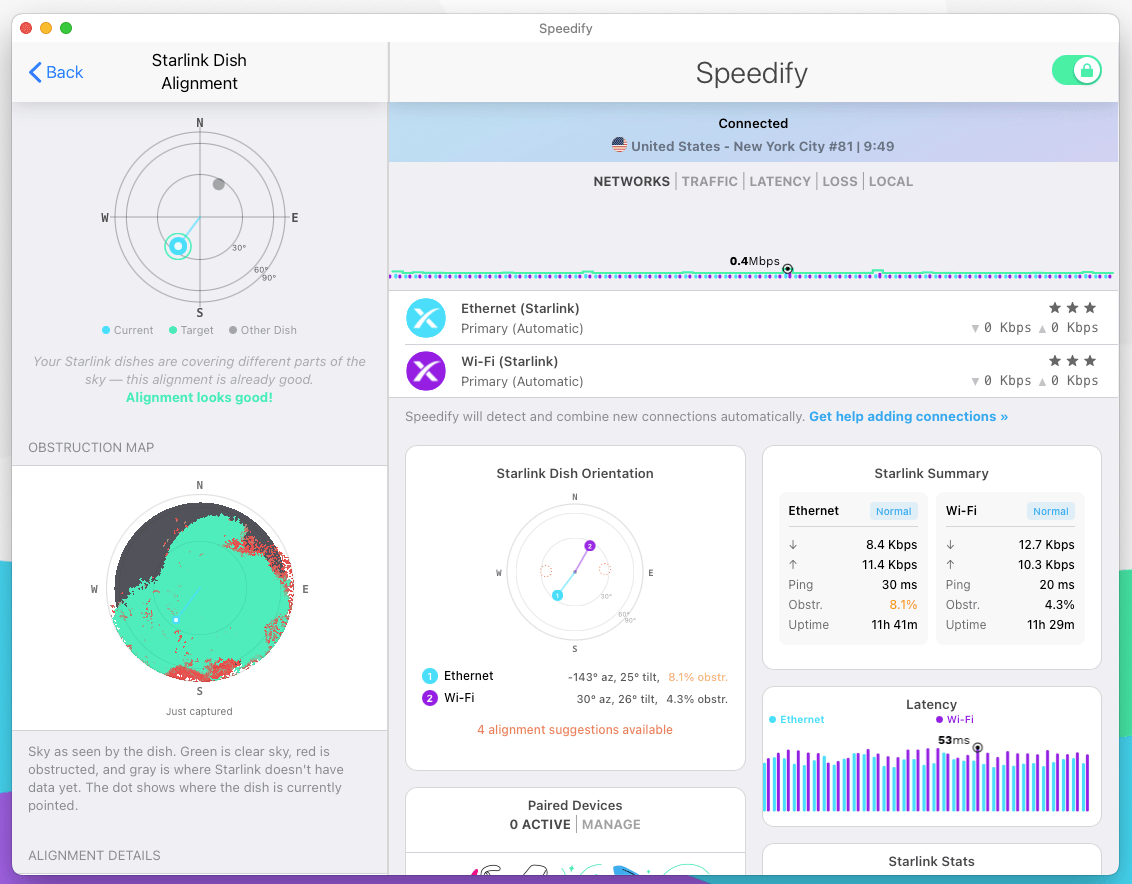
- Starlink Dish Orientation card: A compass-style plot of where each dish is aimed, so you can tell whether multiple dishes actually cover different sky.
- Starlink Connectivity card: A 15-minute timeline per dish, plus a Combined row that shows whether your dishes overlap or fill each other's gaps.
- Starlink Dish Orientation card: A compass-style plot of where each dish is aimed, so you can tell whether multiple dishes actually cover different sky.
Starlink Alignment Wizard
- Bonding Alignment mode: Picks per-dish targets across the sky for multi-dish setups.
- Audio tracking: Beeps as you reduce alignment error, so you can align without watching the screen.
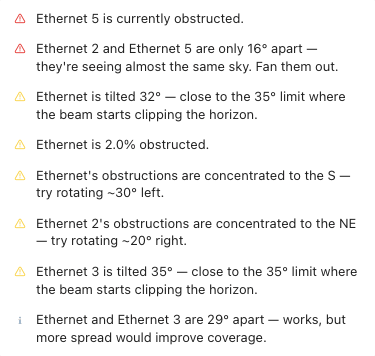
- Setup Analysis report: Flags everything in the setup worth fixing.
Starlink Obstruction Map
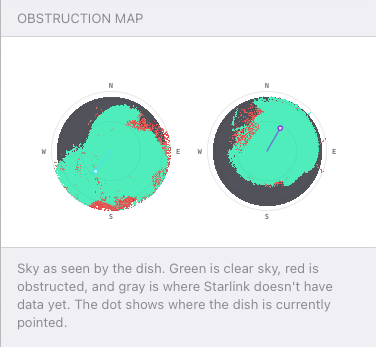
Speedify pulls Starlink's rolling obstruction map directly from the dish and renders it as a polar fish-eye view: green where the dish has clear line-of-sight, red where it's been blocked. When obstruction has a clear directional bias, the alignment wizard suggests a specific rotation (e.g. "Most of the obstruction is to the south. Try rotating the dish 30° north."). With multiple Starlink dishes, the maps render side by side so overlap is visible.
Custom adapter colors
The network adapter color picker now has a custom color option. Pick any color for any adapter.
Slack Huddles detection
Slack Huddles are now detected automatically and treated as a built-in priority stream, alongside Zoom, Teams, and Discord.
Self-Hosted server display names
Self-Hosted servers show their friendly display name in the server picker and on the dashboard, instead of just the hostname. Easier to tell apart when you've spun up more than one.
Windows: Local Load Balancer Mode
The Local Load Balancer Mode is now available for Windows and allows traffic to be distributed between multiple Internet connections per flow/socket completely on the client side, with no VPN connection.
Linux
- ModemManager support: Speedify reads cellular ISP stats (signal strength, technology, operator, IMEI, IMSI) from any Linux modem managed by ModemManager, surfaced in the same place as Starlink and other ISP stats.
- AppArmor compatibility: Improvements for distributions that ship with AppArmor enabled by default.

Update Speedify Now
Speedify is the only app that seamlessly combines all of your connections, including WiFi, 4G, 5G, Ethernet, and Starlink, into one stronger connection to keep you online and secure with increased bandwidth, reduced latency, and failover protection.
You can easily share and combine LTE, 4G and 5G cellular connections between devices to create a faster, more reliable connection for everyone using Speedify’s cellular sharing feature, Pair & Share
Make sure you update Speedify on all your devices, including computers, mobile devices and supported routers!