
Unbreakable VPN Connection When Abroad by Combining Starlink, Wi-Fi, 4G, 5G, and DSL with Speedify
Moving abroad for work brings two connectivity problems on day one: reaching the office network safely, and reaching the shows, banks and news sites from your home country.
Speedify encrypts your internet traffic like a VPN, and Speedify also uses your new apartment’s Wi-Fi and the 4G/5G cellular data from a local SIM card together, so your internet connection is faster and does not drop during a call with head office.
Everything below covers why a VPN matters when you live abroad, a five-step checklist for choosing one, and how to watch streaming services from home – leaving Speedify on keeps that traffic private and your internet connection steady.
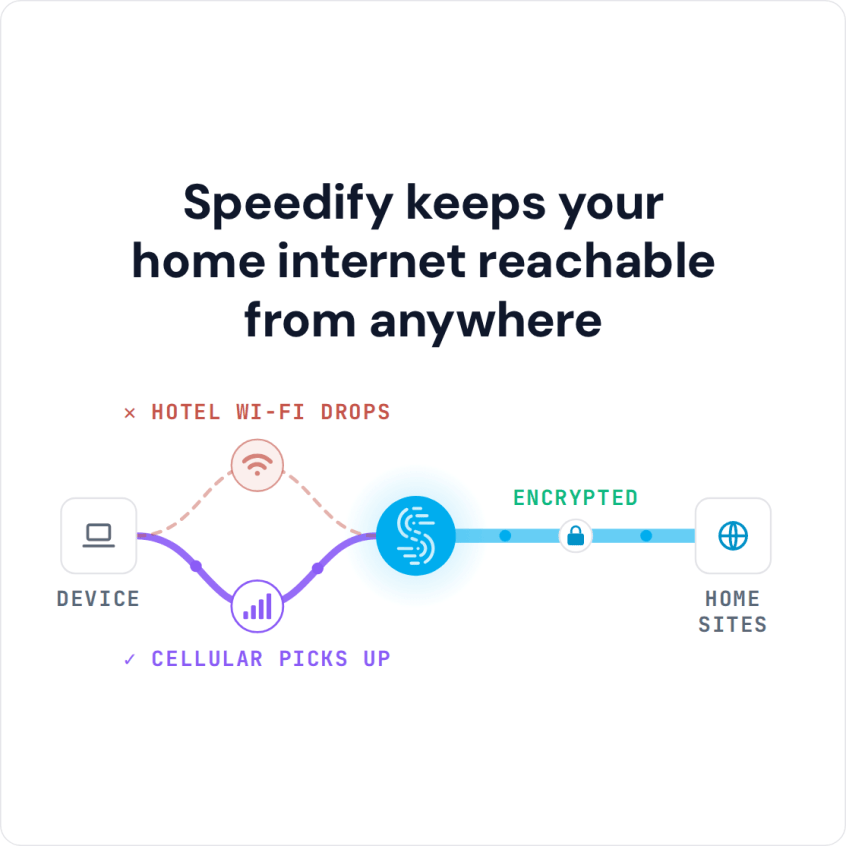
Speedify keeps your home internet reachable from anywhere
Why Do I Need a VPN when Abroad?
A VPN service for remote work allows users to establish secure online connections with a remote computer network from anywhere in the world. The two main roles of the VPN when abroad is to secure the privacy of the user and also to allow using services from the home country that may be restricted when traveling. If you are settling in for longer, see how to stay online while living abroad.
However, in today’s landscape, Internet security is not the only requirement for a VPN solution when abroad. There are some other aspects you need to take into account:
- Internet stability – being always online is important, especially in the middle of an important business call with screen sharing and important decisions to be made. Or simply when watching a live event online.
- Internet speed – while you might think reliability takes the lead, imagine yourself working on a 56k-like connection speed. It’s like not working at all due to the lack of usable Internet.
5 Steps Checklist on Using the Best VPN when Abroad
Given the 3 coordinates described above (security, reliability, speed), here are the steps you should take to get yourself the best VPN when abroad:
- Check out the VPN security encryption level and privacy policy. Although all VPNs will protect your online activities to a certain degree (especially important when using unprotected public Wi-Fi hotspots), make sure the one that you choose has at least a 256-bit encryption key and a no-log policy in which they state they will not sell your “anonymized” traffic data to 3rd party marketing companies.
- Don’t use free VPN solutions when abroad! Although it sounds tempting, you’ll basically get what you’re paying for and “more” in the sense that you might have different companies “chasing” you online with advertisements. And that’s the best case scenario!
- Seek stability from your VPN service when overseas – conventional VPN services have a major flaw with how they’re built, running all traffic through a single connection.
Luckily, Speedify is a fast bonding mobile VPN that has automatic and seamless failover. Speedify can use multiple Internet connections simultaneously – Wi-Fi AND mobile data on your phone, for example. So, even before your WiFi connection drops, Speedify will route traffic through the mobile data connection, so you won’t skip a beat.
- More speed is better for a VPN when abroad – any conventional VPN service adds overhead to the online traffic in order to encrypt it, so, your Internet will be slower when using traditional VPNs. Remember – you have to get sufficient Internet speeds for your bandwidth hungry VoIP video calls or online video streams.
- Be sure you can use the VPN when overseas on all your devices – whether you’re working from your Mac or PC laptop or from your iPhone, iPad or Android smartphone, the VPN for remote work service you choose should support all these devices and, more than that, not charge you extra for additional devices.
How to Unblock and Watch Video Streaming with a VPN when Abroad
Using a VPN when abroad will protect you, but most of the VPN solutions will also slow down the Internet, as all data passes through their servers first before going to or from its final destination.
Speedify doesn’t slow down your online speed: it uses a fast and secure encryption algorithm, and it can also use 2 or more Internet connections at the same time for more stability.
Tried enough VPNs when abroad and none was both secure AND fast plus reliable? Speedify provides the speed, security and reliability as the best VPN when abroad! Get started with Speedify now!
Speedify
Get started with Speedify today.
Combine Wi-Fi, 4G/5G cellular, Ethernet, Starlink, and more into one faster, steadier connection. Free to try — no credit card required.
🚀 Speed
Faster uploads and downloads by bonding all your connections at once.
📶 Stability
Automatic failover in under a second when any connection drops.
🔒 Security
AES-256 encryption on every connection, on every network you join.



15M+ downloads worldwide. 75K+ five-star reviews on iOS and Android.