
Internet Connection Continuity Problem? Fix it with Speedify!
Staying online should be simple, yet a phone loses its internet connection constantly, and the design of the phone is why. It uses either the cellular network or Wi-Fi, never both at the same time, so every switch from one network to the other is a break in service. Navigation apps feel every break, which is often why Waze shows No Network.
Speedify is an app that runs your internet over Wi-Fi, 4G/5G cellular, Ethernet, Starlink and satellite internet connections together, removing those breaks. Speedify can only keep you online through a drop when it has two or more internet connections to work with, for example Wi-Fi plus your phone’s 4G/5G cellular. On a single connection, Speedify works as an encrypted VPN and cannot stop that connection from dropping. Coming up is what actually breaks an internet connection, why other fixes fall short, and what using Speedify delivers on your phone, tablet or computer.
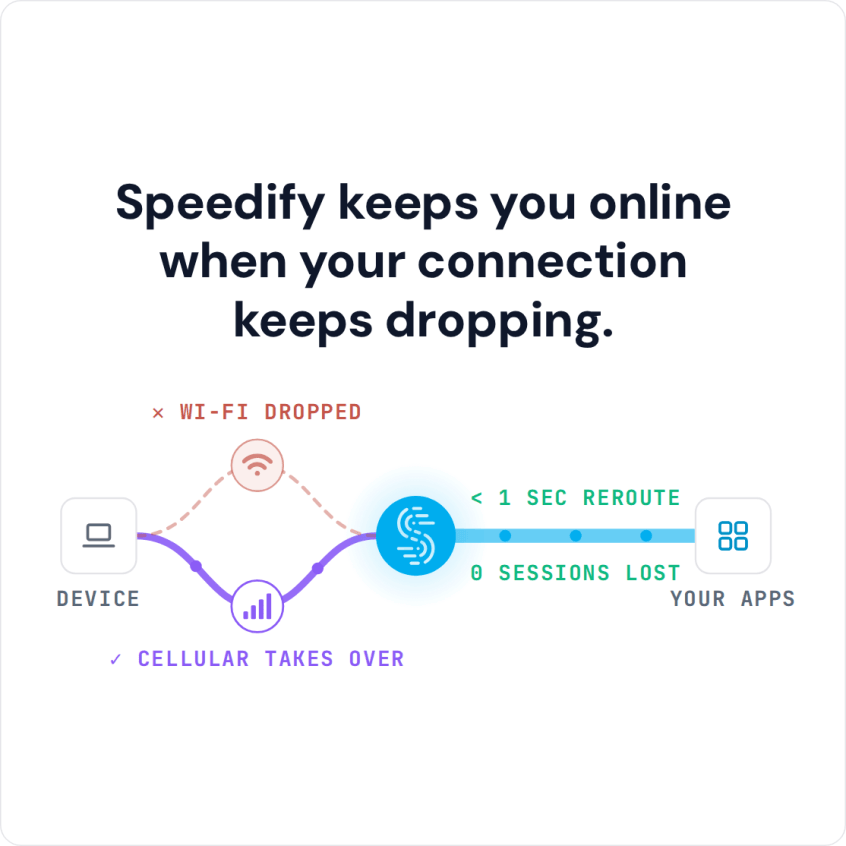
Speedify keeps you online when your connection keeps dropping.
What Breaks Connection Continuity?
Connection continuity is a major issue for mobile phone users. The main cause is the design of your device. No matter who your carrier is, your cell signal is going to fluctuate a lot as you move around. That’s part of the way it works. Your device is designed to only connect to either the cell network or a WiFi network. By default, it cannot connect to both.
That means if something happens to your signal, you lose the connection. There is no second internet connection to fall back on. When your phone tries to switch to new Wi-Fi networks, it first breaks the first connection and then enables the second connection. This causes data loss and connection gaps that range from an annoying few seconds to a painful few minutes.
When you are moving around the chances of breaking connection continuity are greater. But, it can also happen when you are sitting still in a coffee shop. Cell signals and WiFi signals are not stable.
How Speedify Delivers Connection Continuity
Speedify solves the issue with connection continuity. The Speedify app allows your phone to connect to a WiFi network and a cell signal at the same time. This means a second internet connection takes over when something happens to one of them.
But, even more important, Speedify uses smart technology to manage all of your Internet connections in the background. It uses your cell signal as a bridge when you switch between WiFi networks. You don’t have to do anything to make the switch, Speedify does it all automatically. You get to keep enjoying your FaceTime call or YouTube video uninterrupted.
With Speedify, you also don’t have to worry about excessive data usage or having it drain your battery. Speedify can prioritize Wi-Fi connections so that you only use your valuable data when absolutely necessary. It works in the background, but does not draw significantly from your device’s resources.
Issues with Other Developer “Fixes”
Android and iOS developers know that connection continuity is a major problem for their customers. They have each tried to address this with weak software fixes. However, these “fixes” have three major drawbacks:
- They are not available for all users, only those who can download the most recent OS
- They keep you vulnerable to compromised WiFi networks
- They don’t work very well
The Speedify app is easier to use and works better than either the Android OS or the iOS connection continuity solution. Plus, Speedify does much more than just manage your connections.
What the Speedify App Delivers
Speedify also uses cutting-edge encryption to keep your data safe. Your privacy is protected from the prying eyes of any ISP or any hackers who have compromised a public Wi-Fi network. When Speedify combines Wi-Fi and 4G/5G cellular, downloads and uploads can use the speed of both connections at once.
Download the Speedify app today for Android and iOS devices, keep Wi-Fi and 4G/5G cellular both turned on, and switching networks no longer cuts you off.
Speedify
Get started with Speedify today.
Speedify combines Wi-Fi, 4G/5G cellular, Ethernet, Starlink and satellite into one faster, more reliable internet connection. Free to try: 5 GB a month with a free account. No credit card required.
🚀 Speed
Faster uploads and downloads, because Speedify uses all your internet connections at once.
📶 Stability
If one internet connection drops, Speedify moves your traffic to the others in milliseconds.
🔒 Security
AES-256 encryption on every internet connection, on any network you join.



15M+ downloads worldwide. 75K+ five-star reviews on iOS and Android.