
Van Life Internet That Actually Works
Van life internet usually comes from three places: 4G/5G cellular, a Starlink dish, and campground or cafe Wi-Fi. None of them works everywhere you park. One carrier drops out between towns, Starlink needs a clear view of the sky, and campground Wi-Fi is usually too weak for a video call.
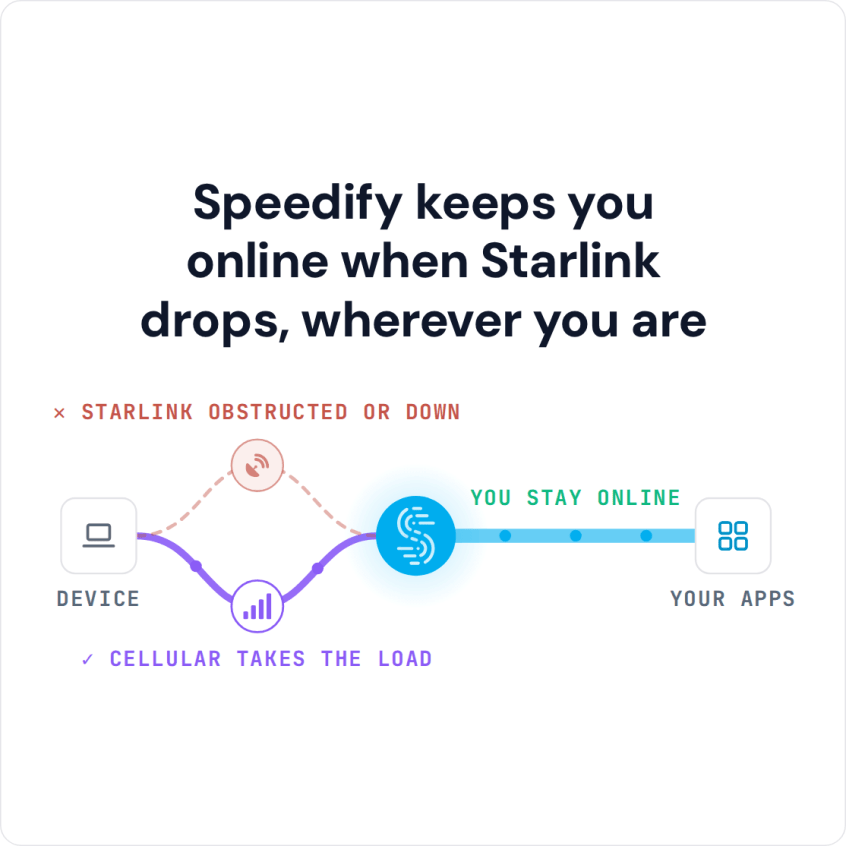
Speedify is an app that uses Wi-Fi, cellular and Starlink at the same time. While all of them work, you get faster downloads and uploads, and when one internet connection drops, Speedify keeps you online on the others. With only one of them, Speedify works as an encrypted VPN and cannot stop that internet connection from dropping.
Watch now
How Speedify combines internet connections on any hardware
Get started with Speedify for your business
Speedify offers three commercial paths. They work together, and most enterprise customers use two or more.
01
Speedify Teams
Speedify on every supported OS for every team member
Centralized dashboard for billing, user provisioning, and usage analytics
CSV import/export and a RESTful management API
02
Speedify for Routers
License for supported OpenWrt routers
Powered by Speedify hardware lineup ready to deploy out of the box
Miri, GL.iNet and other partner models
Covers every device on the network, with no per-device install
03
Embed Speedify into your product
A · DIY
Build it yourself with the Speedify SDK.
Integrate Speedify into your iOS, Android, Windows, macOS, Linux or QNX product. Full developer documentation, sample code and supported integration paths. Your team owns the build, and the Speedify SDK handles combining the internet connections.
B · CUSTOM ENGINEERING
Have the Speedify team build it for you.
Why Van Life Internet Drops: Where Starlink, Cellular and Wi-Fi Each Fail
Each source of van life internet fails in a different place, so a van that depends on only one of them keeps losing the internet.
- Starlink. Fast with a clear view of the sky. Trees, hills and canyon walls block the Starlink dish, and many van setups only work while you’re parked.
- 4G/5G cellular. Great near a cell tower, but a single carrier drops to nothing between towns and on back roads. Two carriers cover more ground than one.
- Campground or cafe Wi-Fi. Free speed when it’s there, but it’s shared, far from your van and often capped, so it rarely holds a video call.
How Speedify Uses Starlink, Cellular and Wi-Fi Together in Your Van
Speedify uses whatever internet connections you have, together, and fills the gaps automatically.
- Use Starlink and cellular together. Starlink carries most of the traffic, cellular covers the moments when trees or driving block the Starlink dish, and Speedify uses both while both work.
- Add a second carrier or campground Wi-Fi. Each extra internet connection means fewer dead zones.
- Automatic switching. When one internet connection drops, Speedify switches your traffic to the others, so your calls and streams keep going.
If you work from the van, see how to keep steady video calls and uploads on Starlink.
Running Speedify on One Laptop vs a Travel Router for the Whole Van
There are two ways to run Speedify in a van. To cover one laptop or phone, install the Speedify app, and Speedify uses that device’s internet connections directly. To cover every device in the van, run Speedify on a Powered by Speedify router (a router with Speedify built in), the same idea as turning a travel router into an internet gateway that combines internet connections. More setups for people who work on the road: reliable internet while working from anywhere.
How to Stay Online in a Van While Driving and Boondocking
Parked under a clear sky, let Starlink lead and cellular cover the gaps. On the road, rely on two cellular carriers, so the van stays online between towers. When you’re boondocking (camping off-grid, far from campgrounds), use every carrier you can reach, and expect gaps at the most remote spots.
The most reliable van life internet setup is Starlink plus two cellular carriers, because it covers blocked sky, driving and coverage gaps. But if you park somewhere with no cellular signal and no view of the sky, Speedify has nothing to work with. No app creates an internet connection where there is none. Speedify helps wherever you have at least two internet connections, which Starlink and cellular together give you at many stops.
Speedify Is Used on Millions of Devices Worldwide
Speedify has made internet connections faster and more reliable for businesses and individuals since 2014.
15M+
Speedify downloads worldwide75K+
5-star reviews for Speedify on iOS and Android82
Speedify server points of presence in 50+ cities on 6 continents500TB+
Of internet traffic carried by Speedify every weekSpeedify Partners
Speedify works with these companies to bring faster, more reliable internet and networking technology to their customers and employees.


For van rental companies and teams working on the road: Speedify can combine Starlink and cellular in every van you run. Contact Us to plan the setup.
For van lifers: Download Speedify to use Starlink, cellular and campground Wi-Fi together in your van. Still choosing a router? See routers for camper vans and RVs.
Speedify Business Solutions
Speedify Teams
Speedify for Routers

Speedify Embedded Solutions and Integrations
Add Speedify to your own app or hardware with the Speedify SDK. Your product then combines internet connections, fails over automatically when one drops, and encrypts the traffic, using the same technology as the Speedify app.