

Turn a Travel Router Into a Bonded Internet Gateway with Speedify
Hotel Wi-Fi is slow and drops. Campground and marina Wi-Fi is worse. A travel router is supposed to fix that by giving all your devices one network wherever you go, but on its own it still rides a single shaky connection. With Speedify installed, the travel router combines every connection it can reach into one, so your laptop, phone, and everything else on the network stay fast and online.
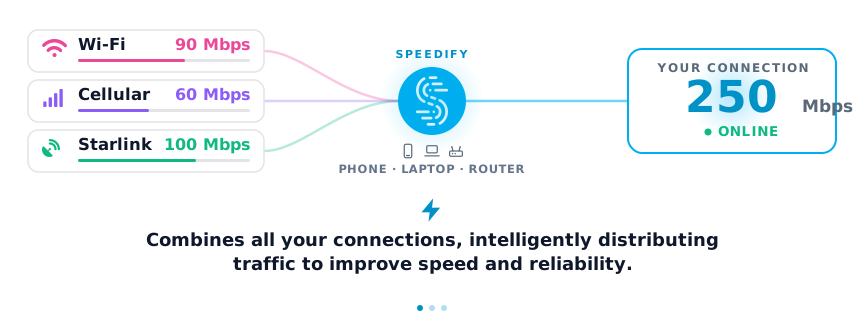
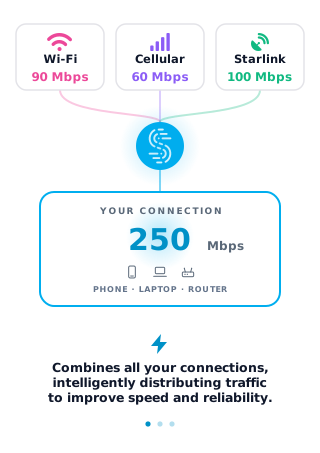
Speedify is an app that combines Wi-Fi, 4G/5G cellular, Ethernet, Starlink and satellite internet connections into one faster, more reliable connection; on a router, it does this for the whole network. With two or more connections, Speedify’s technology for combining connections moves your traffic to the remaining connections when one drops, so a dropped hotel network does not end your call. On a single connection, Speedify still encrypts the traffic but cannot stop that connection from dropping.
How do I use WiFi and 4G/5G cellular at the same time with Speedify?
Pick your two internet connections and your device below and we'll take you to the step-by-step setup guide.


Why a Travel Router That Combines Connections Beats a Plain One
Most travel routers either repeat one Wi-Fi network or fail over from one connection to another, using a single link at a time. A Speedify-powered travel router uses them together. Hotel Wi-Fi plus your phone’s 4G/5G cellular become one faster, steadier connection, and Starlink can join the mix for an RV or boat.
- Everything on the network benefits. Phones, laptops, tablets, and streaming sticks all use the combined connection without installing anything.
- Drops stop interrupting you. When the hotel Wi-Fi cuts out, Speedify keeps going on 4G/5G cellular.
- Real-time traffic gets priority. Speedify protects video calls and live streams, which suffer most on flaky travel networks.
What You Need for a Speedify Travel Router
The travel router has to be one Speedify supports, which means OpenWrt 23.05 or later, or GL.iNet firmware, on an x86_64 or aarch64 CPU. Many popular GL.iNet travel routers qualify out of the box. Confirm your model in Speedify’s supported routers article, and if your device runs stock firmware, flash mainline OpenWrt from the OpenWrt firmware selector first. Running Speedify on a router uses a Speedify Router License.
How to Set Up Speedify on a Travel Router
- Install Speedify on the travel router. Follow Speedify’s OpenWrt and GL.iNet setup guide to install over SSH and sign in.
- Add your connections as WAN interfaces. Connect the hotel or campground Wi-Fi as one WAN and a USB-tethered phone or a second radio as another. The interface steps are in Speedify’s setup guide for combining connections on OpenWrt.
- Connect your devices to the travel router as usual. Speedify combines the WANs in the background and shares one fast, encrypted connection with everything on the network.
Travel, RV, and Van Internet with Speedify
The same setup powers internet on the road. For vehicle-specific builds, see Speedify’s guides to building an RV Wi-Fi router that combines connections and fast, reliable RV internet options. On an RV or boat, combining Starlink with 4G/5G cellular gives you a connection that holds up when the dish gets obstructed or the cellular signal fades.
A Travel Router Needs a Second Internet Connection to Combine
Combining only helps when there is capacity to combine. If the only connection you can reach is a single jammed hotel network, no router can add bandwidth that is not there. The gain comes from a second internet connection, usually your phone’s 4G/5G cellular, so the travel router has something to combine.
Speedify Travel Router: FAQ
Can any travel router run Speedify?
No. The travel router needs OpenWrt or GL.iNet firmware on an x86_64 or aarch64 CPU. Many GL.iNet travel routers qualify; check the supported routers list first. Free Speedify accounts do not work on routers; a router needs a Speedify Router License.
Can I combine hotel Wi-Fi with my phone’s cellular?
Yes. That is the most common travel setup. Speedify uses the hotel Wi-Fi and your 4G/5G cellular together and keeps you online if the Wi-Fi drops.
Does this work with Starlink for an RV or boat?
Yes. Speedify combines Starlink with 4G/5G cellular or Wi-Fi, so the connection holds up when the dish is obstructed or the signal fades.
Do all my devices need Speedify installed?
No. Only the travel router runs Speedify. Every device connected to it gets the combined, encrypted connection automatically.
Speedify
Get started with Speedify today.
Speedify combines Wi-Fi, 4G/5G cellular, Ethernet, Starlink and satellite into one faster, more reliable internet connection. Free to try: 5 GB a month with a free account. No credit card required.
🚀 Speed
Faster uploads and downloads, because Speedify uses all your internet connections at once.
📶 Stability
If one internet connection drops, Speedify moves your traffic to the others in milliseconds.
🔒 Security
AES-256 encryption on every internet connection, on any network you join.


15M+ downloads worldwide. 75K+ five-star reviews on iOS and Android.