
A Personal Hotspot Shares Your Phone’s 4G/5G Cellular Connection with Other Devices Over Wi-Fi
A personal hotspot is a feature built into smartphones that lets you share your cellular data connection with other devices — laptops, tablets, other phones — over Wi-Fi, USB, or Bluetooth. Your phone acts as a portable wireless router, turning its cellular link to the network into a local Wi-Fi network that nearby devices can connect to. If you want to take that further and get more bandwidth and reliability from your hotspot, Speedify’s Pair & Share feature lets you combine multiple personal hotspots together for faster upload and download speeds for everyone connected.
<1 sec
With Speedify, your internet stays on when one connection fails.
When one of your internet connections drops, Speedify shifts your traffic to your remaining connections in under a second — so calls don’t cut out and downloads don’t stall.
Should you have a backup 4G, 5G, Starlink, or cable internet connection?
Yes — every internet connection goes down, including Starlink, which drops for ~34 minutes a day on average. A backup connection from a different provider means one outage never takes you fully offline. The most common options are a 4G/5G cellular hotspot, a cable or DSL line, or a second satellite dish.
4G/5G cellular
Works anywhere. Just a SIM or hotspot — no installation needed.
Learn more →Cable / DSL
Best for fixed locations. Different network, so outages rarely overlap.
Learn more →Second Starlink
Adds redundancy and throughput for remote sites or heavy usage.
Learn more →Speedify bonds any two connections into one — automatic failover, more speed, no dropped calls.
Try Speedify free →

Speedify Feature · Pair & Share
Cellular sharing that works better than a mobile hotspot.
Speedify Pair & Share: share cellular between your devices, both ways
Most hotspots give. Speedify's Pair & Share gives and takes. Two devices running Speedify pair up and each uses the other's cellular connection simultaneously, so you both get faster uploads, faster downloads, and a steadier connection. No extra hardware, no new data plans, no setup beyond a tap.
Learn how Speedify's Pair & Share works ›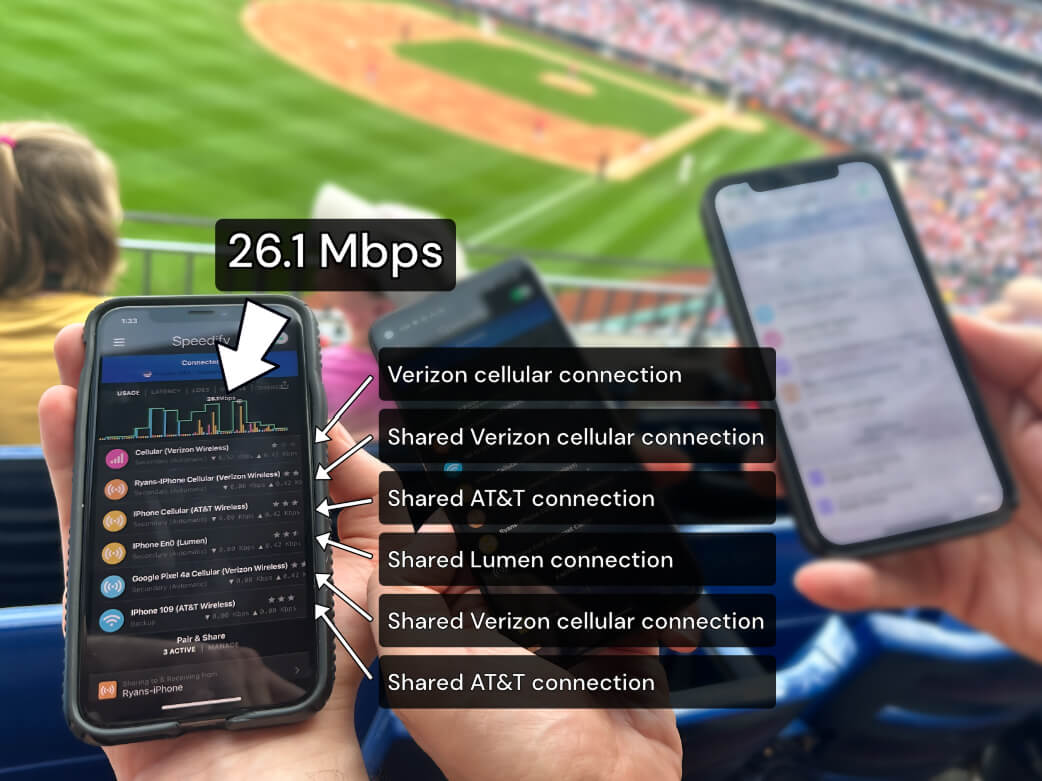
More speed
Every device you pair with adds its cellular to yours, and yours to theirs.
Stays connected
If a paired device drops out, Speedify keeps you online on the remaining links.
Always private
Every shared connection runs through AES-256 encryption. Your traffic is yours.
No new gear
Runs on devices already running Speedify, over your local network. Pair once, reconnects automatically.


What a Personal Hotspot Actually Does
When you enable a personal hotspot, your phone starts broadcasting a Wi-Fi network, just like a home router does. Any device that connects to that network can use your phone’s cellular data connection to reach the internet. Your phone handles the routing between the local Wi-Fi network it’s broadcasting and its 4G/5G cellular connection to your carrier.
From the perspective of a connected laptop or tablet, the hotspot looks like any other Wi-Fi network. The difference is what’s on the other side: instead of a cable modem or fiber connection, it’s the 4G/5G cellular link from your phone to the nearest tower on your carrier’s network.
How Personal Hotspots Are Used
Getting a Laptop Online Without Wi-Fi
The most common use case: you’re somewhere without available Wi-Fi – on a train, at a client site, in a hotel with unreliable in-room internet – and you need to get a laptop or tablet online. Turning on a personal hotspot gives you a private connection that’s tied to your data plan rather than whatever public network happens to be nearby.
Backup When Fixed Internet Goes Down
When home or office internet fails, a personal hotspot provides a cellular fallback. It’s not always fast enough to replace a broadband connection for the whole household — hotspot data is often throttled or capped — but for keeping critical work going during an outage, it’s a practical option that doesn’t require any additional hardware.
Sharing 4G/5G Cellular Data with a Group
A personal hotspot can serve multiple connected devices at once, making it useful when a group needs internet access and only one person has a reliable cellular plan. Everyone connects to the same hotspot, and all their traffic flows through that one phone’s cellular link.
The Limits of a Single Personal Hotspot
A personal hotspot is useful but has real constraints that come from the cellular connection it depends on.
Network Carrier Throttling
Most mobile plans treat hotspot data as a separate allocation with different speed rules from regular on-device data. Even unlimited plans routinely cap hotspot speeds at 5–15 Mbps, or throttle hotspot data after a monthly threshold. This isn’t a hardware limitation — LTE and 5G can move data much faster — it’s a carrier policy applied at the network level to hotspot traffic specifically.
Going Over Your Hotspot Data Cap
Hotspot data allotments are often smaller than total plan data, and they run out faster than most people expect. Uploading video, supporting multiple connected devices, or running cloud backups can exhaust a monthly hotspot cap in a few hours. Once the cap is hit, speeds drop to near-unusable levels on that plan, regardless of how much regular data is left.
Single Carrier Dependency
A personal hotspot is only as good as your carrier’s coverage at your current location. No carrier covers every location equally well — signal strength varies by building, floor, neighborhood, and network type. If you’re somewhere your carrier doesn’t cover well, the hotspot struggles too. And if the local tower gets congested, the hotspot slows down with it.
Device Heat and Thermal Throttling
Running a personal hotspot is demanding on a phone. The cellular radio is active continuously, the Wi-Fi radio is broadcasting, and the CPU is managing traffic between them. Sustained hotspot use generates significant heat, and most smartphones throttle performance — including the cellular radio — when they get too hot. Extended sessions can see speeds degrade steadily as the phone heats up.
How Speedify’s Pair & Share Feature Takes Personal Hotspots Further
The limits of a personal hotspot all trace back to the same root cause: one phone, one carrier, one cellular connection. Speedify is an app that helps you combine multiple internet connections simultaneously for faster uploads and downloads. Connections include Wi-Fi, Ethernet, Starlink, other satellite, wired broadband and tethered smartphones. Speedify routes traffic packet-by-packet across all available connections based on real-time performance metrics: latency, jitter, packet loss, and available bandwidth. If one connection weakens, traffic automatically shifts to the others without dropping active sessions.
Speedify’s Pair & Share feature brings that bonding capability specifically to the cellular connections between paired phones. Rather than each phone keeping its hotspot to itself, Speedify’s Pair & Share feature lets them share and consume each other’s connections simultaneously, combining multiple personal hotspots together for faster upload and download speeds for everyone in the group.
How Speedify’s Pair & Share Feature Works
One-Time Pairing
All phones need to be running Speedify and connected to the same local Wi-Fi network. Pairing is a one-time process: devices discover each other automatically, establish encrypted peer-to-peer tunnels, and remember the relationship for future sessions. No passwords to exchange, no repeated setup.
All Phones Give and Take Simultaneously
Once paired, each phone acts as both a connection provider and a connection consumer at the same time. Phone A contributes its cellular connection to Phone B; Phone B contributes its cellular connection to Phone A. Both devices draw bandwidth from two cellular connections at once, with Speedify’s channel bonding engine continuously routing packets to whichever connection is performing better at that instant.
This is what makes Speedify’s Pair & Share feature different from simply connecting to someone else’s hotspot. Standard hotspot sharing is one-directional — one device gives, the other takes. With Speedify’s Pair & Share feature, both devices give and take at the same time, combining multiple personal hotspots together for faster upload and download speeds for everyone.
Seamless Automatic Failover
Speedify monitors both connections continuously. If one carrier loses signal or hits congestion, traffic shifts automatically to the other without dropping active sessions. Video calls stay connected. Uploads continue without restarting. The failover happens at the packet level, before the application layer notices anything is wrong.
Who Benefits Most from Combining Personal Hotspots with Speedify’s Pair & Share Feature
Remote Workers and Traveling Professionals
For anyone whose work depends on a reliable connection away from a fixed office, a single hotspot is a single point of failure. Speedify’s Pair & Share feature gives remote workers the combined bandwidth and automatic failover of two cellular connections — keeping video calls, cloud collaboration, and VPN access stable regardless of which carrier has stronger signal at any given location.
Live Streamers and Video Creators
Upload speed and connection consistency are essential for live streaming. A single hotspot that dips in bandwidth mid-stream results in quality drops or a dropped stream. By combining two hotspots with Speedify’s Pair & Share feature, creators get the aggregate upload bandwidth of both cellular connections — and if one fluctuates, the other compensates automatically. This is especially valuable at crowded venues where one carrier’s network is congested. Learn more about how Speedify helps live streamers stay connected.
Teams Working in the Field
Journalists, field technicians, emergency responders, event production crews — any team that needs reliable internet away from fixed infrastructure benefits from Speedify’s Pair & Share feature. Team members pair their phones, pool their cellular bandwidth, and everyone benefits from the combined connection. In areas where any single carrier has marginal coverage, two phones on different networks dramatically improve the odds of staying connected.
Home and Small Office Backup
When home or office internet goes down, two phones running Speedify’s Pair & Share feature provide a combined cellular backup with more bandwidth than either phone could deliver alone. Instead of everyone competing for one hotspot’s capacity, the bonded connection gives the whole household or team faster upload and download speeds from the combined pool, no extra hardware required.
How to Get Started with Speedify’s Pair & Share Feature
Setup takes just a few minutes:
- Download and install Speedify on all phones (available for iOS and Android).
- Connect all phones to the same Wi-Fi network.
- Enable Personal Hotspot on all phones.
- Open Speedify on all devices and go to the Pair & Share section.
- Pair the devices: Speedify handles peer discovery and encrypted tunnel setup automatically.
- You’re connected: all phones now share and receive each other’s cellular connections simultaneously, combining multiple personal hotspots together for faster upload and download speeds for everyone.
- You can connect other devices – laptops, computers, etc. – to the same network so they can also benefit from faster uploads and downloads using Speedify.
Speedify works across iPhone and Android, so the phones don’t need to be the same type or on the same carrier. Using phones on different carriers is actually ideal; it maximizes coverage diversity and means congestion or outages on one network don’t affect the combined connection.
A Personal Hotspot Is a Starting Point; Two or More Combined Is the Upgrade
A personal hotspot is a useful feature built into every modern smartphone. But its limits — carrier throttling, single-carrier dependency, data caps, device heat — all stem from relying on one phone’s cellular connection. Speedify’s Pair & Share feature is purpose-built to go beyond those limits: combining multiple personal hotspots together for faster upload and download speeds for everyone, with automatic failover and coverage diversity across two carriers. If you have two or more phones, you have everything you need.
Download Speedify and try Speedify’s Pair & Share feature today. You can also learn more about how Speedify’s channel bonding technology works under the hood, or explore Speedify’s Pair & Share feature for teams and enterprise use cases.
Alex and the Speedify team are always exploring the latest in networking and security technology—like 5G, 6G, WiFi 7, laser and satellite internet—and sharing it in new discussion content across YouTube, TikTok, Instagram, and LinkedIn every week.
Got a tech question? Let's go deeper! Pop into Speedify Office Hours live every Wednesday at 10 AM Eastern. Speedify CEO Alex Gizis and our network engineers are standing by to break down your questions about networks, tech updates, and Speedify features.

Speedify
Get started with Speedify today.
Combine Wi-Fi, 4G/5G cellular, Ethernet, Starlink, and more into one faster, steadier connection. Free to try — no credit card required.
🚀 Speed
Faster uploads and downloads by bonding all your connections at once.
📶 Stability
Automatic failover in under a second when any connection drops.
🔒 Security
AES-256 encryption on every connection, on every network you join.



15M+ downloads worldwide. 75K+ five-star reviews on iOS and Android.