

You Can Combine Multiple Internet Connections Together – Like Starlink, Wi-Fi, 4G, 5G, and DSL – with Speedify, to Fix Slow Facebook Live
Facebook Live lagging tends to strike at the worst moment (the school game, the product launch, the announcement): your upload speed, the rate at which video leaves your device, falls under what the broadcast needs, and the picture turns mushy or stops altogether.
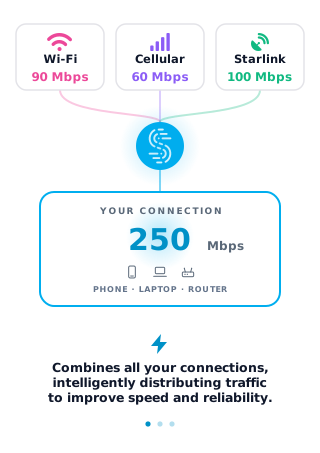
Speedify is an app that streams over two or more internet connections at once (Wi-Fi, 4G/5G cellular, wired Ethernet, Starlink and others), adding their upload capacity together and covering for whichever internet connection weakens. With only one internet connection, Speedify works as an encrypted VPN and cannot add speed or stop that connection from dropping. Ahead you will see how that plays out for personal and business broadcasts, and why using Speedify also encrypts your traffic while you are live.
Keep Facebook Live Going When Wi-Fi Drops with Speedify
Speedify runs on iPhone and Android phones as well as Windows and macOS computers. Speedify uses its next generation VPN for mobility technology to manage multiple internet connections at the same time: if you walk out of Wi-Fi range while streaming your Facebook Live video, Speedify keeps the broadcast going over your phone’s 4G/5G cellular connection. This is known as automatic failover, and it is why walking into another room no longer has to drop the feed.
This means fewer lag spikes, less buffering and fewer drops to a low-resolution, blocky picture.
Speedify uses the full power of your phone to keep you connected to the web. Instead of only using WiFi or your cellular connection, Speedify uses both connections at the same time delivering you a faster, more reliable internet experience.
Why Facebook Live Lags: Upload Speed and Meta’s Bitrate Guidance
Facebook Live lags when your upload cannot carry the video bitrate. Meta’s Live Video API reference lists 1,500 to 4,000 kbps for 720p at 30 fps, 3,000 to 6,000 kbps for 1080p at 30 fps and 4,500 to 9,000 kbps for 1080p at 60 fps. If a speed test shows your upload below those numbers, or swinging up and down, Facebook lowers the picture quality or the stream stalls.
Before going live, move closer to the router or use Ethernet, stop other uploads on the same network (cloud backups, other video calls), and drop the stream to 720p if your upload stays short. If the phone itself is hot or low on battery, the frame rate can fall even on a good connection.
Facebook Live for Business: Keep a Pitch from Dropping Mid-Broadcast
Facebook and Facebook Live are no longer just for entertainment: businesses use Facebook Live for sales and marketing. With two or more internet connections combined, a drop on one connection does not end the broadcast in the middle of a pitch.
Your business is too important to only be relying on one of your phone’s native internet connections.
Encrypt Facebook Live Traffic on Unprotected Networks
Cyber security is a major concern for businesses and consumers. Speedify does more than improve your Facebook Live connection: Speedify encrypts your traffic like a VPN, using current encryption standards, which keeps your data safe from unprotected networks and prying eyes, and with two or more connections combined you do not give up speed for it.
Here is why Speedify is faster than other VPNs when you have two or more connections: Speedify adds together the speed of every connection it combines, while a conventional VPN runs over one connection.
If you haven’t tried using Speedify to fix your Facebook Live problem, you are missing out.
Speedify
Get started with Speedify today.
Speedify combines Wi-Fi, 4G/5G cellular, Ethernet, Starlink and satellite into one faster, more reliable internet connection. Free to try: 5 GB a month with a free account. No credit card required.
🚀 Speed
Faster uploads and downloads, because Speedify uses all your internet connections at once.
📶 Stability
If one internet connection drops, Speedify moves your traffic to the others in milliseconds.
🔒 Security
AES-256 encryption on every internet connection, on any network you join.


15M+ downloads worldwide. 75K+ five-star reviews on iOS and Android.