
Recommended YouTube Bitrate Settings for Live Streaming and Uploads
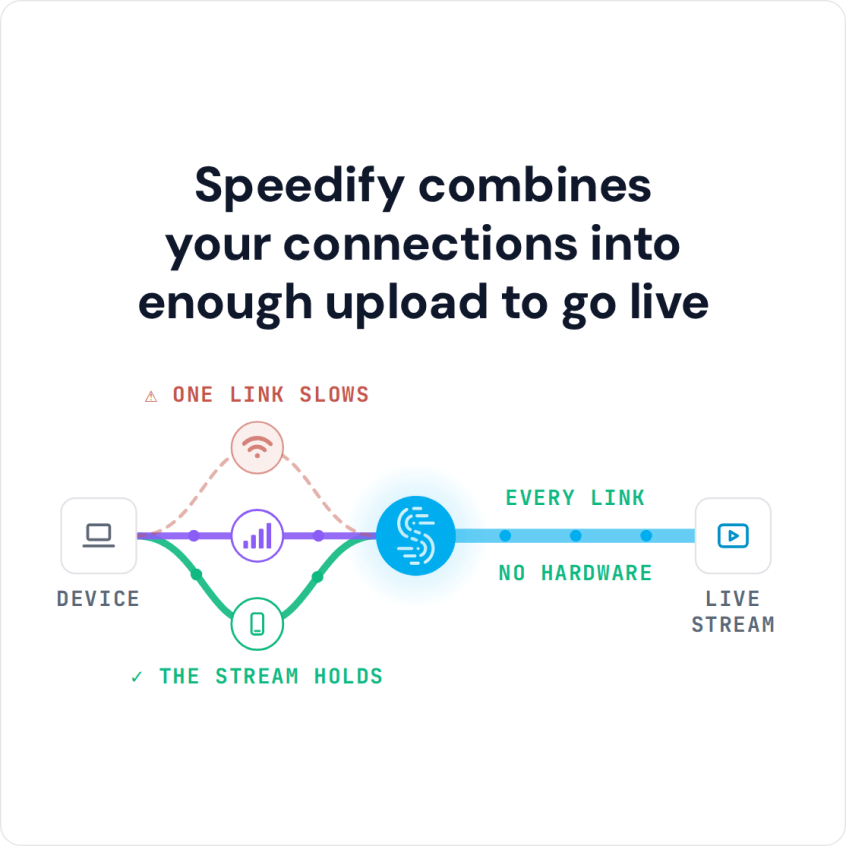
For YouTube live streaming, Google’s recommended bitrate with the common H.264 codec runs from 0.4 to 4 Mbps for 360p up to 14 to 50 Mbps for 4K at 60 fps, and a full HD 1080p stream at 30 fps needs 5 to 14 Mbps. Your stream holds that bitrate only if your upload speed stays steady. Speedify is an app that combines Wi-Fi, 4G/5G cellular, Ethernet, Starlink and satellite internet connections at the same time into one faster, steadier upload, so your stream keeps its bitrate even if one connection weakens.
If your YouTube stream buffers even at the recommended bitrate, you are not the only one with this problem. Below are the best YouTube bitrate settings for live streaming and uploads, and how Speedify keeps your upload speed stable enough to use them.
Speedify combines your connections into enough upload to go live
How do I use WiFi and 4G/5G cellular at the same time with Speedify?

Pick your two internet connections and your device below and we'll take you to the step-by-step setup guide.


What YouTube Bitrate Means and Why It Affects Your Stream
Bitrate is a measure of the number of bits of information that are being transmitted on a digital network. When it comes to video, bitrate is the amount of data to encode a single second of your video. Bitrate directly affects both the quality and file size of the video you are streaming.
The higher the YouTube bitrate, the higher the quality of the video and the more upload bandwidth your stream needs. You have to find the right balance between quality and bandwidth. If the bitrate is higher than your upload speed can carry steadily, it will cause buffering when streamed, because a live stream cannot wait for a slow upload to catch up.
But if the YouTube bitrate is too low, the video quality will be poor and your stream will look unprofessional.
The Optimal YouTube Bitrate for Live Streaming and Uploads
When live streaming video on YouTube, you have to take three things into account:
- Bitrate
- Framerate
- Resolution
All of these factors will affect the quality of your YouTube video, how much processing power it takes to encode your video, and how much bandwidth it takes to broadcast your video. It is always better to have a steady YouTube stream with a slightly lower resolution or framerate than it is to have a super high-quality stream that is constantly buffering.
Here are some recommended bitrates for live streaming and file uploads on YouTube:
- Live streaming on YouTube: according to Google, the recommended YouTube live streaming bitrates with H.264 range from 0.4 to 4 Mbps for a 360p video to 14 to 50 Mbps for a 4K @ 60 fps video; the newer AV1 and H.265 codecs need less.
For example, in order to live stream a full HD 1080p @ 30 fps video on YouTube, set a bitrate between 5 and 14 Mbps (H.264). - Video uploads on YouTube: Google recommends YouTube video upload bitrates starting at 1 Mbps for a 360p video up to 53 to 68 Mbps for a 4K @ 60 fps video (higher for HDR).
If you’re uploading a full HD 1080p @ 60 fps video file on YouTube, you should set it with a bitrate of 12 Mbps (15 Mbps for HDR).
Your upload speed, not your download speed, decides which of these bitrates you can hold. Keep the bitrate comfortably below the upload speed your connection sustains for the whole stream, because a live stream has no time to catch up when the upload dips.
YouTube Bitrate for Live Streaming: How Speedify Fixes Poor Internet Connections
A common problem for YouTube streamers is a poor Internet connection, which can stop you from holding a steady live stream even at the optimal YouTube bitrate.
Streaming on YouTube in standard definition is always an option, but most viewers now expect high definition, so a standard definition stream looks dated.
The best option is to download the Speedify app to manage your Internet connections. Speedify is available for Windows, macOS, iOS, Android and Linux, and runs in the background to monitor the quality of each connection and spread your traffic across them.
Whether on a computer or a mobile device, Speedify can combine multiple connections together at the same time into one faster, more stable Internet connection, so your live stream has the upload it needs at your chosen bitrate.
And if one of the connections drops, Speedify’s automatic failover mechanism keeps your YouTube live stream online on the others, so your viewers don’t see a loading screen.
If you are planning to live stream on YouTube, try Speedify: the free tier gives you 5 GB per month with a free account, enough for a test broadcast.
Speedify
Get started with Speedify today.
Speedify combines Wi-Fi, 4G/5G cellular, Ethernet, Starlink and satellite into one faster, more reliable internet connection. Free to try: 5 GB a month with a free account. No credit card required.
🚀 Speed
Faster uploads and downloads, because Speedify uses all your internet connections at once.
📶 Stability
If one internet connection drops, Speedify moves your traffic to the others in milliseconds.
🔒 Security
AES-256 encryption on every internet connection, on any network you join.



15M+ downloads worldwide. 75K+ five-star reviews on iOS and Android.