
Internet Connectivity – Key Element for Any Live Streaming Setup
When a stream turns blocky and then stalls, the camera and microphone are almost never at fault. The upload is: one internet connection shared with a household or an office cannot keep sending video at a steady rate, and an audience notices immediately.
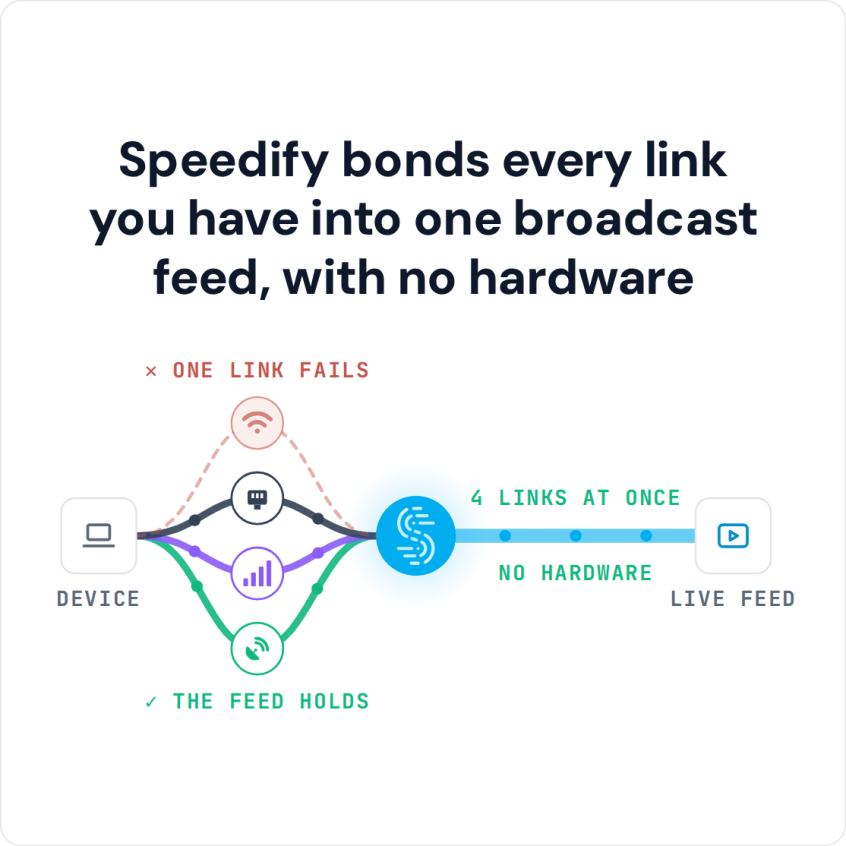
Speedify is a software app that uses two or more internet connections at the same time (Ethernet, Wi-Fi, 4G/5G cellular, Starlink and others), so the stream keeps flowing when one of them fades. With a single connection, Speedify works as an encrypted VPN and cannot stop that connection from dropping.
Speedify bonds every link you have into one broadcast feed, with no hardware
What follows is the connectivity side of a streaming setup for IRL broadcasts, gaming and video calls. Contact Speedify to equip a team of creators or remote staff.
Watch now
How Speedify combines internet connections on any hardware
Get started with Speedify for your business
Speedify offers three commercial paths. They work together, and most enterprise customers use two or more.
01
Speedify Teams
Speedify on every supported OS for every team member
Centralized dashboard for billing, user provisioning, and usage analytics
CSV import/export and a RESTful management API
02
Speedify for Routers
License for supported OpenWrt routers
Powered by Speedify hardware lineup ready to deploy out of the box
Miri, GL.iNet and other partner models
Covers every device on the network, with no per-device install
03
Embed Speedify into your product
A · DIY
Build it yourself with the Speedify SDK.
Integrate Speedify into your iOS, Android, Windows, macOS, Linux or QNX product. Full developer documentation, sample code and supported integration paths. Your team owns the build, and the Speedify SDK handles combining the internet connections.
B · CUSTOM ENGINEERING
Have the Speedify team build it for you.
Unreliable Internet: the Most Common Reason Live Streaming Setups Fail
You might have the best of the best when it comes to audio / video equipment for streaming, and the software to go with it: multiple cameras, effects and more. That is enough to create great videos for DVDs, Blu-ray discs or other offline media. To live stream online, though, your streaming setup is missing a key element.
The thing you need most is a reliable and fast internet connection. Whether you are using a GoPro or a smartphone on a tripod, or a professional video system with several cameras, the quality of the live stream comes down to the quality of your internet connection. That has been true since the first live stream on the internet in 1993.
So, assuming you’ve got the equipment, how do you get the internet to go with it?
A Reliable Streaming Setup Uses Two or More Internet Connections at Once
Having an internet connection does not mean trouble-free access to the internet. Disruptive things can happen:
- Your ISP may be having issues with their infrastructure
- There might be an issue with your local equipment, such as the modem or router
- Your internet speed might drop at busy times, when everyone in the house or the neighborhood is online
One solution that comes to mind is a second internet connection kept in reserve, which is better than nothing. But what if the issues happen during a live streaming session? How long does it take for your camera, phone or computer to switch from one connection to the other? How will that affect your transmission? Will the streaming servers drop you for inactivity?
The answer is to use all the connections (at least two) at the same time. That is called combining internet connections, and the Speedify app for Android, iOS, Windows, macOS and Linux does it.
Best Internet Setup for Content Creators and Remote Workers
Start with the fastest wired connection you have: Ethernet from the router holds a steadier upload than Wi-Fi over a stream that runs for hours. Add a second internet connection from a different provider, such as a phone’s 4G/5G cellular over USB or Personal Hotspot, or a 5G home internet line next to cable or fiber.
Run a speed test on each connection at the time of day you stream, then set the encoder bitrate below the upload the combined connection holds steadily, leaving headroom for calls and everyone else in the house. Speedify uses both connections at once, so a dip on one does not reach the stream.
Speedify Is Used on Millions of Devices Worldwide
Speedify has made internet connections faster and more reliable for businesses and individuals since 2014.
15M+
Speedify downloads worldwide75K+
5-star reviews for Speedify on iOS and Android82
Speedify server points of presence in 50+ cities on 6 continents500TB+
Of internet traffic carried by Speedify every weekSpeedify Partners
Speedify works with these companies to bring faster, more reliable internet and networking technology to their customers and employees.


Speedify Provides the Fast and Reliable Internet Needed to Livestream Gaming, IRL or for Video Conferencing
An essential element in any streaming setup, Speedify works like a VPN that combines connections on the device you use to live stream. Instead of using a single internet connection at a time, Speedify lets your device use multiple connections simultaneously, which gives more upload bandwidth and more stable live streams.
That means that on a smartphone, you can combine Wi-Fi with your 4G/5G cellular connection. And on a computer, or a live streaming camera linked through a computer, you can add every available connection: Wi-Fi, Ethernet, 4G/5G cellular and more.
Speedify constantly monitors the quality of your internet connections. If the Wi-Fi becomes unreliable, for example, Speedify automatically reroutes data through other working connections until Wi-Fi is available again.
Speedify’s Streaming Mode, on by default, identifies audio and video streams and gives them priority over other traffic (quality of service), so web browsing and software updates do not disrupt your calls and live streams.
Try Speedify as part of your streaming setup on your next live stream.
Speedify Business Solutions
Speedify Teams
Speedify for Routers

Speedify Embedded Solutions and Integrations
Add Speedify to your own app or hardware with the Speedify SDK. Your product then combines internet connections, fails over automatically when one drops, and encrypts the traffic, using the same technology as the Speedify app.