

NORAD, Radars and the Wi-Fi Connection
Read the video transcript below.
Should you get a backup connection for Starlink?
Yes. Starlink goes down every day — an always-on dish averages about 34 minutes of downtime daily from routine satellite handoffs. A second connection keeps you online when Starlink drops.
What’s the best backup connection for Starlink?
A 4G/5G cellular hotspot or SIM is the most practical backup for most Starlink users — it works anywhere Starlink works, requires no installation, and uses a different network so outages rarely overlap. Cable or DSL broadband is a strong option if you have it at a fixed location. A second Starlink dish is also possible if you need maximum throughput.
How do you use two internet connections at once with Starlink?
Speedify combines Starlink with any other connection — cellular, cable, Wi-Fi, or a second dish — into one bonded connection. Speedify runs on your phone, laptop, or router. When Starlink drops, Speedify moves your traffic to the backup instantly, so calls don’t cut out and downloads don’t stall. Speedify is free to try.
71% of Speedify’s Starlink users already run a second connection. Speedify’s Starlink Index tracks real-world Starlink performance data from thousands of dishes.
See the full dataset →Use Speedify to stay online during Starlink satellite handoffs every 15 seconds
Research confirms Starlink switches between satellites every 15 seconds on a fixed schedule. Each satellite handoff is a potential dropout, and on a congested network or with any obstruction, those Starlink dropouts become real interruptions.
Speedify fixes Starlink connection drops by combining your Starlink internet connection with another satellite dish, Wi-Fi, 4G/5G cellular, or wired Ethernet at the same time. When Starlink drops, Speedify keeps your traffic moving on the backup internet connection instantly.

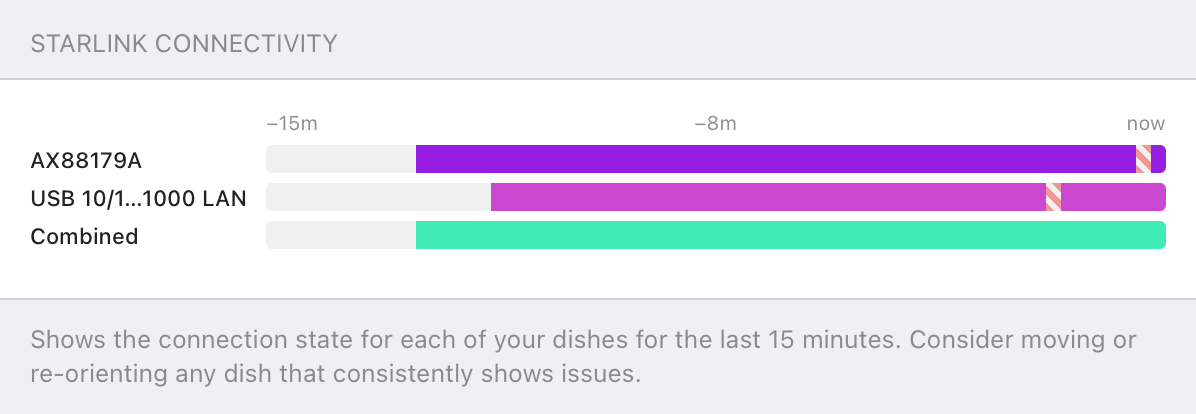
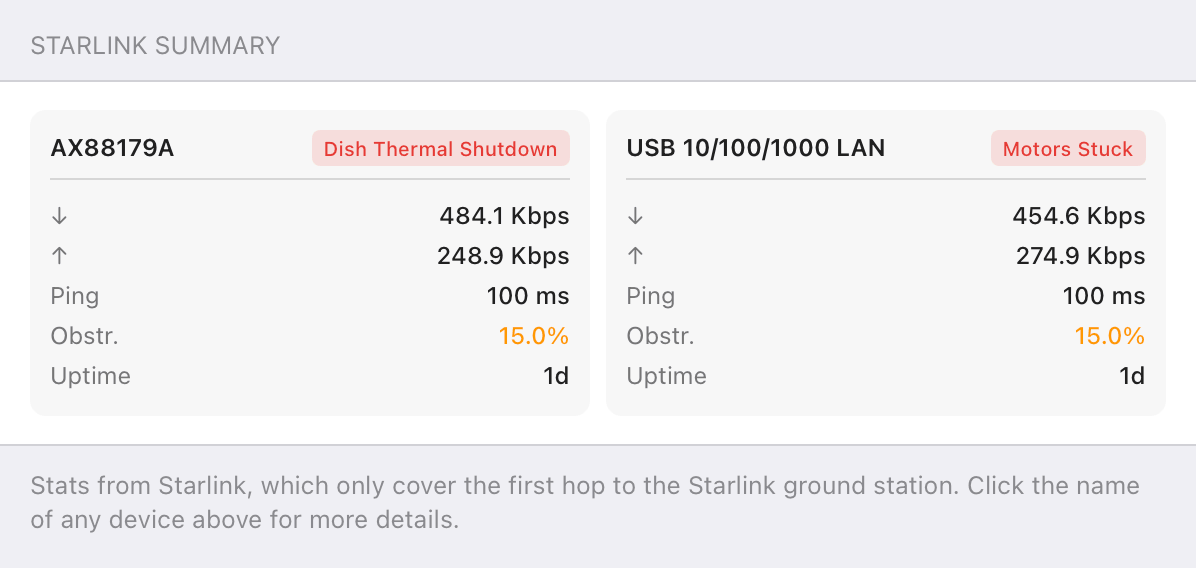
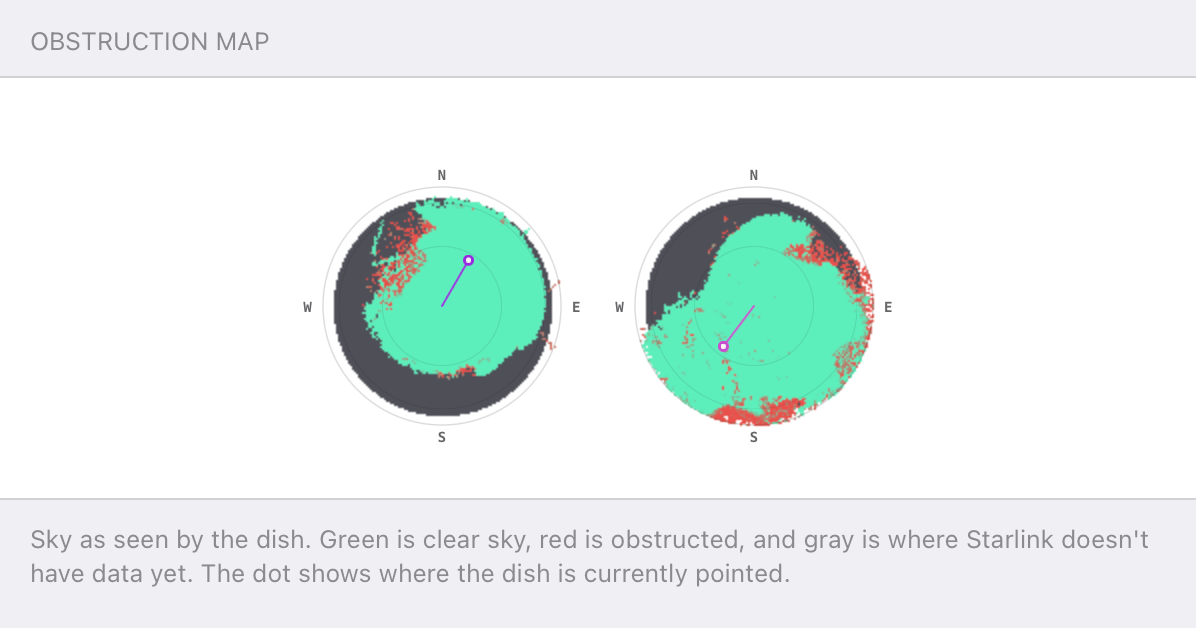
Speedify alerts you about your Starlink dish status
Speedify software alerts you about your Starlink dish status as soon as your dish experiences an issue - e.g. when your actuator motor is stuck, the mast is not vertical or there's a thermal throttle.
Speedify's Starlink Control Center helps you monitor all your Starlink dishes, read obstruction maps, and align multiple dishes all in the Speedify app. Get a real-time view of each dish's health and optimize the position of each Starlink dish, so you get the best possible performance out of your Starlink connections.
How NORAD Tracks Santa
Alex Gizis: This time of year, you hear a lot about NORAD because of their Santa Tracker. But this is a real defense organization. Brian, what is NORAD?
Brian Prodoehl: NORAD is the North American Aerospace Defense Command. So, it’s a group between the US and Canada, part of the military, and they monitor missiles and other air threats. And they’ve done it for a long time.
Alex Gizis: So, why are they tracking Santa?
Brian Prodoehl: Story goes that back in 1955, somebody got a hold of the wrong phone number, essentially. And they called up to find out where Santa was or what was up with Santa. And they ended up calling kind of an unlisted number for NORAD. And so, the officer on duty at the time answered the question and said, “Oh, yeah, we’ll take care of Santa” and it sort of took off from there.
Alex Gizis: This is one of those jobs where it’s a lot of sitting around waiting for something to happen. I imagine they actually have plenty of time to take phone calls about Santa.
Brian Prodoehl: Seems that way, but I think at this point, it’s a ton of volunteers and stuff. And yeah, I think the amount of traffic and calls they get is probably more than they’d want to interrupt their normal duties.
Alex Gizis: How does NORAD in real life actually track things?
Brian Prodoehl: When they started out, radar was really their big engine, their big source of getting information was radar. And at this point now it’s radar, and satellite, and aerial reconnaissance planes that are just up there listening for radio signals and watching things.
So they’re kind of fusing a bunch of stuff together now to kind of be aware of missile launches or anything like that.
Alex Gizis: I know they used to be in charge of tracking all the satellites too, but they’ve turned that off or they’ve turned that over to another organization.
Brian Prodoehl: Yep. I think US Stratcom is what does it now. Is that right? Yes.
Alex Gizis: US Stratcom. Peace is our profession. Dot, dot, dot. What comes after the dots?
Understanding Radar: Active vs. Passive Systems
Alex Gizis: So radar, let’s talk about radar for a second. How does it really work?
Brian Prodoehl: Usually we’re talking about active radar. There’s active and there’s passive radar. So with active radar, they actually send out a bunch of sort of fast pulses of a radio signal and then measure what comes back.
So it’s similar to like echolocation for bats, but it’s really high frequency radio signals. And so they can do that over a big area and they can see, small changes compared to the background. And they can say, okay, this is something new here.
Alex Gizis: Right. You can time how long it takes to get a reflection, and that’s how far away it is. If you hit something that’s moving, there’s a little bit of Doppler, the frequency will be just a little bit off, so you can get a lot of info that way.
You also mentioned passive radar.
Brian Prodoehl: So passive radar, usually you have a few spots that are listening across a broad spectrum for radio signals. And so if you have a few different spots that are listening and are all really communicating with each other, they can say, “Hey, I detected a signal at this frequency this far away.” And you get three of those points together and they could say, “Okay, there’s an airplane that’s here.”
Alex Gizis: It’s passive because they’re not sending anything. They’re just listening. They’re using the TV stations and the radio stations that are putting out radio waves anyway and listening for them bouncing off something.
Brian Prodoehl: Yeah. And so if you get a few of those together, you can know exactly where things are.
Wi-Fi and Radar: Sharing the 5 GHz Spectrum Thanks to DFS
Alex Gizis: Why do Wi-Fi radios on 5 GHz, some of the channels are marked as radar channels. What does that mean to us, Wi-Fi users?
Brian Prodoehl: So there’s a big chunk of channels, especially up in like 5 and 6 GHz that are marked for DFS. And so those channels, you can use them as long as there isn’t radar on them. And so the Wi-Fi, for a long time, they were essentially unusable. And then chip makers started to incorporate the technology actually where they could say, “Hey, I’m going to listen. And if I don’t see those chirps, those, those high frequency pulses on that channel for a while, then we’ll start using it.”
And so they’ve kind of proved that they can operate without interfering with radar because they’ll detect. And so those work really well if you know they work.
Alex Gizis: And so some airports and things must have it and you can’t use it and you’re there.
So can you run this passive radar stuff in your house? What kind of equipment do you need?
Brian Prodoehl: Yes, so there have been a lot of advancements in the last like 10 years of putting more and more powerful like FPGA chips in a spot that you can just run them with your computer.
Alex Gizis: I used to have one of those GNU radio boxes…
Brian Prodoehl: Exactly, the USRP. There’s a lot of software defined radios and even like some Wi-Fi cards are flexible enough that you can listen for things there. And so there are a lot of projects for running passive radar with like one of these SDR dongles and like a Raspberry Pi for instance, and so you can start mapping the skies above you with passive radar with a under a hundred bucks worth of stuff. It’s pretty neat.
WiFi 7 and DFS Channels
Alex Gizis: That is cool. So what versions of Wi-Fi know how to scan for radar? Do all Wi-Fi cards do that?
Brian Prodoehl: I would think at this point it would be tough to find one that doesn’t, because it sort of goes back to when they initially did the 802.11g and really opened up a lot of those bands. So I think it’d be tough to find a card that doesn’t support these DFS channels.
Alex Gizis: So does Wi-Fi 7 work with these channels?
Brian Prodoehl: Yeah, Wi-Fi 7 actually added more channels. I think now there’s 31 channels up in 5 GHz and it operates, it detects radar and stuff and moves away from those channels if it needs to.

Connectivity Tech Discussions
Our Connectivity Tech Discussions Between Two Palms video series shines the spotlight on Alex and technical guests, diving deep into caonversations about the latest Internet technology, including Starlink satellite, WiFi 7, Apple, fiber optics, new routers, remote connectivity, and networking protocols.
Join us and let's talk tech!