
What is Low Latency Video Streaming and Who Needs It?
Latency is the lag between an action on camera and a viewer seeing it: a few seconds normally, under a second when live chat or esports depend on it. Most of that lag comes from the software encoding your video and the platform, but an unsteady upload adds more, because lost data must be resent.
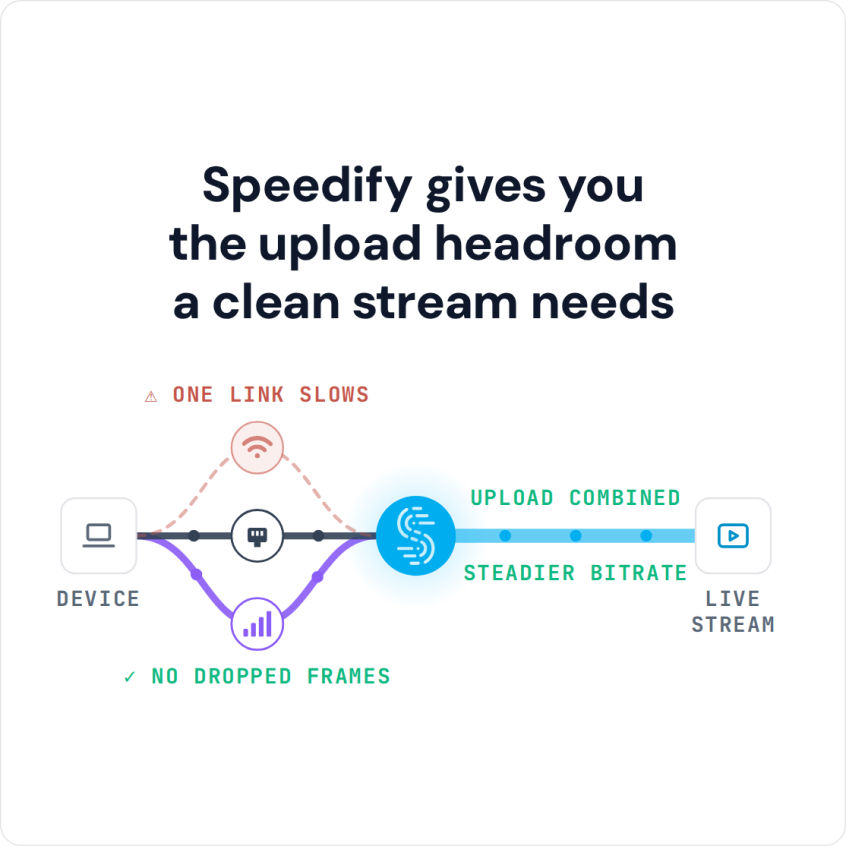
Speedify is an app that carries a stream over Wi-Fi, 4G/5G cellular, Ethernet, Starlink and satellite internet connections at once, resending lost data over whichever internet connection is healthy. Speedify needs two or more connections to keep a stream live through a drop; on a single connection it works as an encrypted VPN and cannot stop that connection from dropping. Here you will see who needs low latency, the techniques that deliver it, and where Speedify fits: it cannot make a single connection faster, but it cuts the delay that lost data adds, and in Redundant Mode latency follows whichever connection is faster at that moment.
How to Achieve Low Latency Video Streaming
Broadcasting with lower latency can be achieved using multiple techniques, but each of them has its drawbacks. Each of the parties involved in the live streaming process can be “tweaked” for lower latency:
- the encoder: using the right codecs (H.264, HEVC), protocols (RTMP, SRT, WebRTC) and bitrates
- the transcoder: having multiple different qualities available for mobile, desktop, TV, etc.
- content delivery network (CDN): optimizing the technologies and protocols
- client (viewer) player

Find out more technical details about low latency video streaming in 2018 from this Zender article.
One of the most common practices for low latency video streaming is reducing the read-ahead buffer for the client (viewers) on the delivery side, either by reducing video segment size or reducing the network overhead. Although this reduces end to end latency from broadcaster to viewers, it makes the client more sensitive to network glitches and prone to playback buffering.
Low Latency Streaming with Speedify: Combining Connections for a Steadier Stream
As explained above, low latency video streaming can cause playback issues for viewers whose internet is not stable or fast enough. Speedify helps when you broadcast or watch Twitch, YouTube or other low latency streams with two or more internet connections.
With Speedify you can use multiple internet connections at the same time. Combining them adds bandwidth and an automatic failover mechanism that kicks in should anything happen to one of your connections. In Redundant Mode, Speedify sends each packet over every connection and uses the copy that arrives first, so latency follows whichever connection is faster at that moment. This is useful both for live streamers and for viewers of low latency video streaming.
Speedify’s method for combining internet connections splits your traffic packet by packet across two or more connections at once. Speedify runs as software on Windows, macOS, iOS, Android and Linux, on computers, phones and tablets.
If one of your connections fails, you can still enjoy your favorite stream. Speedify automatically reroutes all the traffic through your other available connection(s). This happens in the background without you having to do anything. When the dropped connection is back online, Speedify will pick it up and start using it again.
Low Latency Video Streaming Must Have: the Speedify App
Speedify also works as a true mobile VPN: on compromised Wi-Fi networks, Speedify’s encryption keeps your private data under your control.
On a single connection, encryption can make Speedify a little slower than browsing without a VPN. With two or more connections combined, the added bandwidth means you no longer have to choose between security and speed. You can have both.
Cut down on choppy video, buffering and dropped low latency streams by combining two internet connections with Speedify. Get started with Speedify today!
Speedify
Get started with Speedify today.
Speedify combines Wi-Fi, 4G/5G cellular, Ethernet, Starlink and satellite into one faster, more reliable internet connection. Free to try: 5 GB a month with a free account. No credit card required.
🚀 Speed
Faster uploads and downloads, because Speedify uses all your internet connections at once.
📶 Stability
If one internet connection drops, Speedify moves your traffic to the others in milliseconds.
🔒 Security
AES-256 encryption on every internet connection, on any network you join.



15M+ downloads worldwide. 75K+ five-star reviews on iOS and Android.