
Speedify Helps You Use Wi-Fi and 4G/5G Cellular at Once on Windows for Faster Uploads and Downloads
Want faster upload and download speeds on your Windows PC? Run Wi-Fi and 4G/5G cellular at the same time.
Speedify is an app that combines two or more internet connections at once, such as Wi-Fi and a phone’s 4G/5G cellular, so you get faster uploads and downloads and stay online if one connection drops out. This guide explains why Windows won’t do this on its own and how Speedify makes it work. There is also a Mac version of this guide.
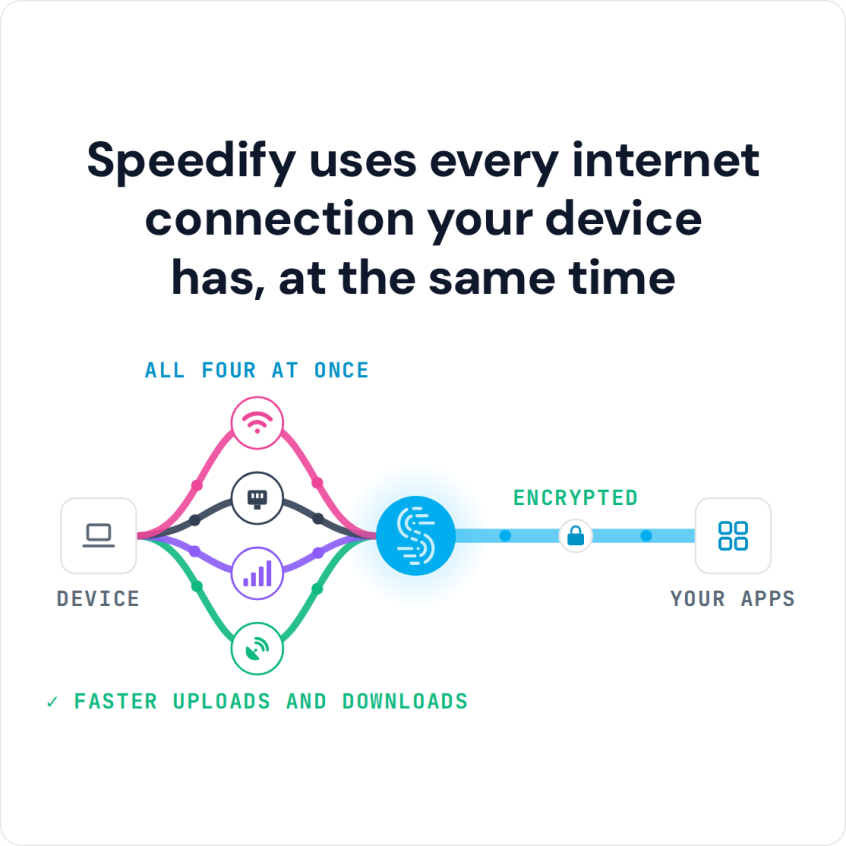
Speedify uses every internet connection your device has, at the same time
How do I use WiFi and 4G/5G cellular at the same time with Speedify?

Pick your two internet connections and your device below and we'll take you to the step-by-step setup guide.


Why Windows Uses Only One Internet Connection at a Time
Some Windows laptops and tablets, such as cellular-enabled Surface, Dell, Lenovo and HP models, have a built-in 4G LTE or 5G modem alongside Wi-Fi. Even so, Windows routes all internet traffic through a single active network interface at a time, based on which connection has the lowest metric (highest priority) in the Network Adapter settings.
The limit is built into how Windows handles network interfaces. You can change each adapter’s metric in Control Panel → Network and Internet → Network Connections → Adapter Properties → IPv4 Properties → Advanced, but the metric only sets which connection Windows prefers. Windows will not split traffic across two connections at the same time to increase speed, and it cannot move you to the other connection without a drop.
In other words, if both Wi-Fi and a 5G cellular connection are active, Windows picks one. If that one drops, you are disconnected, even if the other connection is perfectly healthy.
The following popular workarounds also don’t natively combine Wi-Fi and 4G/5G cellular at once:
- iPhone or Android USB tethering: Gives the PC a second connection, but Windows uses it as a fallback, not simultaneously with Wi-Fi.
- Personal Hotspot via Wi-Fi: The PC connects to the phone’s hotspot over Wi-Fi, which replaces the existing Wi-Fi connection instead of adding to it.
- Bluetooth tethering: Extremely slow by modern standards and again treated as a single connection.
The bottom line: without additional software, a Windows PC can only use one internet connection at a time, no matter how many are plugged in or available.
The Fix: Use Speedify to Combine Wi-Fi and 4G/5G Cellular at Once on a Windows PC
Speedify lets a Windows PC use Wi-Fi and 4G/5G cellular at the same time by combining internet connections: Speedify splits your traffic across both, so you get one faster, more reliable connection.
Here is what Speedify does that Windows cannot do on its own:
- Speedify actually uses both Wi-Fi and 4G/5G cellular at the same time. Traffic is split across Wi-Fi and a phone tethered over USB, a built-in 5G modem, or an external 4G/5G USB adapter, instead of switching between the two internet connections.
- Speedify runs in the background. If the café Wi-Fi drops, Speedify instantly shifts all traffic to 4G/5G cellular without any disconnection. Video calls keep going, uploads finish, streams don’t buffer.
- Speedify gets faster upload and download speeds on a Windows PC. Instead of being capped by a single connection’s speed, the combined bandwidth of both is available. A 50 Mbps Wi-Fi connection plus a 40 Mbps hotspot can deliver close to 90 Mbps of usable throughput.
- Speedify encrypts everything. All your online traffic is encrypted the way a VPN encrypts it, which protects you on public Wi-Fi at an airport or hotel.
How to Use Wi-Fi and 5G at the Same Time on a Windows PC with Speedify
Setting up Speedify on a Windows PC takes less than five minutes:
- Connect the PC to Wi-Fi as normal.
- Add the 4G/5G cellular connection: tether an iPhone or Android phone to the PC with a USB cable (an iPhone needs Apple’s drivers on Windows, which come with iTunes or Apple Devices). Alternatively, use the PC’s built-in 5G modem (if available) or a 4G/5G USB cellular adapter.
- Download and install Speedify on the PC.
- Open Speedify and connect. Both connections will be listed and active in the Speedify dashboard, with real-time speed data flowing across both.
Speedify works with any combination of connections the PC can see: Wi-Fi networks, iPhone or Android hotspots, USB tethering, wired Ethernet, Starlink, and more. It runs quietly in the background and requires no technical configuration.
Download and Upload Speeds with Wi-Fi and 5G Combined on a Windows PC
The speed improvement depends on the individual connections, but here are realistic scenarios for Windows PC users:
| Scenario | Without Speedify | With Speedify |
|---|---|---|
| Home Wi-Fi (200 Mbps) + iPhone 5G hotspot (80 Mbps) | 200 Mbps max (single connection) | ~270 Mbps combined |
| Coffee shop Wi-Fi (15 Mbps) + 4G hotspot (30 Mbps) | 15 Mbps (café Wi-Fi chosen as primary) | ~40 Mbps combined |
| Hotel Wi-Fi (8 Mbps) + 5G hotspot (120 Mbps) | 8 Mbps (hotel Wi-Fi only) | ~125 Mbps combined |
| Wi-Fi drops mid-video call | Call drops or freezes | Call continues on 4G/5G cellular without a break |
Speedify vs. Other Options for Windows PC Connectivity
| Solution | Combines Wi-Fi + 4G/5G Cellular? | Automatic Failover? | Faster Downloads and Uploads? | Encrypted Online Traffic? | Windows Support? |
|---|---|---|---|---|---|
| Speedify | ✅ Yes | ✅ Yes | ✅ Yes | ✅ Yes | ✅ Yes |
| Windows Network Adapter Priority | ❌ No (switches only) | ❌ No (manual) | ❌ No | ❌ No | ✅ Yes |
| iPhone or Android Personal Hotspot | ❌ No (replaces Wi-Fi) | ❌ No | ❌ No | ❌ No | ✅ Yes |
| Other VPNs | ❌ No | ❌ No | ❌ No (often slower) | ✅ Yes | ✅ Yes |
| Windows Mobile Hotspot (sharing) | ❌ No (shares one connection) | ❌ No | ❌ No | ❌ No | ✅ Yes |
When to Combine Wi-Fi and 4G/5G Cellular at Once on a Windows PC
Remote Workers and Freelancers
Working from cafés, co-working spaces, or client sites means putting up with unpredictable Wi-Fi. Speedify combines the venue’s connection with a phone’s 5G hotspot so that Zoom, Teams, Slack, and Google Meet calls stay up whatever the local Wi-Fi is doing.
Content Creators and Live Streamers
Upload speeds matter more than downloads for creators. Whether pushing 4K footage to Frame.io, going live on YouTube, or uploading to Dropbox, Speedify combines the upload bandwidth of every connected internet connection. Speedify’s Streaming Mode, the default, is built to keep live streams and calls from dropping.
Digital Nomads and Frequent Travelers
Airport lounge Wi-Fi, hotel broadband and Airbnb connections are often unreliable. With Speedify running on a Windows laptop, a local SIM card’s 4G/5G cellular connection becomes a second internet connection that takes over the moment the Wi-Fi drops. Travelers often combine a local SIM’s 4G/5G cellular with any available Wi-Fi to get faster, affordable internet wherever they land.
Windows Users Who Work with Sensitive Data
Lawyers, finance professionals, journalists, and healthcare workers who regularly use public or shared Wi-Fi need encrypted connections. Speedify encrypts traffic like a VPN, so the combined connection is also an encrypted one, and the extra bandwidth from the second internet connection helps make up for the encryption overhead.
Power Users Who Want Faster Downloads
Even at home, if both Wi-Fi and a phone hotspot are available, Speedify can combine them for large file downloads, system updates, or game installs.
Frequently Asked Questions for Using Wi-Fi and 4G/5G Cellular at Once on a Windows PC
Can a Windows laptop use Wi-Fi and 5G at the same time without Speedify?
No. Windows routes all traffic through a single connection based on network adapter priority. With Speedify installed, a Windows PC can combine Wi-Fi with an iPhone or Android 5G hotspot connected by USB and use both at the same time.
Does Speedify work with iPhone and Android USB tethering on Windows?
Yes. Connect a phone via USB, enable Personal Hotspot (iPhone) or Mobile Hotspot/USB Tethering (Android), and Speedify will detect it and combine it with Wi-Fi. USB tethering typically delivers faster and more stable cellular speeds than Bluetooth or Wi-Fi hotspot.
Will using two connections drain phone battery faster?
When a phone is tethered via USB to a PC, it charges while sharing its 4G/5G cellular connection, so battery drain is not an issue with USB tethering. Bluetooth tethering uses minimal power on both devices.
Does Speedify slow down a Windows PC?
Speedify encrypts traffic like a VPN, which adds a small amount of overhead on any single connection. With Wi-Fi and 4G/5G cellular combined, you get the bandwidth of both connections, which is why the combined connection is usually faster than either one alone.
Is Speedify free?
Speedify has a free tier with 5 GB per month when you create a free account. Paid plans cost $89.99 per year for an Individual plan ($7.49/month billed yearly), as low as $4.99/month on a 3-year plan, or $14.99 month to month, and include unlimited data and use on up to 5 devices at once.
Speedify
Get started with Speedify today.
Speedify combines Wi-Fi, 4G/5G cellular, Ethernet, Starlink and satellite into one faster, more reliable internet connection. Free to try: 5 GB a month with a free account. No credit card required.
🚀 Speed
Faster uploads and downloads, because Speedify uses all your internet connections at once.
📶 Stability
If one internet connection drops, Speedify moves your traffic to the others in milliseconds.
🔒 Security
AES-256 encryption on every internet connection, on any network you join.



15M+ downloads worldwide. 75K+ five-star reviews on iOS and Android.