
Speedify Helps You Use Wi-Fi and 4G/5G Cellular at Once on Mac for Faster Uploads and Downloads
Want faster upload and download speeds on your Mac? Run Wi-Fi and 4G/5G cellular at the same time.
Speedify is an app that combines two or more internet connections at once, such as Wi-Fi and a tethered phone’s 4G/5G cellular, so you get faster uploads and downloads and stay online if one connection drops out. This guide explains why macOS won’t do this on its own and how Speedify makes it work.
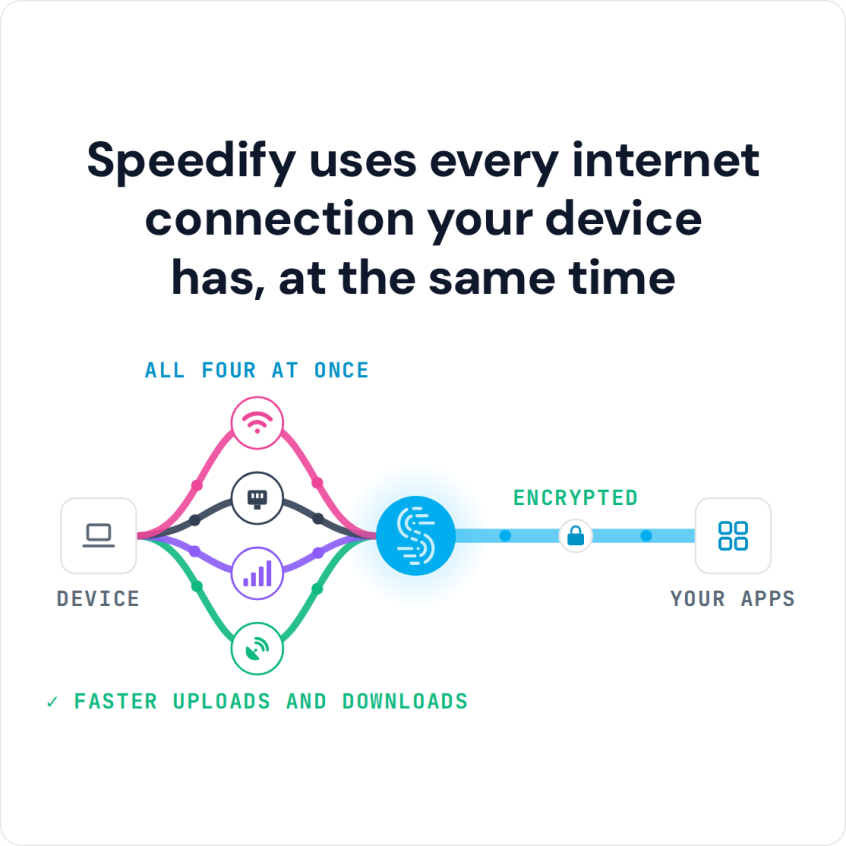
Speedify uses every internet connection your device has, at the same time
How do I use WiFi and 4G/5G cellular at the same time with Speedify?

Pick your two internet connections and your device below and we'll take you to the step-by-step setup guide.


Why a Mac Can’t Use Wi-Fi and 4G/5G Cellular Together on Its Own
Unlike iPhones, which have a built-in 4G/5G cellular modem and Apple’s Wi-Fi Assist feature to help switch between Wi-Fi and 4G/5G cellular, most Mac models do not have a built-in cellular radio.
The MacBook Air and MacBook Pro with Apple Silicon are Wi-Fi-only machines. Even with an external USB modem or a tethered iPhone hotspot providing a secondary connection, macOS still routes all traffic through a single active interface at a time, whichever it considers “best.”
Single-interface routing is a basic limit of how macOS handles network interfaces. The operating system does have a concept of network interface priority (you can order them in System Settings → Network), but it cannot combine them: it won’t split your traffic across two connections at the same time to increase speed or keep you online through failover.
In other words, if you have both Wi-Fi and an iPhone tether active, macOS picks one. If that one drops, you disconnect, even if the other connection is perfectly healthy.
Macs with External 4G/5G Cellular Modems Still Use One Connection at a Time
Apple has been rumored to bring integrated 5G to future MacBook models, and some enterprise Mac deployments use external cellular modems. But even on hardware that supports a 5G cellular interface, macOS still does not natively combine 5G with Wi-Fi. You’d still be switching between them, not using both at once.
The following popular workarounds also don’t natively combine Wi-Fi and 4G/5G cellular at once:


- iPhone USB tethering: Gives your Mac a second connection, but macOS uses it as a fallback, not simultaneously with Wi-Fi.
- Personal Hotspot via Wi-Fi: Your Mac connects to your iPhone’s hotspot over Wi-Fi, completely replacing your existing Wi-Fi connection, not adding to it.
- Bluetooth tethering: Extremely slow by modern standards and again treated as a single connection.
The bottom line: Without additional software, your Mac can only use one internet connection at a time, no matter how many are plugged in or available.
The Fix: Use Speedify to Combine Wi-Fi and 4G/5G Cellular at Once on Your Mac
Speedify lets your Mac use Wi-Fi and 4G/5G cellular at the same time, combining them into a single, faster, and more reliable connection by splitting traffic per packet across both.
Here is what Speedify does that macOS cannot do on its own:
- Speedify actually uses both Wi-Fi and 4G/5G cellular at the same time. Speedify splits your traffic intelligently across Wi-Fi and your iPhone hotspot (or USB tether) or external 4G/5G cellular modem. It doesn’t just switch between the two internet connections.
- Speedify is running in the background. If your café Wi-Fi drops, Speedify instantly shifts all traffic to 4G/5G cellular without any disconnection. Your video calls keep going, your upload finishes, your stream doesn’t buffer.
- Speedify gets you faster upload and download speeds on your Mac. Instead of being capped by a single connection’s speed, you get the combined bandwidth of both. A 50 Mbps Wi-Fi + a 40 Mbps hotspot can deliver close to 90 Mbps of usable throughput.
- Speedify encrypts everything. The app also works like a VPN and encrypts all your online traffic, so public Wi-Fi at an airport or hotel is much safer to use.
How to Use Wi-Fi and 5G at the Same Time on Your Mac with Speedify
Setting up Speedify on your Mac takes less than five minutes:
- Download and install Speedify from the Apple Mac App Store. Speedify needs macOS 11.5 or later.
- Connect your Mac to Wi-Fi as you normally would.
- Add the 4G/5G cellular connection: tether your iPhone or iPad to your Mac with a USB cable and turn on Personal Hotspot, or plug in a 4G/5G USB cellular adapter. Joining a Personal Hotspot over Wi-Fi would replace your Wi-Fi network, so use USB. With an Android phone, install Speedify on the phone too and use Speedify’s cellular sharing feature to share its 4G/5G cellular with the Mac over Wi-Fi. Speedify detects the new connection automatically.
- Open Speedify and connect. That’s it. You’ll see both connections listed and active in the Speedify dashboard, with real-time speed data flowing across both.
Speedify works with any combination of connections your Mac can see: Wi-Fi networks, iPhone or Android hotspots, USB tethering, wired Ethernet, Starlink, and more. It runs quietly in the background and requires no technical configuration.
Real-World Download and Upload Speeds: What to Expect When Using Wi-Fi and 5G at Once on Your Mac with Speedify
The speed improvement you’ll see depends on your individual connections, but here are realistic scenarios for Mac users:
| Scenario | Without Speedify | With Speedify |
|---|---|---|
| Home Wi-Fi (200 Mbps) + iPhone 5G hotspot (80 Mbps) | 200 Mbps max (single connection) | ~270 Mbps combined |
| Coffee shop Wi-Fi (15 Mbps) + 4G hotspot (30 Mbps) | 15 Mbps (café Wi-Fi chosen as primary) | ~40 Mbps combined |
| Hotel Wi-Fi (8 Mbps) + 5G hotspot (120 Mbps) | 8 Mbps (hotel Wi-Fi only) | ~125 Mbps combined |
| Wi-Fi drops mid-video call | Call drops or freezes | Call continues on cellular without interruption |
Speedify vs. Other Options for Mac Connectivity
| Solution | Combines Wi-Fi + 4G/5G Cellular? | Automatic Failover? | Faster Downloads and Uploads? | Encrypted Online Traffic? | Mac Support? |
|---|---|---|---|---|---|
| Speedify |  Yes Yes |
Yes |
Yes |
Yes |
Yes |
| macOS Network Priority |  No (switches only) No (switches only) |
No (manual) |
No |
No |
Yes |
| iPhone Personal Hotspot | No (replaces Wi-Fi) |
No |
No |
No |
Yes |
| Other VPNs | No |
No |
No (often slower) |
Yes |
Yes |
| Apple Wi-Fi Assist | No |
(iOS only) |
No |
No |
No (iPhone only) |
When You Should Combine Wi-Fi and 4G/5G Cellular at Once on Your Mac
Remote Workers and Freelancers
Working from cafés, co-working spaces, or client sites means putting up with unpredictable Wi-Fi. Speedify combines the venue’s connection with your iPhone’s 5G so that Zoom, Teams, Slack, and Google Meet calls stay steady whatever the local Wi-Fi is doing. No more “sorry, you froze again” mid-presentation.
Content Creators and Live Streamers
Upload speeds matter more than downloads for creators. Whether you’re pushing 4K footage to Frame.io, going live on YouTube, or uploading to Dropbox, Speedify combines the upload bandwidth of both connections. Speedify’s Streaming Mode, the default mode, is built to prevent mid-stream drops, which end a broadcast on a single connection.
Digital Nomads and Frequent Travelers
Airport lounge Wi-Fi, hotel broadband and Airbnb connections are often unreliable. With Speedify running on your Mac, a local SIM card’s 4G/5G cellular connection becomes a failover that takes over when the Wi-Fi drops. Travelers often combine a local SIM with any available Wi-Fi to get fast, affordable internet wherever they land.
Mac Users Who Work with Sensitive Data
Lawyers, finance professionals, journalists, and healthcare workers who regularly use public or shared Wi-Fi need encrypted connections. Speedify encrypts your traffic like a VPN, so your combined connection is also a secure connection, and the bandwidth of the second connection helps make up for the overhead that encryption adds.
Power Users Who Just Want Faster Downloads
Even at home, if you have Wi-Fi and a phone you can tether, Speedify lets you combine them for large file downloads, system updates or game installs, so they finish sooner.
Frequently Asked Questions for Using Wi-Fi and 4G/5G Cellular at Once on Mac
Can I use Wi-Fi and 5G at the same time on a MacBook Air or MacBook Pro?
Not natively: macOS routes all traffic through a single connection. With Speedify installed, yes: you can combine your Wi-Fi with an iPhone 5G hotspot connected over USB and use both at the same time.
Does Speedify work with iPhone USB tethering on Mac?
Yes. Connect your iPhone to the Mac with a USB cable, turn on Personal Hotspot, and Speedify will detect it and combine it with your Wi-Fi. USB tethering typically delivers faster and more stable cellular speeds than Bluetooth or Wi-Fi hotspot.
Will using two connections drain my iPhone battery faster?
When your iPhone is tethered to your Mac with a USB cable, it charges while providing cellular data, so battery drain is not an issue. Bluetooth tethering uses minimal power on both devices. Using an Android phone instead? See how to combine Wi-Fi and a tethered Android on a Mac.
Does Speedify slow down my Mac?
Not in normal use. Unlike traditional VPNs, which send everything over one connection, Speedify adds the bandwidth of every connection you have, which helps make up for the small overhead that encryption adds.
Is Speedify free?
Speedify has a free tier with 5 GB per month when you create a free account. Speedify plans with unlimited data cost $14.99 billed monthly, $89.99 per year ($7.49 per month billed yearly), or as low as $4.99 per month on a 3-year plan. The Individual plan covers up to 5 devices at once.
Speedify
Get started with Speedify today.
Speedify combines Wi-Fi, 4G/5G cellular, Ethernet, Starlink and satellite into one faster, more reliable internet connection. Free to try: 5 GB a month with a free account. No credit card required.
🚀 Speed
Faster uploads and downloads, because Speedify uses all your internet connections at once.
📶 Stability
If one internet connection drops, Speedify moves your traffic to the others in milliseconds.
🔒 Security
AES-256 encryption on every internet connection, on any network you join.



15M+ downloads worldwide. 75K+ five-star reviews on iOS and Android.